
kcnchleajedobajlpgkcinfcdmdnfejd
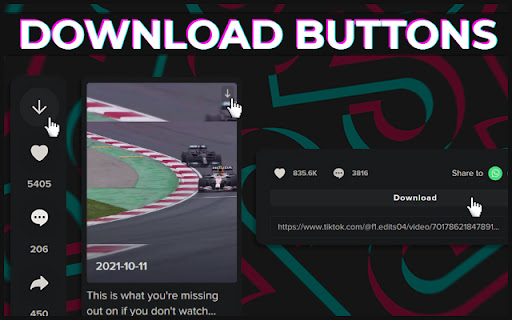

After installing this addon, there will be download buttons on every TikTok video, allowing for easy downloading of videos. This addon has support for attempting to download non-watermarked videos. In cases where this doesn't work or the user decides not to use it, it'll download the regular, watermarked videos instead. Please keep in mind that TikTok's website is being updated fairly regularly, therefore the addon may not work all the time, but keeping it updated is a priority as long as I have time.

TikTok Video Downloader
Bulk download TikTok videos effortlessly. Save videos from any creator's profile with minimal clicks. This extension is tailored for bulk downloading from TikTok’s web platform. Whether you’re a dedicated content creator or gathering materials for a project, this tool streamlines the process of saving multiple clips at once. Main Features Easily save content from any creator’s profile, providing a complete solution for collecting materials. How to Use • Step 1: Visit any creator’s profile on the website. • Step 2: Click the ‘Save’ button on the ‘Videos’ or ‘Reposts’ tab to start the process. • Optional Step: You can also paste a creator’s profile URL into the input field on the extension’s main page, then click “Start Batch Save.” • Tips: Customize the name of your save folder, or leave it blank for automatic naming. Advantages • Efficiency: Quickly Save multiple clips with just a few clicks. • User-Friendly: No technical knowledge is needed to operate. • Privacy-Focused: Your data stays on your device, providing enhanced security. Data Privacy Your privacy is our priority. All data processing is done locally on your machine, ensuring that no information is transmitted or stored on our servers, guaranteeing full security. Disclaimer This software is an independent third-party browser extension, developed by an unaffiliated developer, and is not an official product of TikTok Inc.

TikTok downloader unlimited official
Download TikTok videos without watermark in bulk and easier. Save your TikTok best memories Download TikTok videos without watermark in bulk and easier. Save your TikTok best memories *** Key Features of the extension: - No login required. - Download without watermark - Fast speed to download and save videos. - HD video downloader for downloading all HD videos.

Turbo Downloader for Instagram
Download photos, videos and Reels from Instagram. Turbo Downloader for Instagram adds a button to every Instagram post, Reel, and Story so you can quickly and easily download anything while browsing Instagram. The “Download All” button added to Instagram accounts lets you bulk download all their posts in one click. NOTE: Please reload your Instagram tabs after installing or updating to load the extension. While browsing Instagram, just hover over a post preview and click the download button to save it. If there are multiple images/videos in the post, they’ll all be saved. If you’re looking at a post or Reel, check next to the bookmark and share icons for the download button, or try the hotkey Ctrl + Shift + D or Cmd + Shift + D. A story can be saved with the download button in the top right corner. When downloading an entire Instagram account, you’ll be prompted to choose a folder. A new folder will be created inside that folder with the name of the account being downloaded. Images and videos will appear in that folder as soon as they get downloaded. For future account downloads, files with the same name in that folder will be skipped. As of February 21, 2026, version 4.12.16 of Turbo Downloader is up and running. Feel free to reach out to igdownload2023@gmail.com if you have questions. Version 4.12.16 changes: -Fixed download icon not appearing on posts with multiple images/videos. Version 4.12.15 changes: -Fixed download icon not appearing on stories from the home page Version 4.12.14 changes: -Added a download all button for stories and highlights -Fixed "Could not find post" for stories and highlights -Fixed "Download all" button not appearing on profiles Version 4.12.11 changes: -Fixed "Could not find post" in some cases -Fixed download icon not appearing beside the bookmark icon on some posts -Fixed download icon not appearing in some places when not signed in -Fixed some images being cropped or downloaded in a lower resolution than available Version 4.12.9 changes: -Fixed download icon not appearing while hovering Instagram posts in a grid -Added a tip for Brave users who are unable to select an accounts download folder Version 4.12.5 changes: -Account download folder is now saved. -Added option to change your account download folder -Fixed "Could not find post" for some users. Version 4.12.4 changes: -Added options page. -Posts with multiple images/videos now show a download icon by default. Please use the options page if you would like to change this behavior. -Fixed download icon sometimes appearing in places it shouldn't. -Fixed "Could not find post" for some users. Version 4.12.1 changes: -Fixed download icon over carousel media for some users -Fixed “Could not find post” for most users Version 4.11.2 changes: -Download icon on posts with multiple images/videos now downloads everything -Added a download icon when hovering the image/video of a carousel for only that item -Fixed “Could not find account” for some users Version 4.11.1 changes: -Fixed download icon for some users with dark mode off -Fixed “Could not find post” for some users Version 4.11.0 changes: -New bulk account download now saves files as they're downloaded instead of all at the end -Fixes bulk account downloads sometimes failing to start -Fixes bulk account downloads sometimes failing to complete Version 4.10.5 changes: -Fixes Reels downloads sometimes downloading a profile picture -Fixes for smaller screen sizes Version 4.10.4 changes: -Fixes "Cannot find post" for some users -Fixes for some Stories Version 4.10.0 changes: -Adds hover downloader -Fixes for feed downloads Version 4.9.0 changes: -Migrated to MV3 -Fixed Feed post downloads -Updated progress bar for bulk downloads -Added progress bar for reel/video post downloads

TikPak Downloader
TikPak Downloader, helps you view and download videos from Tiktok in one click! !!! The extension has a block with Promotion of other extensions !!! TikPak Downloader helps you to download videos from the TikTok platform. Now your favorite videos will be always at hand even without Internet access! Functions: - Download TikTok videos in one click; - Quick access to downloaded videos; - Convenient and minimalistic interface; - The extension REALLY allows you to download absolutely any video from Tiktok. - The extension also shows recommended apps from the developer and partners in popup. We will add soon: - Bulk download of videos from profile pages and feed from Tiktok. Changelog: -- v2.1.2 - Fix bugs - Change service for support -- v2.0.3 - Fix for updates tiktok - v2.0.2 - Removed mobile view feature (removed webRequset, webRequestBlocking permissions) - If it is not possible to determine the file name, instead of generating a random name, returned the video id. - Added a button to open the download folder - v2.0.1 - Fix download file of name with emoji - v2.0.0: - Added bulk downloads; - Added mobile view; - Added FAQ page; - New Popup Design. - v1.4.4: * fixes the display of the download button on the detail page - v1.4: * settings button was added in a Popup; * you can select where to save downloaded videos: 1) by default; 2) in a TikPak folder (created in your downloads); 3) in a folder for every user whose videos you download. ATTENTION: EXTENSION DOWNLOADS YOUR VIDEOS ONLY FROM TikTok SERVICE !!!
