
kcjkmcmcpompphkoaokebhhhindnfpnp
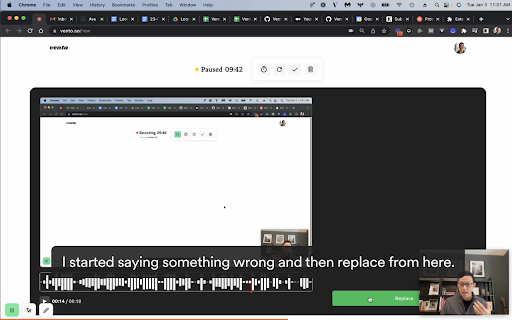
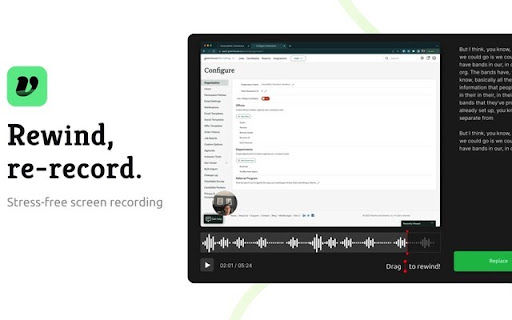
Vento Chrome Extension Chrome Extension supporting https://vento.so/, a stress free video recording website which allows you to rewind and film over mistakes as you record. Vento supports link sharing, presenter bubbles, and more! This extension adds a toolbar to easily pause or restart your recording, annotate your screen, or point and click as you go!

Writeseed - Smart AI Assistant
Writeseed - Your Personal AI Assistant on Every Website Powered by ChatGPT Introducing Writeseed, the Chrome extension that brings the power of ChatGPT, your personal AI assistant, to every website you visit. Say goodbye to information overload, writer's block, and the hassle of searching for content inspiration. With Writeseed by your side, online productivity and creativity reach new heights. 1. Seamless Integration: Writeseed seamlessly integrates into your Chrome browser, instantly transforming it into a versatile writing companion on every website. Whether you're composing emails, drafting reports, or engaging with social media, Writeseed is there to enhance your writing experience. 2. Content Suggestions and Ideas: Experience the remarkable creative capabilities of ChatGPT as Writeseed generates content ideas, suggestions, and even complete sentences to kickstart your writing process. It's like having a brainstorming partner available whenever you need it. 3. Contextual Assistance: Writeseed's AI assistant is trained to understand the context of your web browsing. It offers suggestions and insights that are directly relevant to the webpage you're on, ensuring that your content is not only inspired but also tailored to the topic at hand. 4. Real-time Grammar and Spelling Checks: Never submit a typo-ridden comment or email again. Writeseed provides real-time proofreading, correcting your grammar and spelling as you type, so your online interactions are always polished and professional. 5. Research Made Easy: Need to extract information from an article or webpage? Writeseed can summarize long texts and provide concise, easy-to-understand briefs, making research and data collection a breeze. 6. Multilingual Capabilities: Writeseed is your global writing companion, offering support in multiple languages, breaking down language barriers, and empowering you to communicate effectively in any tongue. 7. User-Friendly Customization: Tailor Writeseed's assistance to your preferences. Adjust its tone, style, and level of involvement to ensure it perfectly aligns with your writing style and needs. 8. Privacy and Security: Your online privacy is paramount. Writeseed respects your data and employs robust security measures to safeguard your online interactions. With Writeseed, you'll never be alone while browsing the web. It's the ultimate AI-powered companion, offering inspiration, guidance, and support on every website you visit. Whether you're a student, professional, or content creator, Writeseed is your secret to online productivity and creativity. Elevate your online writing and communication with the power of ChatGPT and Writeseed. Say hello to a new era of effortless online interactions. Try it today, and let your words flow effortlessly on every website you explore.

Tab Reminder
Have you ever opened a website and thought "I want to read this later" -- then completely forgot about it? Tab Reminder lets you set a reminder on any tab and come back to it exactly when you're ready. No bookmarks to dig through, no tabs left open for days. How it works: - Click the Tab Reminder icon on any tab - Choose a time -- in 20 minutes, 1 hour, 3 hours, tomorrow, next week, or a custom date and time - Get a native browser notification when it's time, and click it to go straight back to the page Key features: - ⏰ Quick reminder presets or custom date & time - 🔁 Repeating reminders -- hourly, daily, or weekly - 📋 Full dashboard to view and manage all your reminders - 🕓 Reminder history so you never lose track - 🔗 Webhook support for automation (Zapier, Make, etc.) - 🦊 Works in Chrome, Firefox, and Brave

Stepsy: create step-by-step guide with screenshots
Struggle to describe your every step with screenshots in the browser manually? Welcome to Stepsy, your free AI-powered go-to solution for generating powerful, yet easy-to-understand step-by-step guides, SOPs, process tasks, or manuals, and sharing them with your colleagues and customers. Our software features have been proven to deliver exceptional results. With our intuitive interface and robust functionality, you can streamline your processes and achieve greater efficiency. Stepsy is free to use, along with Personal and Team plans to fit any team's needs. BENEFITS OF USING STEPSY: 📈 Increase data processing efficiency 📊 Improve workflow documentation accuracy ⚙️Ensure consistency across instructions ⏳ Save time of tedious work for each guide 🎯 Simplify the training and onboarding process STEPSY’S FEATURES: 📸Record your steps with screenshots on clicks: Just do your work, and we will automatically capture the screenshots with auto-generated descriptions. ✨Customize your screenshots: No need for other tools, we have a built-in image editor. ⚙️AI-tuned step descriptions and document summaries: Eliminate the need for manual repetitive text input, let us care about it. 📥Export and share via GDrive: Your guide quickly becomes shareable online via your own GDrive. 🔐Keep your screenshots safe: Your screenshots never leave YOUR space. Everything happens in YOUR browser and then gets exported directly to YOUR GDrive or YOUR local workstation. HOW TO USE STEPSY: Step 1. Get started Begin by downloading our extension for free. Step 2. Capture the process Navigate to the website you want to document. Then, open the Stepsy icon in your Chrome toolbar and click the “Record a Guide” icon to initiate the process. Once you've captured your process, you can edit and customize it with a built-in toolset. Step 3. Publish your results Simply click the “Finish and share” button and publish it as a Google Docs document directly to your Google Drive. WHO'S STEPSY FOR WHAT YOU CAN CREATE WITH STEPSY ✔️ Any documentation you need! What used to take hours, now takes seconds with our free step-by-step guide creator — empowering you and your team's productivity as well as allowing you all to focus on what truly matters: innovation and growth.

Layerpath - Create Interactive Product Demos
Create interactive product tours, videos and guides in minutes with AI. Layerpath helps teams turn product workflows into Tours, Guides, and Videos from one source. Use the Chrome extension to record your screen. Layerpath uses your narration to automatically generate callouts, titles, and descriptions. Then edit the result in Layerpath, export it in multiple formats, and publish it wherever your team or customers need it. Layerpath is built for teams creating: ✅ customer onboarding and training ✅ internal training and enablement ✅ help center and support content ✅ product demos and walkthroughs What you can do with Layerpath 1️⃣ Record product workflows from Chrome 2️⃣ Layerpath uses narration to write callouts, titles, and descriptions 3️⃣ Edit your demo with a prompt using Magic editor 4️⃣ Export as a Tour, Guide, or Video 5️⃣ Rewrite callouts and update copy without starting over 6️⃣ Add AI voiceover in multiple languages 7️⃣ Keep walkthroughs visually consistent with Brand memory 8️⃣ Track drop-off, replays, and completion with Insights Install the extension. Click record. Walk through your product. Website: https://www.layerpath.com Support: support@layerpath.com
