
kcilmecflaiejbhlddkbhekipmkfggjg
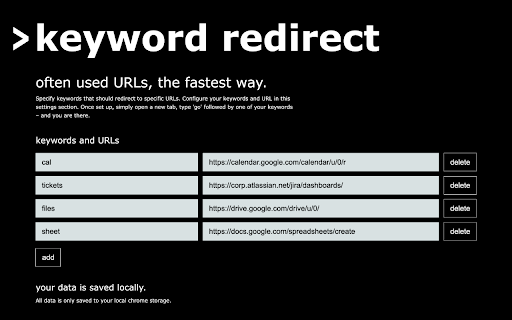

Chrome extension that redirects by keyword Specify keywords that should redirect to specific URLs. Configure your keywords and URL in the options section. Once set up, simply open a new tab, type 'go' followed by one of your keywords – and you are there.

BoomConsole - Web Organizer & Contact Management
BoomConsole is the organizational tool to capture your online viewing experience with your description and folders. Bank Your Connections with BoomConsole Bank Your Insights, Chats, Contacts and Web views to your personal database, Safe and Secure in the Cloud. BoomConsole is a button and sidebar for your web browser that lets you describe your thoughts on the web page you are visiting, capture texts, images and screenshots of the page and secure the composition of all the captured information in folders you remember in your own personal safe database. Search, Find, Organize, View and Review the insights in your safe. We help you Secure Your AI Chats from Chat GPT, Google Gemini, You Chat and Poe Chat. The Boom Console button known as an ‘‘Extension’’ or ‘Add-on’ that you download from the Google Chrome Web Store. The Boom Console Button works on the Chrome Browser, Edge Browser and Brave Browser. (Firefox and Safari coming soon) --------------------------------------------------------------------------------------------------------------------- Key Features: 1. Bank Your AI Chat Interactions: Save and secure the chats you had with AI Chatbots like: ChatGPT, Gemini, You Chat, Poe Chat, then edit and export memories of your chats into Word, PDF, JSON, and CSV formats. 2. Bank Your Online Contents: BoomConsole helps you to Describe and file the web pages you visit. Capture screenshots, HTML, URLs, images, off a website. Revisit your web pages whenever you need it. 3. Bank your Contact information Import your contacts from social media platforms like: LinkedIn, WhatsApp, Google Maps, Indeed, and Monster. Store phone numbers, emails, map locations into your personal contact manager and find them whenever you need it. 4. Smart Categorization Consolidate all your chats, emails, contacts, and contents into the private organized directory system you create. Assign unique title names to the folders you remember. Who Can Benefit? -> Any internet user can benefit from BoomConsole by using it as a personal memory bank to save and remember important information, web pages, and online interactions. -> Professionals and entrepreneurs can save LinkedIn profiles and industry-related online content for networking, market analysis, and business development enhancing project management and creative workflows. -> Sales professionals can capture business locations, helping them keep track of important addresses and contact information. -> Marketers can benefit from the screen capture feature to save visual elements, such as social media posts or website designs, for inspiration or content planning. -> Professors can use BoomConsole to capture and combine online educational resources and course materials for curriculum development. Disclaimer: BoomConsole is an independent platform and is not affiliated with or sponsored by any of the companies whose data it captures, including LinkedIn, Google Maps, Indeed.com, and Monster.com. The use of trademarks and logos is for informational purposes only and does not imply endorsement.

Bookmark It — Personal & Team Bookmarks
Save, share, and find bookmarks in one click. Personal collections and shared team workspaces, with fast import and instant search. Bookmarks are a necessary evil. Lost in folders. Buried in browsers. Impossible to share. Almost no one bookmarks the way they actually want to — and almost no one can collaborate on bookmarks with their team, family, or friends. It's the only bookmarking app that combines real ease of use, real organization power, and real collaboration in a single place — for yourself, your team, and everyone in between. 🚀 Get started in seconds ● One-click import from your existing Chrome bookmarks bar ● One-click import from your browser history ● No spreadsheets, no copy-paste, no re-saving ● Free plan with no credit card. Ever. 👤 Personal + 👥 Team workspaces ● Keep a private collection just for you ● Spin up a shared workspace for your team, family, or side project ● Invite anyone in seconds — everyone sees the latest version, every time ● No more "send me that link again" in Slack, Messages, or email 🔍 Find anything in one click ● Recently Viewed history puts the page you're looking for one click away ● Instant search across every bookmark in every workspace ● Collections, tags, and notes that scale from 10 bookmarks to 10,000 📌 Bookmark from anywhere ● Browser extension — save the active tab with one click ● Menubar app — save and search without leaving what you're doing ● Web app — organize and manage from any device ● Title, URL, and page details pre-filled so saving really is one click 💬 Built for collaboration ● Share entire collections, not just single links ● Add notes and context so teammates understand why a bookmark matters ● Organize together — for work projects, family hubs, reading lists, travel planning, recipe collections, anything 🪄 More than a bookmark manager ● Boosted productivity — spend less time searching, more time doing ● Onboarding made easy — new teammates get the full knowledge hub on day one ● Cross-platform — your bookmarks follow you across browsers and devices ● Upstream from the browser into a dedicated app you'll actually open Stop losing links in chat threads. Stop emailing yourself URLs. Stop maintaining bookmarks five different places. Bookmark It is the home for every link that matters — personal, professional, and everything in between. 🔒 Privacy first ● We will never sell or share your data ● Imports are optional and read-only — we never modify your native browser bookmarks ● Page content is never sent to our servers

307 Redirect
This extension intercepts network requests "on the fly", and causes the browser to use a different URL to load a file. This allows you to swap files on pages without having to change source code or upload/push changes. Works for scripts, images, css, or any other file transferred over the network. - Replace URLs - Block URLs - Regular Expression compatible (regexp, wildcards) - Disable / block source files - Toggle Individual items on/off - Drag and drop to re-arrange items - Export/Import for sharing - Color code items to quick-reference related items - Duplicate item Traditionally, web servers have a mechanism to redirect resources at the server-level, known as "307 Temporary Redirect", which provide a "307" status code to the browser. Server-level redirects are altogether different animals than browser-based redirects, but the end result is the same -- the browser does not fetch the original resource, it fetches the resource that the redirect is pointing at. This extension provides the same functionality as server redirects, but at the browser level -- allowing local and AB testing without having to alter source code, nor push updates to a server.

Redirect Helper
The best way to intercept HTTP requests and redirect URLs 💻 A FREE extension for Intercept HTTP(s) Requests and Redirect URLs 🔀 Redirect URLs - [unlimited rules✅] ➡ Modify the URL of the ongoing request and change it to whatever you want. ➡ Use dev/stage APIs on production sites and test your latest changes before deployment to production ➡ Load JavaScript or CSS running locally on production sites by setting up redirects. ➡ Switching Hosts (All requests for xyz.com should go to abc.com) ➡ Configure rules, eg a URL contains facebook, redirect to xyz.com.
