
kcancggpgjikndnlbmngcpjjkdcgffdo
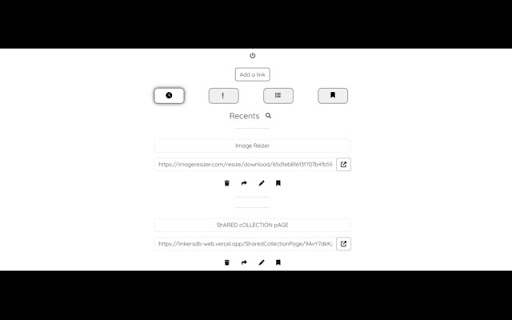
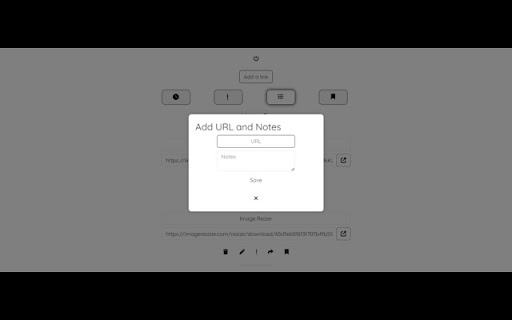


Save links with notes. 📌 One-click link saving with notes for active tabs. 🌐 Seamless access to saved content from anywhere. 🖥️ Intuitive interface for effortless navigation and usage. 🔒 Secure cloud synchronization for data accessibility across devices. 🗂️ Organize saved links into customizable collections for better management. 🔐 Prioritize privacy and security with encrypted data storage Linker's DB revolutionizes the way you manage and organize your online resources. As your ultimate digital link repository, Linker's DB offers a seamless solution for capturing, storing, and accessing web content with unparalleled ease. With Linker's DB, saving active tab links along with personalized notes is as simple as a click. Whether you're bookmarking articles, compiling research materials, or saving inspiration for creative projects, Linker's DB empowers you to curate your digital library effortlessly. Navigation and organization are made effortless with Linker's DB's intuitive interface. Categorize and tag your saved links to streamline retrieval, eliminating the need for endless scrolling through cluttered bookmarks folders. With Linker's DB, finding and accessing specific content is quick and hassle-free. Linker's DB isn't just a bookmarking tool – it's a versatile platform that adapts to your unique needs and preferences. Whether you're a student, researcher, professional, or casual internet user, Linker's DB provides a flexible solution for managing your online resources. From educational materials to project resources, Linker's DB is your indispensable companion for digital content management. Accessibility is key with Linker's DB. Your saved links and notes are securely stored in the cloud, ensuring seamless access from any device, anywhere in the world. Whether you're on your computer, tablet, or smartphone, Linker's DB keeps your digital link repository within reach, allowing you to transition between devices effortlessly. Privacy and security are top priorities for Linker's DB. Your data is encrypted and stored securely, guaranteeing that your valuable information remains safe and confidential at all times. With Linker's DB, you can manage your web content with confidence, knowing that your privacy is protected. Join the Linker's DB community today and experience the power of a centralized digital link repository. Say goodbye to scattered bookmarks and hello to a more organized and productive online experience with Linker's DB.

URL Saver
A simple and fashionable way to save and manage your URLs. An extension that is here to simplify the user life. It allows to save whatever URL the user wants by typing and saving it directly on the list, or by saving the current tab. It is also easy to manage; the user can delete all of the items with just one click or choose which ones to eliminate. It has a Day and Night mode that is activated just by toggling the button.

Save Links
An extension to save and manage links easily. Save Links - Your Personal Link Saver What Does It Do? Save Links is a lightweight and easy-to-use Chrome extension designed to help you save and manage links locally with just one click. Whether you're browsing the web for research, shopping, or entertainment, Save Links allows you to store important URLs directly in your browser. With the simple click of a "Copy" button, you can save any link and access it anytime, anywhere. Why Should You Install It? Effortless Link Saving: No more losing track of important links. Save Links lets you store URLs locally, so they’re always at your fingertips. Quick Access: Instantly copy saved links and use them wherever you need—whether it’s in an email, document, or another browser tab. No Cloud Storage Needed: Your links are saved locally on your device, ensuring privacy and security without relying on external servers. Simple and Intuitive: With a clean and user-friendly interface, Save Links makes managing your links a breeze. Perfect For: Students saving research links for assignments. Professionals organizing resources for work. Anyone who wants to save and access links quickly and efficiently. Click the Save Links icon in your browser toolbar. Copy any link you want to save. Access your saved links anytime and copy them with a single click. Say goodbye to lost links and cluttered bookmarks. Install Save Links today and take control of your browsing experience!

Lindle: Save, Manage Web Links
Say goodbye to scattered links and hello to streamlined productivity. All-in-one web link saver and bookmark manager Lindle is your ultimate solution for managing and organizing your web links with ease. This versatile Chrome extension empowers you to save, categorize, and access your online resources like never before. Say goodbye to the chaos of scattered bookmarks and hello to streamlined productivity. 1. Effortless Link Saving: Save links from the web with a single click, and watch as they're neatly organized in one central hub. 2. Intelligent Auto-Sorting: automatically categorizes your saved links based on their source, whether it's from social media platforms like Facebook, Instagram, LinkedIn, or other websites. 3. Seamless Integration with URL Shorteners: Enjoy the convenience of integrated Bitly and other popular URL shorteners to keep your links clean and concise. 4. Intuitive Search Functionality: Easily find any link you've saved by using our powerful search feature. No more endless scrolling or digging through folders. 5. Folder Organization: Create custom folders to sort and manage your links. Keep everything neatly tucked away for quick access. 6. Access from Messenger Platforms: Our extension embeds directly into Facebook Messenger, Instagram, and LinkedIn. You can access your saved links right from these platforms whenever you need them. 7. Share with Ease: Share links with colleagues, friends, and family without leaving your preferred messenger platform. 8. Cross-Device Sync: Enjoy a seamless experience across multiple devices. Your links are always within reach, whether you're on your desktop or mobile. 9. Clean, User-Friendly Interface: The extension is designed for simplicity and ease of use, making link management a breeze.

Link Saver & Organizer
This link saver helps you save time by storing your links onto your local storage with one click of a button. Quick Guide: - Enter your link manually and save by clicking on "Save Input" - Click on "Save tab" to save link directly from the browser tab - The "Delete all" button removes all saved links at once - The "trashcan Icon" removed that specific link - The "copy Icon" will copy that specific link I am currently working on a new interface and features, which will include the possibility to rename links, categorize them by collection and drag and drop them.
