
pibkfggcnkcfpkfbhghfoooigaikmnao

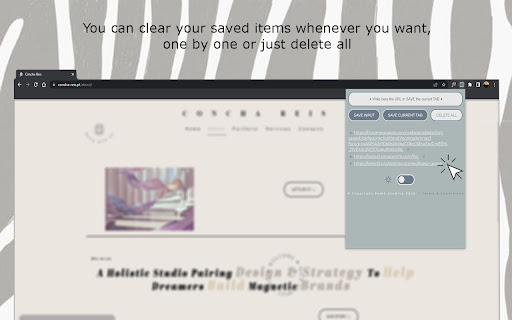
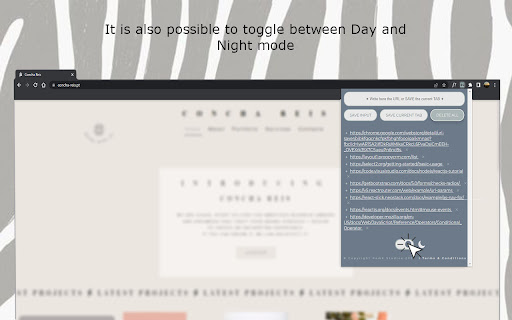
A simple and fashionable way to save and manage your URLs. An extension that is here to simplify the user life. It allows to save whatever URL the user wants by typing and saving it directly on the list, or by saving the current tab. It is also easy to manage; the user can delete all of the items with just one click or choose which ones to eliminate. It has a Day and Night mode that is activated just by toggling the button.

Link Saver
Easily save, manage, and share your links with just a click Tired of losing track of important links? Say hello to Link Saver, the must-have Chrome extension that makes managing your favorite websites a breeze! Special features included in this extension: Dark mode: You can enable dark mode and your choice will be saved! Customizable Keyboard Shortcut: Open the extension instantly with a shortcut of your choice. Generate QR Codes: Create QR codes for easy sharing of links. Add Current Tab: Save the URL of the current tab to your list. Delete All Links: Clear all saved links in one action. Export Links: Download all saved links as a Word document.

SaveMyTabs Manager
SaveMyTabs Manager is a powerful tool designed to help you save, organize, and manage URLs from any website. Whether you're building a list of targeted leads, saving important links, or organizing your research, SaveMyTabs Manager makes it easy to keep track of your online resources. You can enter a URL manually and click the 'Save Input' button, or save the URL of your current tab by clicking the 'Save Current Tab' button. What You Can Do with SaveMyTabs Manager - Fetch and save URLs from any site. - 100% of the URLs are saved on the SaveMyTabs Manager. - Add, edit, and delete folders one by one. - Add, save custom URLs, edit, copy, delete any URL, or delete all URLs at once. - Edit the title of any saved URL for better organization. - Links/Folders sorting - Active Tabs: View and manage currently open tabs. - Timestamp for saved URLs: Now every saved URL includes a timestamp to track when it was added. - Profile Page: Access and manage your profile details directly within the app. Updated: Feb 28th, 2025 - Version v0.0.0.8 2025 - New Feature: Timestamp added for saved URLs. - New Feature: Profile page added for user management. - Improved: Enhanced folder management for better organization. - Improved: Smoother user experience with faster performance. Why Upgrade to Premium? The Premium Plan unlocks advanced features that make organizing and accessing your saved URLs even easier. For a one-time payment of $2.99, you’ll get: - Search through saved URLs to find what you need quickly. - Drag-and-Drop Links reordering - Export (CSV) file - Sessions saved and Folders with the links: Download your saved sessions and folders as a CSV file. - Import (CSV) file - Sessions saved and Folders with the links: Upload a CSV file to restore your saved sessions and folders. - Reveal Hidden Active Tabs: Reveal hidden tabs - Save Tab Session: Save an entire session of open tabs for later use. Upcoming Subscription Features. - Download Links as Text Document, PDF, Word Document, CSV file - Save Folder with links as a bookmark

Reading List
Reading List is an extension designed for quickly accessing links you wish to save without cluttering your bookmarks. It functions similarly to the Chrome Reading List but offers the convenience of a shortcut (a popup) and a more user-friendly interface.

Link Saver
Save your links which you paste everywhere. While applying for jobs across many websites, we have to paste our LinkedIn, Github, Portfolio, Resume links on many forms. That time if we have a chrome extension which will save the links, copy, etc will be helpful. Made for the same. All it does is keep your links stored in your extension.
