
kbnbkogeeackdjiibllebnpdccbmepil
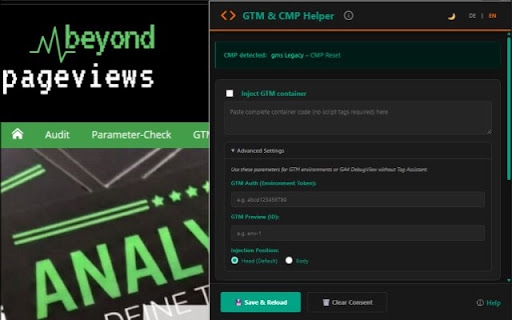


Reset consent state for 60+ CMPs and / or inject GTM container, push dataLayer events, or execute JS on selected pages. GTM & CMP Helper - The ultimate companion for web analysts and developers GTM & CMP Helper (formerly "Insert GTM" / "GTM Helper") is a powerful Chrome extension that drastically simplifies debugging Google Tag Manager containers and managing Consent Management Platforms (CMPs). 1. Intelligent CMP Reset (60+ providers) Reset consent status with just one click. The extension automatically detects over 60 common CMPs (such as Cookiebot, Usercentrics, OneTrust, Borlabs, CMP19, and many more) and specifically deletes the associated cookies and storage entries. Ideal for testing consent banner logic without manually clearing cookies. 2. GTM Container Injection Inject any GTM container code (GTM-XXXXXX) into any website. Test new tracking setups in live environments before they are implemented in the source code. - Supports GTM Environments (gtm_auth & gtm_preview). - GA4 Debugging: Automatically activates GA4 DebugView by passing preview tokens – without needing the official Tag Assistant. - Flexible positioning in or . 3. dataLayer Tools Send dataLayer push events or execute custom JavaScript code on the current page. Perfect for quick testing of event handlers. 4. GTM Workspace Checkup Integration When working in the GTM interface, the Helper detects this and provides a direct link to the Analytrix GTM Checkup to verify your container for best practices. DESIGN & USABILITY: - "Engineering Aesthetic": Lean, functional design without clutter. - Dark Mode by default (with Light Mode option). - Fully bilingual (English and German). - 100% Vanilla JavaScript – fast and secure. --- CHANGELOG Version 3.0: - Renamed to "GTM & CMP Helper". - Expanded CMP detection to over 60 providers. - Optimized CMP reset (specific vs. global). - Improved UI with "Engineering Aesthetic" design. - GA4 DebugView support via preview tokens. Der GTM & CMP Helper (ehemals "Insert GTM" / "GTM Helper") ist eine leistungsstarke Chrome-Extension, die das Debugging von Google Tag Manager Containern und das Management von Consent Management Plattformen (CMPs) drastisch vereinfacht. 1. Intelligenter CMP-Reset (über 60 Anbieter) Setzen Sie den Consent-Status mit nur einem Klick zurück. Die Extension erkennt automatisch über 60 gängige CMPs (wie Cookiebot, Usercentrics, OneTrust, Borlabs, CMP19 uvm.) und löscht gezielt die zugehörigen Cookies und Storage-Einträge. Ideal zum Testen von Consent-Banner-Logiken ohne manuelles Löschen von Cookies.

GTM Plus
GTM Plus enables hotkeys and the utility features in the UI of the Google Tag Manager. Keyboard and UI shortcuts for prompting the search bar or launching the preview mode from anywhere in the interface of the GTM, thus enabling quicker and easier component editing and debugging experience. Additional hotkeys for creating and saving components. And, a button for sorting the tables with the parameters alphabetically.

GTM Watson
A GTM helper which let's you see events in real time, copy it and define selectors for possible variable definitions GTM Watson: Your Ultimate Google Tag Manager Companion GTM Watson is a powerful Chrome extension designed to streamline and enhance your Google Tag Manager (GTM) experience. It offers a suite of features to assist web developers, marketers, and analysts in testing, managing, and optimizing their GTM implementations. With GTM Watson, you can generate test data, monitor your dataLayer, inject GTM containers, and record variables effortlessly. Description: Instantly generate test data for CPF (Brazilian Individual Taxpayer Registry), phone numbers, emails, passwords, and credit card information. Usage: Ideal for developers and testers who need realistic sample data for their projects without manually creating it. Benefits: Save time and ensure consistency in your test cases with auto-generated data that mimics real-world information. Description: View all the data collected by your dataLayer in a clear, organized manner. Usage: Analyze and verify the information being pushed to your dataLayer to ensure accurate tracking and reporting. Benefits: Simplify troubleshooting and debugging by easily copying dataLayer information to your clipboard for further analysis. Description: Load different GTM containers onto your web page to test various tags and triggers. Usage: Perfect for A/B testing or experimenting with different tracking setups without modifying the site’s actual GTM configuration. Benefits: Quickly switch between containers to compare performance and functionality, ensuring the best configuration for your needs. Description: Record variables on your web page for later use. Capture the JS path or a direct function to save as a variable in GTM. Usage: Facilitate the creation of GTM variables by recording and copying the necessary paths or functions. Benefits: Enhance your GTM setup by easily creating accurate and reusable variables, improving tracking accuracy and data collection efficiency. Efficiency: Reduce the time spent on routine tasks with automated data generation and easy-to-use tools. Accuracy: Ensure your dataLayer and GTM configurations are working as expected with comprehensive viewing and recording features. Flexibility: Test multiple GTM setups without hassle, enabling you to find the optimal configuration for your site. User-Friendly: Intuitive interface designed for both beginners and advanced users, making it easy to navigate and utilize all features. GTM Watson is an indispensable tool for anyone working with Google Tag Manager. Whether you're a developer needing test data, a marketer optimizing your tracking, or an analyst verifying data collection, GTM Watson simplifies and enhances your workflow. Download GTM Watson today and take your GTM management to the next level.

GTM Variable Builder
🚀 Build Custom JS Variables with Ease! Highlight any text on a webpage, click the extension, and instantly generate the JavaScript needed to extract your highlighted content. Perfect for creating custom JavaScript variables in Google Tag Manager (GTM) or any other platform that requires variables from a page (e.g., ID, title, value, phone, email, etc.)!

TagHound - Analytics/GTM/Pixel Debugger
Debug Google Analytics, Google Tag Manager dataLayer, Google Ads, Facebook Ads & +18 ad platforms pixels: Twitter, TikTok and more TagHound Analytics/GTM/Pixel Debugger by Assaf Trafikant helps you validate your analytics tools implementation as well as ad platforms pixels and Google Tag Manager dataLayer events - all in one tool. It works all the time for all the supported platforms at once. In total, TagHound Analytics/GTM/Pixel Debugger supports 22 analytics and ad platforms, including Google Analytics 4 (and older versions) & Google Tag Manager (events and dataLayer viewer), to give you a holistic tracking and pixel analysis experience. Just navigate to any page, open your DevTools panel (F12), or click the extension icon (less information) and it will show you all your pixels and events, with a never-seen-before error validation (over 1200 validation rules). Just click the event to see all the data in a clear format, grouped by attributes. TagHound Analytics/GTM/Pixel Debugger allows you to group events by type, performance and attributes. You can RECORD your debugging activity while navigating through any website and even export the results. TagHound Analytics/GTM/Pixel Debugger his all-in-one tool, giving you a clear high-level overview as well as detailed data harmonization between all platforms . Three ways to see and debug the events ================================= 🟩 Clicking the extension icon 🟩 Using DevTools 🟩 On-screen toast messages TagHound Analytics debugger & Ad platforms pixel helper features ====================================================== 🟥 Read all supported pixels at once 🟥 Clear view of each pixel parameters, grouped into categories with over 1200 validation rules 🟥 Filter pixels by type 🟥 Record activity across page and export the results 🟥 Group tags by type/ad platforms 🟥 Sort tags by execution time, platforms, etc. 🟥 Exclude domains from being tracked by the extension to optimize performance Google Tag Manager features ======================== 🟨 dataLayer viewer 🟨 You can change the dataLayer name (the default dataLayer will always be tracked) 🟨 In the "Options" screen (the gear icon) you can add enhancements to Google Tag Manager Assistant (see pictures above): 🟪 Sort tags alphabetically 🟪 Highlight tags fired multiple times 🟪 Highlight tags with errors 🟪 Hide paused tags Release notes ============ 1.3.4 - Temporary removal of custom endpoints 1.3.2,1.3.3 - Minor bug fix 1.3.1 - Updating GA4 debugger, minor UI changes 1.3.0 - Supporting S2S custom endpoints 1.2.6 - Fixing Google Tag Assistant enhancements 1.2.5 - Update to GA4 debugger (new EU endpoints), design adjustments 1.2.2 - Update to GA4 debugger (privacy sandbox fine-tuning) 1.2.1 - Added Sleep-mode 1.2.0 - Adding on-screen debugging with toasts messages! Some refactoring for performance. 1.1.4 (1/4/2024) - Name change, performance optimization 1.1.3 - Adding Floodlight. Updating Facebook Ads pixel, improving performance and filters. 1.1.2 - Removal of self-hosted pixels tracking 1.1.1 - Bringing back GTM toggle to save browser memory. 1.1.0 - Improving GTM dataLayer parsing. 1.0.9 - Adding Google consent for Google-based tags 1.0.8 - Adding GTM toggle for less impact on browser memory. Turns OFF after 2 minutes of idle and redesign Settings page 1.0.7 - Updating Microsoft UET & LinkedIn ads tracking. Removing Google Optimize. 1.0.6 - Ability to change GTM dataLayer name, adding enhancements to GTM Tag Assistant 1.0.5 - Improving GA4 debugging 1.0.3 - Improving Facebook Pixel debugging 1.0.2 - Improving TikTok, LinkedIn & Taboola pixel tracking 1.0.1 - Removing redundant code and typo fix 0.9.3 - Google Ads conversion tracking improvement 0.9.1 - Google Analytics 4 debugger upgrade + code optimization 0.9.0 - Performance version. Decreasing the extension weight by 70%. 0.8.8 - Now supports Amplitude + improving Google Tag Manager performance. 0.8.7 - Adding Plausible Analytics, Umami Analytics & AB Tasty 0.8.6 - Fixing display bug for some users 0.8.5 - Improving GTM dataLayer viewer 0.8.4 - Improving Google Tag Manager events parsing 0.8.3 - Improving LinkedIn pixel tracking and Google Analytics 4 ecommerce validations 0.8.2 - Supporting the new TikTok custom events 0.8.1 - Upgrade Google Analytics debugging 0.8.0 - Update Google Analytics 4 CDN 0.7.9 - Updating Facebook pixel 0.7.8 - Upgrade Google Analytics debugging 0.7.7 - Removed cookie module 0.7.5 - Fixed: Some websites bloat GTM dataLayer with faulty values which caused the extension to break 0.7.4 - Adjusting TikTok standard events 0.7.3 - Major performance improvement, adding GTM JSON viewer 0.7.1 - Adding more events to Google Tag Manager dataLayer tracking 0.7.0 - Adding Google Tag Manager tracking 0.6.9 - Bing Ads changed to Microsoft Ads + minor bug fixes 0.6.8 - Adding MixPanel 0.6.5 - Adjusting to Facebook new pixel 0.6.1 - Faster recording 0.6.0 - Supports Snap Ads pixel, TikTok & Reddit pixel upgrade 0.5.9 - Adding Errors view in extension popup 0.5.2 - Fixing LinkedIn account ID identification 0.5.2 - Update TikTok pixel 0.5.0 - Adding Google Ads Conversion tracking 0.4.4 - Adding Google Ads Remarketing tracking and Bing Ads 0.4.2 - Adding AppsFlyer & TikTok tracking, update Twitter pixel 0.4.1 - Adding Pinterest pixel 0.4.0 - Adding Facebook & Quora & Google Optimize pixel tracking, Adding the ability to record activity 0.3.9 - Adding Taboola, Outbrain, LinkedIn and Google Analytics tracking 0.3.5 - Adding Twitter & Reddit pixel tracking 0.0.1 - Initial version
