
kbepkemknbihgdmdnfainhmiidoblhee

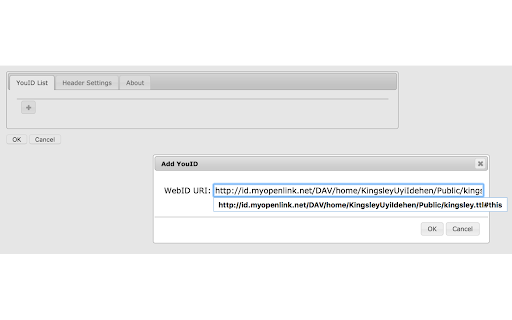

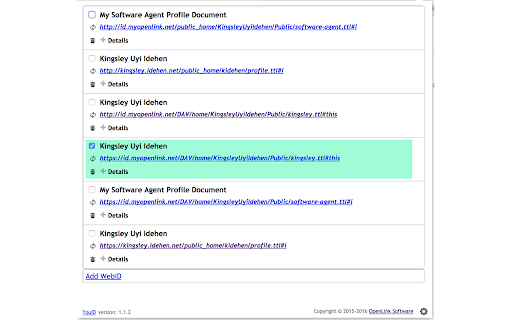

A tool for generating verifiable credentials, tokenized in a digital certificate, from a wide variety of profile data sources that includes: [1] Any HTML document over which you have read-write privileges -- this includes profile pages from Github, Twitter, Linktree, Instagram, Quora, and many others Following installation, you will be able to take advantage of the following benefits: [1] Generate verifiable credentials (digital certificates and their associated private keys) directly from you browser to a secure file. [2] Enjoy self-sovereign identity authenticity that scales to both the Internet & Web e.g., sending digitally-signed emails that verify your identity to mail recipients [3] Leverage existing Public Key Infrastructure (PKI) and emerging Decentralized Public Key Infrastructure (DPKI) for both password-less authentication and self-sovereign identity authenticity, courtesy of hyperlink-based identifiers (WebIDs and NetIDs) used in conjunction with broadly used protocols such as OpenID-Connect + OAuth 2.0 and/or TLS (including HTTPS).

Deep Link
Create a link to a specific portion of a page by selecting a text snippet and using right click of a mouse. Are you sharing a link to a very long page and want users to land on a specific section of it? Use this extension to create deep links to web pages and send users to any text part of the page. This is useful when sharing long articles, manuals and other long online documents. How this extension works: 1. Highlight a short piece of text on any web page 2. Right click and select "copy text fragment" 3. Paste the link to share with others When someone clicks on your deep link they'll land on the exact part of the text you wanted.

Policy Control
Policy Control is an extension that helps you easily adjust all content settings (via contentSettings API) from the toolbar popup UI. These settings are adjusted on a website (domain) basis. Once you open the toolbar popup UI, the tab URL will appear at the top section in the UI as a pattern (i.e. http://example.com/*). Adjust what you need for this pattern and then reload the webpage. Please note, all changes are auto-saved to the memory. If you want to reset the content setting changes to the default values, please press the reset button at the top toolbar. Note: The extension interface supports dark mode. To switch the interface theme to dark, please press the moon icon in the top-right toolbar. To report bugs, please fill out the bug report form on the addon's homepage (https://mybrowseraddon.com/policy-control-wext.html).

Link Revealer
See the true URL for all links and improve your security! Link Revealer extension is designed to improve your online security. When you hover on any link element, the underlying - href - will be displayed as the link's title. Moreover, a colored footer will also be displayed at the bottom of the page showing the link href. If the underlying domain for the link is similar to the page's domain, this color will be BLUE. If the link is third-party the color is GREEN. For a situation where the displayed URL in the link's text content is different than the underlying href, the footer color will be RED. The toolbar icon color will also be updated according to the above rules. For any link, if you right-click and select - Scan link for threats, the add-on scans the link with the SafeBrowsing JavaScript API (https://safebrowsing.google.com/). When you first install the add-on, please visit the options page to activate the safe-browsing API. From the toolbar popup, you can also turn the add-on ON or OFF. Moreover, you can hide the page's footer if you find it inconvenient. Please note that you can still scan links for threats even if the page footer is hidden. If you have a feature request or found a bug to report, please fill out the bug report form on the add-on's homepage (https://mybrowseraddon.com/link-revealer.html).

Pulsedive Threat Intelligence
Highlight IPs, domains, and URLs on any website to enrich them using Pulsedive's threat intelligence. Streamline real-time threat research and analysis on any website you visit with Pulsedive’s threat intelligence browser add-on. Highlight IPs, domains, URLs, or threat names in any website text to enrich them using Pulsedive's free Community dataset. Get immediate, up-to-date context when reading cybersecurity news and threat advisories, or exploring threat intelligence collections and research. Create a free account at pulsedive.com for increased limits and additional capabilities. – FEATURES: • Indicator Lookup - highlight text around an IP, URL, or domain to enrich with contextual data from Pulsedive, including associated threats, screenshots, ports, protocols, web technologies, HTTP headers, meta tags, WHOIS data, and much more • On-Demand Scans - perform real-time passive or active scans on IPs, domains, and URLs to fetch live data • Bulk Processing - highlight text containing hundreds or thousands of indicators to parse and refang in bulk, download them as a CSV, and submit to Pulsedive Analyze for bulk enrichment • Threat Research - look up threat names and aliases to retrieve threat summaries, associated indicators, TTPs, latest news, and additional context • Website Enrichment - click the add-on button without highlighting text to retrieve domain information for the website you're visiting • Mute Options - reduce noise by easily muting the auto-popup temporarily or on specific sites • Flexible Controls - adjust the add-on settings to control when, where, and how Pulsedive parses threat intelligence information • Quick Pivoting - convenient one-click pivot to the Pulsedive Community platform at pulsedive.com for further analysis – WHAT'S NEW - VERSION 3: The latest update introduces bulk indicator processing, advanced settings & controls, and an improved user experience and interface. • Dark mode • Free-text parsing for IPs, URLs, and domains • Bulk indicator processing • Muting/unmuting and website exclusions • Usage guide in Settings page • Fixed punycode domain support • Fixed various CSS conflicts with injected popup – Pulsedive offers frictionless threat intelligence solutions for growing teams. The Pulsedive Community platform at pulsedive.com aggregates, enriches, and correlates community threat data to support analyst workflows and time to action. With 50M+ searchable indicators and threats collected from user submissions and feeds, the Pulsedive add-on delivers invaluable context wherever you work.
