
kbcpafllcaoefpacjojiliohdhfjgbmo
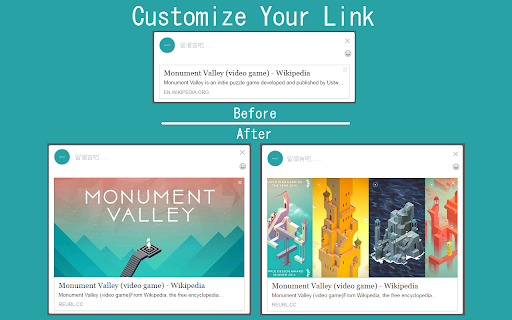


Extension to shorten URL This extension lets you shorten your current website URL with the service provided by reurl.cc (https://reurl.cc/), and automatically copies the shortened link to your clipboard. This extension need you LOGIN reurl account to use

Url Shortener for Google Chrome™
Just click our extension icon on toolbar to shorten the URL of current page with TinyURL.com url shortener service. Want to use a simple URL shortener service for Google Chrome? Simply install our software and you can shorten the website URL you are on to a short simple link. To begin using our URL shortener service, you need to install our extension. Click on our software icon Choose either the QR code option or the shortened URL to share the website you are on Its extremely simple to use and your privacy is guaranteed. Our software does not save any data/website URLs which you are on. Begin using our URL shortener service today! ================================================================ ★ Features of Url Shortener for Google Chrome™: ✔ Easily shorten any link of current page with TinyURL url shortener service. ✔ Easily shorten any link that you copied and put into a special textbox ✔ Automatically copies url to clipboard ✔ Сlick to shorten url and copy to clipboard ✔ Generate QR code for this website URL ✔ Light / Dark theme switcher for more comfortable use for night time Disclaimer: Please note this extension is NOT made by Google and is made by an independent development team. All copyrights belong to their respective owners. Google doesn’t endorse or sponsor this Chrome extension. URL Shortener for Google Chrome™ is not owned by, is not licensed by and is not a subsidiary of Google Inc.

BigGo Shopping Assistant
Price comparison and product price history. Smart shopping with BigGo Shopping Assistant. Viewing products on the store page: 1. Show the similar products, one click to slide the list by low to high products. 2. Right-click on the text and select "Search BigGo for..." to view the price comparisons. 3. Find the best promotions. Search products: Show the amount of the products and suggests other related products. Click the products to see more comparison results on the BigGo website. BigGo Shopping Assistant is your guide for shopping, helping you buy more and save more. Compare price automatically and check the discount codes quickly, finding the lowest price. **Affiliate Links and Commission Disclosure** To continue providing our free price comparison service, BigGo has established affiliate partnerships with major e-commerce platforms. When you complete a purchase through BigGo Shopping Helper's recommended links, we may receive a small commission from partner merchants. These commissions do not affect your purchase price. - We do not tamper with cookies or links without users' knowledge - All affiliate recommendations are completed through user confirmation (via cashback reward prompts on e-commerce sites) or by clicking products to redirect from the BigGo website - You are free to choose whether to use our recommended links BigGo Shopping Helper only collects necessary browsing data and cookie information for: - Tracking product price changes to provide accurate price comparisons - Confirming your shopping information with partner merchants For detailed information, please refer to our Privacy Policy. Affiliate commissions are a revenue source that supports BigGo's continued operations, enabling us to keep providing free and convenient price comparison services. Thank you for your understanding and support.

Tiny URL Shortener
The Finest URL Shortening Service to convert long URLs or Links of websites to short. Simple Extension to convert long URLs or Links of websites to short or tiny ones. TOP Features: - Absolutely FREE - No sign-up or login required - Just one-click to get short URL - Auto-copy the short URL to clipboard - Sharing over social networks [Soon..] - Context Menu for direct links and selected text(auto-extract first link) - Notifications to sharing critical updates - All links are safely verified against adware, spyware, malware - Other features coming soon… For any issues, errors, bugs and enhancements, please contact us at - http://tiny.cc/exthelp

ChatGPT Toolkit
Enhances your ChatGPT experience with useful features like a Auto-Fill prompt text from URL, common prompts after response, and… The ChatGPT Toolbox provides some useful additional features for the ChatGPT website, which can enhance the user experience. Currently, two features are available: 1. Automatic prompt filling from URL: This allows you to save commonly used prompts as bookmarks and quickly fill them in when needed. 2. Automatic prompt button in the ChatGPT response field: These commonly used prompts can be automatically entered through a button. 3. You can directly edit the prompt by double-clicking on the user icon or prompt text. 📢 This extension adds support for AutoFill and AutoSubmit functions for Gemini, Claude, phind and Groq on 2024-03-11. Please make use of the ChatGPT Prompt Link Generator: https://blog.miniasp.com/ChatGPTToolkitExtensionUrlGen.html to automatically generate links. More useful features will be launched in the future, and everyone is welcome to provide ideas and suggestions. 1. Add `#autoSubmit=1&prompt=your_prompt_text` to the URL bar, for example: Open the ChatGPT website and fill in "hello" without automatically submitting (`autoSubmit=0`): Open the ChatGPT website and fill in "hello" with automatic submission (`autoSubmit=1`): 2. Set it as the default search engine in Chrome / Edge, for example: Refer to the [Set your default search engine & site search shortcuts](https://support.google.com/chrome/answer/95426?hl=en) document for instructions! ```txt Search engine: ChatGPT Shortcut: g URL with %s in place of query: https://chat.openai.com/chat#autoSubmit=1&prompt=%s ``` Just type `g` in the URL bar and press the Tab key, and ChatGPT will automatically open and fill in the prompt text.
