
kbanfkffoldngciemjinoaealhjaniol

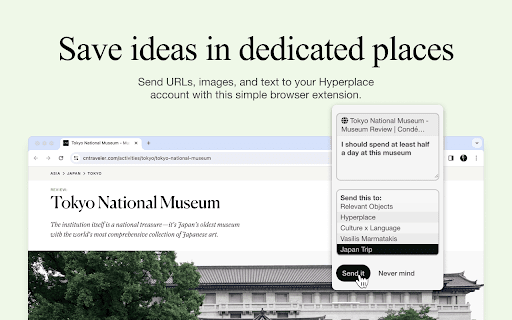
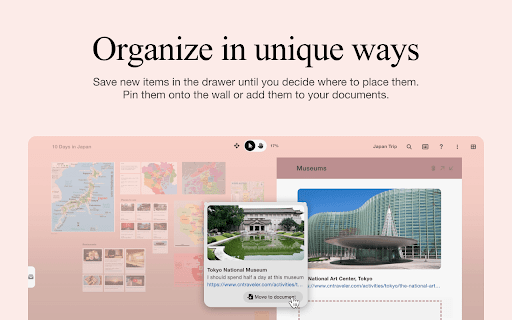
Hyperplace, create dedicated spaces for your interests, collect relevant ideas, and discover how they come together in meaningful new ways. With this simple extension, you can save content from any webpage directly to your Hyperplace places along with personal notes. Saved items will wait in the drawer until you decide where to place them. Explore them with the AI assistant, pin them onto the wall or add them to your documents. To get started, just log in or sign up for a free account.

klemmbrett
faster notes in your browser Klemmbrett is a dynamic note-taking extension designed to enhance your browsing experience and boost your productivity. With Klemmbrett, you can effortlessly create, manage, and access your notes directly in your browser window or in a new tab. In-Browser Note-Taking: Say goodbye to switching between tabs or applications. With Klemmbrett, you can jot down your thoughts, ideas, or important information directly in your browser window. New Tab Note-Taking: Prefer a clean slate? Klemmbrett allows you to create notes in a new tab, providing a distraction-free environment to focus on your thoughts. Easy Access and Management: Access and manage your notes with just a click. Klemmbrett's intuitive interface makes it easy to find, edit, and organize your notes. Secure and Private: Your notes stay on your device. Klemmbrett values your privacy and doesn't store or transmit your data anywhere else. klemmbrett is the only note taking app that is not a pain to use, loads faster than Notion and is always there when you need it.

Save to Niphtio
Your personal library, searchable and organized. Do you hoard hundreds of bookmarks only to lose them, forget that you have them, or never find them again? Niphtio is the easiest way to save, find, and read what matters to you. This browser extension works together with our web app, Niphtio. Learn more at https://www.nipht.io 📚Build your personal library Save articles, videos, recipes, or any other web page to Niphtio so you never lose it. Access Niphtio from any web browser on your computer, tablet, or phone. 📚Bulk multi-tab saver Have lots of tabs open? Save them all at once and organize them in bulk. 📚Find anything again later Search for anything you’ve saved. Our powerful search looks for keywords inside the content of your items, not just their titles. This means you can always find items again, even if you can’t remember their titles. 📚Flexible and robust tagging Do you dump all your bookmarks into a “random” folder? We get it—some items simply don’t fit into one specific category. That’s why Niphtio lets you add multiple tags to any item. 📚A to do list for readings Add important reads to your to do list so you remember to read them. Check them off once you’re done and feel accomplished. 📚Built with privacy in mind Enjoy peace of mind with our commitment to privacy. We don't use tracking cookies, sell any of your personal information, or share it with anyone else.

SwipeNote
SwipeNote is designed to help anyone who uses the Internet. Swipe, Save, Organize, Share & Collaborate any content from the web with your friends and team members. SwipeNote Chrome Extension Features: 1. Swipe and Save social posts from Facebook, Instagram, YouTube and more with a single click. 2. Grab Full-Page or Regional Screenshots from any website. 3. Bookmark URLs. 4. Save Highlighted Content. 5. Add Tags and Notes to individual Saved items/Cards. 6. Import Favorite Kindle Highlights. 7. Shortcut Keys for Easy Access. All the content you grab from the internet gets saved as multi-purpose Cards. a. These Cards can be saved in your personal cloud Folders or Sub-Folders created by you directly from the chrome Extension. b. These Cards can also be saved to a Workspace/Subspace created by you. After you Save and Organize the Cards, you can do so much more: 1. Copy or Move Cards to Workspace/Subspace and Folders/Subfolders. 2. Share Cards with teammates, individual account holders or directly to social sites. 3. Add Tags and Notes to individual Cards. 4. Create Short Links for easy share. 5. Assign Cards with team members and Set Reminders for the same. Set and View Due Date of completion of assigned tasks. 6. Real Time Chat with individual team members or in groups. Share files/documents, use Emoji’s and @mentions. 7. Create Labels (to-do, work-in-progress, done) to let know the status of Cards. 8. Track your work through a single dedicated menu. Easy Date Filters to understand the priority and due dates. 9. Job Board (simple Dashboard) to view all your Cards/task inside your Workspace or Sub-space. At a glance know about what's going on, by viewing Due Dates, Chats and much more. === VERSION 1.0.23 ==== Latest fixes for all the social media websites and Youtube/Yshorts

Pincone
Share links and knowledge, privately or with a team. The Pincone extension allows you to easily grab any link in your browser and add it to your Pincone, without visiting the Pincone website, so you can easily get back to it later. The extension requires having a Pincone account, which you can create on pincone.com.
