
kapgbdjkajejnjkbppedkdjkibijnffi
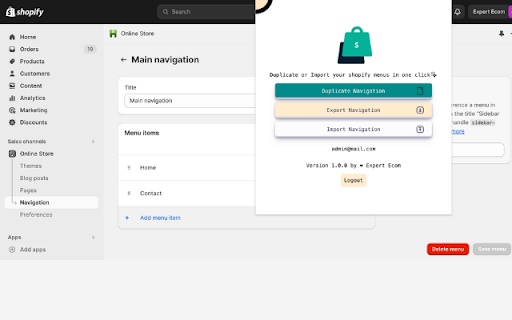
Import export and duplicate your shopify navigation/menu in one click. Shopify menu assistant extension is a powerful extension for Shopify. It allows you to duplicate, export, and import Shopify menus with one click. Take control of your navigation structure and enhance your productivity, allowing you to focus more on growing your business. # Data confidentiality All Operation is processed in your local computer, it never goes through our web server, no one knows what you have discarded. Questions? Write to us at the email address: menu.assistant.com@gmail.com or directly on our site from this link https://menu-assistant.com/contact # IMPORTANT NOTE: Shopify Navigation Assistant is in no way in partnership with the official Shopify site. It is an unofficial application which is independently developed and maintained.

Theme Explorer for Shopify
Theme Explorer allows you to view important information about the themes installed on your Shopify store. Enhance Your Shopify Management with Theme Explorer Theme Explorer is a Chrome extension designed for Shopify store owners and developers. It provides quick access to essential theme details including Theme ID, creation and update dates, and the theme name. Direct links to the theme’s JSON, Theme Customiser, and code editor simplify your workflow. • Detailed Theme Information: Get theme IDs, names, and update/creation dates immediately. • Quick Access Links: Jump straight to your theme’s JSON, customise your theme in the Theme Customiser, or edit directly in the code editor with one click. • Storefront Insights: On any Shopify storefront, Theme Explorer reveals the live theme name and offers quick links to Theme ID, Theme Preview URL, and Theme Editor URL.

Shopify Export Data
This extension allows the user to export shopify data in csv,excel format. Export product listing data with just one tap, no setup, no sign-up, Free to start. Download the export file automatically into two formats Excel and CSV. Shopify Export Data is a complete product data exporter extension, download all product details with a single click and import them quickly into the Shopify store. Simple and easy to use. There is no limit to product listing download. You can export an unlimited number of collection pages. With Shopify Export Data, you can • Easy to operate • Free to start • All language website data exporters • Easy export and download automatically • With just one click, you can export thousand of products data • The extension supports all screen resolutions of your desktop • Use CSV files format to import products to or export products from your Shopify store • Information may contain Handle, Title, Body (HTML), Vendor, Type, Tags, etc... How Extension Work • Tab the extension icon. • Go to the Shopify website and click on that collection page for the product listing data you have to download. • Select the export file format and click on the Export/Download button. In extension, you can export all collection data by choose to all collections. • When you choose the collection, the number indicates how many products are in that collection. • It will redirect automatically after the download is over. You can save your data in your selected folder. • The data that will download will be in Excel and CSV files. • You can easily import the data on your Shopify website. Shopify Export Data is an easy to operate extension to facilitate the best user experience while dealing with the export product data. Note: Some time extension can take long time to download due to larger product details, so be patient until the download is over.

Shopify Menu Copier
Copy, export, and import Shopify menus directly from the Shopify admin Streamline your Shopify navigation with the Shopify Menu Copier extension. Easily copy, export, and import menus directly in the Shopify admin — perfect for theme updates, store migrations, or backups. Key features: - One-click copy of any menu with auto-suggested handle and optional new title. - Export menus (with nested items) to clean JSON for easy backup or transfer. - Import menus by uploading or pasting a JSON file — structure is recreated instantly. Works securely within your existing Shopify session, no API keys needed. Simple UI built with React + Tailwind. Great for devs and merchants alike.

Shopify Theme Inspector for Chrome
Profile and debug Liquid templates on your Shopify store Profile and debug Liquid templates on your Shopify store Shopify themes are fast out of the box, but Liquid changes made afterwards can cause slowdowns. Shopify Theme Inspector for Chrome helps identify Liquid changes that are slowing your site down by providing a visualization of Liquid render profiling data, and giving you the means to triage the slowest parts of your Shopify theme. Once you install this extension you should be able to sign in with your Shopify credentials and see a “Shopify” panel in Chrome DevTools. This tool helps you visualize results as a flame graph which is readable and easy to understand. You can examine the flame graph nodes to localize performance issues down to the exact file and line. This is the perfect tool to accelerate your workflow while debugging Liquid performance. If you would like to learn more, contribute a feature, open an issue, or make a feature request you can check out the shopify/shopify-theme-inspector Github repository.
