
jiapemkfhgejoifinncjnbdkpafhkcnj
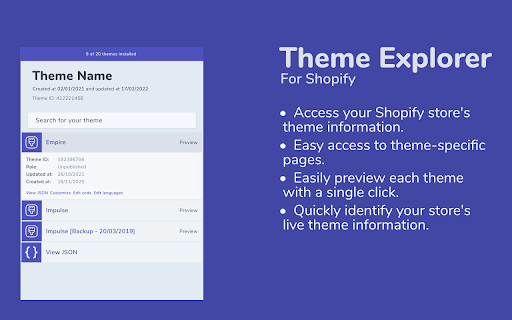
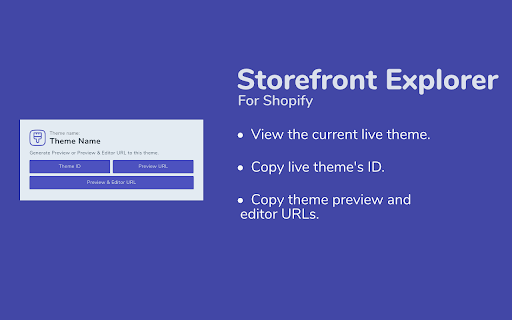
Theme Explorer allows you to view important information about the themes installed on your Shopify store. Enhance Your Shopify Management with Theme Explorer Theme Explorer is a Chrome extension designed for Shopify store owners and developers. It provides quick access to essential theme details including Theme ID, creation and update dates, and the theme name. Direct links to the theme’s JSON, Theme Customiser, and code editor simplify your workflow. • Detailed Theme Information: Get theme IDs, names, and update/creation dates immediately. • Quick Access Links: Jump straight to your theme’s JSON, customise your theme in the Theme Customiser, or edit directly in the code editor with one click. • Storefront Insights: On any Shopify storefront, Theme Explorer reveals the live theme name and offers quick links to Theme ID, Theme Preview URL, and Theme Editor URL.

Shopify App Detector by ShopScan
Easily know what shopify apps and themes are being used on a shopify website Free Shopify App & Inspector — see what apps, themes, analytics, and payment methods any Shopify store is using. 🛍️ 🕵️ Ever wondered what Shopify apps, theme, or payment gateway a store is using? ShopScan's free Shopify App Detector reveals it in one click. 🎯 Perfect for competitor research, dropshipping, agencies, and anyone curious about a Shopify store's tech stack. ====== WHAT IT DETECTS ====== 1️⃣ Shopify Theme — name + Theme Store URL 2️⃣ Shopify Apps — with direct App Store links 3️⃣ Analytics & Tracking Tools — Google Analytics, Meta Pixel, TikTok, Klaviyo, and more 4️⃣ Payment Gateways — Shop Pay, Stripe, PayPal, Afterpay, Klarna, and more 5️⃣ Third-party tools & integrations powering the store ====== HOW IT WORKS ====== 1️⃣ Visit any Shopify store 2️⃣ Click the ShopScan icon 3️⃣ Instantly see the full tech stack — apps, theme, analytics, payments ====== WHO IT'S FOR ====== 1️⃣ Dropshippers researching winning stores and product strategies 2️⃣ Agencies auditing client sites or scouting competitors 3️⃣ Shopify merchants looking for proven apps that work 4️⃣ Developers and marketers analyzing tech stacks 5️⃣ Anyone curious how a Shopify store is built ====== WHY SHOPSCAN ====== 1️⃣ Free — no account, no paywall, unlimited scans 2️⃣ Fast — results in under 2 seconds 3️⃣ Accurate — actively maintained app database 4️⃣ Private — we don't collect your browsing data ✔️ You can also visit www.shopscan.app to get more details about all the apps, and may request to add missing apps or new apps. Try Shopscan Shopify App and Theme Detector today! 📌 Version 1.2.1 - Updates (April 2026) ➜ New in-app announcement banner for product updates & news ➜ Cleaner "No apps detected" empty state ➜ Accurate app count ➜ Performance & stability improvements 📌 Affiliate Disclosure: This extension has affiliate links. If you start your store through our link, you’ll be supporting us too—at no extra cost to you.

Shopify Store Spy - Shoper Spy - Shopify apps
Are you curious about the apps fueling a competitor's store? Or perhaps you're smitten by a store's theme and wish to know its name? Shoper Spy is here to satiate your curiosity. With just a few clicks, unveil the apps and theme a Shopify store is utilizing, unless it's a bespoke theme crafted from scratch. Uncover the secrets behind successful Shopify stores with Shoper Spy! Originally crafted and nurtured by a team of Shopify owners along with a vibrant community of contributors, Shoper Spy is your go-to tool for spying on your competitors. This robust Shopify App/Theme Detector will bring you closer to the arsenal of apps and themes employed by any specific Shopify store that catches your eye. We thrive on feedback and community involvement. Your insights could be the catalyst for the next big update! If there's an app you wish we could detect or if you have suggestions to enhance Shoper Spy, we're all ears. Shoper Spy is not just a tool; it's your companion in the quest for e-commerce excellence. By unveiling the technological wizardry of successful Shopify stores, it provides a ladder for aspiring merchants to climb up and level the playing field. So why wait? Embark on a journey of discovery and competitive intelligence with Shoper Spy, and equip yourself with the knowledge to propel your Shopify store to new heights! In addition to uncovering apps and themes, Shoper Spy also spies on competitor products, giving you detailed insights into their offerings. Discover best-selling products, the most expensive and cheapest items, and the newest additions to their catalog. With this information, you can strategize better, align your inventory with market demands, and stay ahead of the competition. Shoper Spy provides a comprehensive view of your competitor’s product range, including total product count and details on sourcing. By understanding their product strategies, you can learn how to source similar or better products for your store, optimizing your offerings to meet customer preferences. This not only helps in competitive pricing but also ensures you stock the latest trends, giving your store a competitive edge. The ultimate Shopify Chrome extension designed for e-commerce entrepreneurs who want to stay ahead of the competition. In the fast-paced world of online retail, knowing what tools and technologies your competitors are using can give you a significant advantage. That's exactly what Shoper Spy offers—an edge to understand, analyze, and outmaneuver your competition. Shoper Spy is tailored specifically for Shopify store owners. It seamlessly integrates into your Chrome browser, allowing you to instantly uncover the Shopify apps and technologies employed by any Shopify store with just a click. Whether you're curious about the latest marketing plugins, customer service tools, or checkout enhancements your competitors are using, Shoper Spy provides you with the insights needed to make informed decisions. But Shoper Spy is more than just an app detection tool. It's a comprehensive competitor analysis platform that helps you spy on your competitors' strategies. By understanding what apps they're using, you can infer their sales tactics, marketing strategies, and customer engagement approaches. This knowledge enables you to adapt and improve your own store, ensuring you're not just keeping up but staying ahead. This Shopify app detector is a great alternative to koala inspector extension, shopify app detector by fera.ai, Shopify App Detector by EZFY, best Shopify App detector (ShopifyAppdetector.com) & Fritz AI Powered Shopify App Detector, ShopifyHunt - Shopify™ store parser & spy, Shopify Analyzer, Shopify Scraper, Raise - Shopify™ store analysis tool, PPSPY- Shopify analytics & dropship tool, Shopify spy scraper & parser. In today’s competitive e-commerce landscape, being equipped with the right data can transform your business strategy. Shoper Spy empowers you to turn competitors’ insights into your strategic advantage, enhancing your ability to innovate and grow your business. Don't just compete; lead the market with Shoper Spy. Shoper spy has partnered up with the best apps on the market to help you get the best deals of Shopify apps! Disclaimer: Shoper Spy may get affiliate commission from installs initiated by the extension.

TinyIMG Shopify SEO Extension & Inspector
TinyIMG is a free multi-purpose extension designed to give users comprehensive SEO insights about any web page or Shopify store! It’s an excellent tool that we continuously power up with new features to help improve your website or analyze competitor pages. The TinyIMG extension offers: 1️⃣ Landing Page Overview (metadata, robot.txt, core web vitals) 2️⃣ Heading Tags List 3️⃣ Page Status 4️⃣ Link Insights 5️⃣ Image Details (URL, alt text) 6️⃣ Schema Markup Overview 7️⃣ Social Media Content Metadata The extension comes with a straightforward interface that’s easy to use even for beginners. Here’s how TinyIMG can help you analyze pages: 🖥️ Landing Page Overview Upon opening the extension, the first thing you’ll see is the Overview tab, which shows: 1. Page title and description (including the current and maximum recommended character count) 2. Page URL 3. Canonical tag (lets search engines know which URL is the main one) 4. Robots.txt (file that helps search engines understand which pages to crawl) 5. Sitemap (list of all the essential pages of your website) 6. Meta robots tag (lets search engine bots know if the page should be indexed and whether they should pass on link equity to the linked pages) 7. Core web vitals (Google’s user experience metrics) 8. List of heading levels and their count 9. Link, image, word, and paragraph count on the page TinyIMG gives you a full list of all-level headings found on the page to help visualize the structural content organization better. You can also automatically highlight heading levels in the text to see where they’re placed within the content. Plus, TinyIMG allows you to export the whole heading list into a CSV format for further analysis. Since search engines use heading tags to comprehend the hierarchy of page content, the extension can help users optimize their content structure to achieve higher rankings or analyze competitor pages. 📄 Page Status TinyIMG shows you current page status insights, which allows you to see the full redirect path. You may encounter such status codes as 200 (loaded), 404 (not found), 301 (permanently redirected), 302 (temporarily redirected), 500 (server error), and so on. This feature is useful for identifying any redirect chains that can tamper with page loading time, SEO efforts, or user experience. This TinyIMG feature crawls the full list of links that are present within the page and checks their status codes. This is useful for quickly identifying which pages are loading and which return error codes. The feature allows you to filter the results by link type (external or internal), meta robot directives (dofollow, nofollow, Sponsored, or UGC links), or placement (text or image). For extra convenience, you can highlight all links within the page or use the search functionality to find specific ones. Plus, you can export the data into a CSV format. TinyIMG presents you with a list of images within a page and information about them. You can view the image URL and alt text, including the current and maximum recommended character count. There’s also an option to filter images and quickly find which ones are missing the alt text. The highlight functionality lets you easily see where the images are placed in the content. You can also download the data in CSV format with a single click. Optimizing your images helps search engines navigate your content and increases chances to rank in regular organic and image search results. TinyIMG quickly shows you the Microdata and JSON-LD structured data that the page contains in a simplified manner. It organizes the schema types in a hierarchical order by numbering them and demonstrating their structure within the code. You can also conveniently expand them and view the nested schema parameters. The Social feature in the TinyIMG extension shows whether the page is using the Open Graph (og:) protocol. You can view its different properties, including title, type, image, URL, site name, and description, and find what’s missing. You can also use the Preview functionality which redirects you to an external site. It gives you a visual demonstration of how the URL will look like on different social media channels, including Facebook, X, Discord, and LinkedIn. In case you have any questions, you can contact our support team on our official website: https://tiny-img.com/?open-support=true

Store Detector - Shopify Analysis & Dropship Tool
Quickly analyze Shopify stores for themes, apps, and product insights to optimize your dropshipping or e-commerce strategy. Store Detector is the ultimate tool for e-commerce professionals and dropshippers looking to gain insights into any Shopify store. With a single click, you can uncover key details such as store themes, installed apps, and product listings. Whether you're conducting competitor research or optimizing your own store, Store Detector equips you with the data needed to make informed decisions and drive conversions. Key Features: ✅ Theme Detection: Instantly identify the Shopify theme used by any store. ✅ App Analysis: Discover which Shopify apps are installed on the store. ✅ Product Insights: View detailed product listings, including prices and descriptions. ✅ Fast & Easy to Use: Scan any Shopify store in seconds with a simple click. ✅ Optimize Your Strategy: Leverage insights to improve your e-commerce or dropshipping store and stay ahead of the competition. 🚀 Perfect for dropshippers, e-commerce store owners, and marketers! 🔍 Store Detector provides all the essential data you need to make informed decisions about your own store or analyze competitors. 👉 Download Store Detector today and start uncovering the secrets behind successful Shopify stores!
