
einfacogeelpbhdlmiglhpbkicknhpla

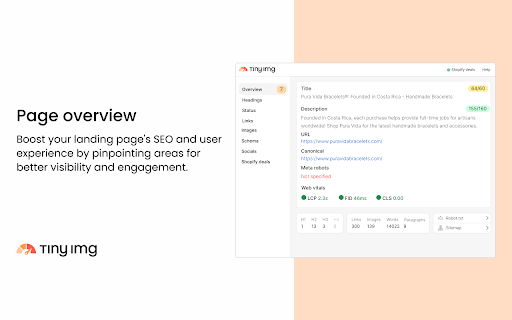
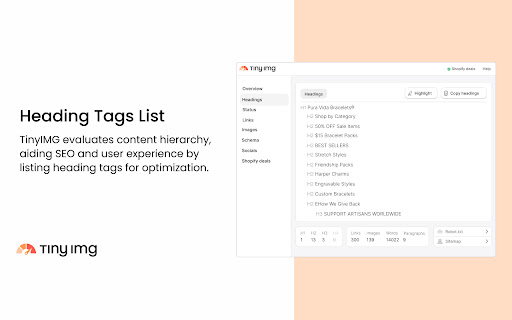
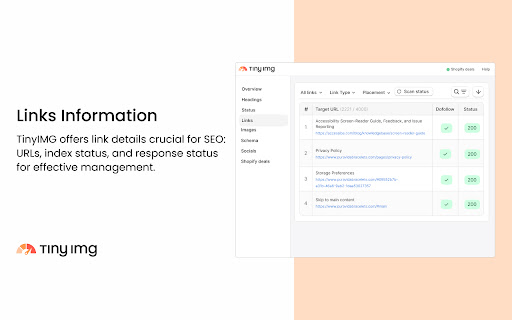
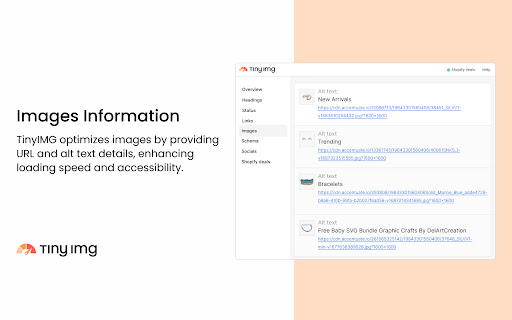
TinyIMG is a free multi-purpose extension designed to give users comprehensive SEO insights about any web page or Shopify store! It’s an excellent tool that we continuously power up with new features to help improve your website or analyze competitor pages. The TinyIMG extension offers: 1️⃣ Landing Page Overview (metadata, robot.txt, core web vitals) 2️⃣ Heading Tags List 3️⃣ Page Status 4️⃣ Link Insights 5️⃣ Image Details (URL, alt text) 6️⃣ Schema Markup Overview 7️⃣ Social Media Content Metadata The extension comes with a straightforward interface that’s easy to use even for beginners. Here’s how TinyIMG can help you analyze pages: 🖥️ Landing Page Overview Upon opening the extension, the first thing you’ll see is the Overview tab, which shows: 1. Page title and description (including the current and maximum recommended character count) 2. Page URL 3. Canonical tag (lets search engines know which URL is the main one) 4. Robots.txt (file that helps search engines understand which pages to crawl) 5. Sitemap (list of all the essential pages of your website) 6. Meta robots tag (lets search engine bots know if the page should be indexed and whether they should pass on link equity to the linked pages) 7. Core web vitals (Google’s user experience metrics) 8. List of heading levels and their count 9. Link, image, word, and paragraph count on the page TinyIMG gives you a full list of all-level headings found on the page to help visualize the structural content organization better. You can also automatically highlight heading levels in the text to see where they’re placed within the content. Plus, TinyIMG allows you to export the whole heading list into a CSV format for further analysis. Since search engines use heading tags to comprehend the hierarchy of page content, the extension can help users optimize their content structure to achieve higher rankings or analyze competitor pages. 📄 Page Status TinyIMG shows you current page status insights, which allows you to see the full redirect path. You may encounter such status codes as 200 (loaded), 404 (not found), 301 (permanently redirected), 302 (temporarily redirected), 500 (server error), and so on. This feature is useful for identifying any redirect chains that can tamper with page loading time, SEO efforts, or user experience. This TinyIMG feature crawls the full list of links that are present within the page and checks their status codes. This is useful for quickly identifying which pages are loading and which return error codes. The feature allows you to filter the results by link type (external or internal), meta robot directives (dofollow, nofollow, Sponsored, or UGC links), or placement (text or image). For extra convenience, you can highlight all links within the page or use the search functionality to find specific ones. Plus, you can export the data into a CSV format. TinyIMG presents you with a list of images within a page and information about them. You can view the image URL and alt text, including the current and maximum recommended character count. There’s also an option to filter images and quickly find which ones are missing the alt text. The highlight functionality lets you easily see where the images are placed in the content. You can also download the data in CSV format with a single click. Optimizing your images helps search engines navigate your content and increases chances to rank in regular organic and image search results. TinyIMG quickly shows you the Microdata and JSON-LD structured data that the page contains in a simplified manner. It organizes the schema types in a hierarchical order by numbering them and demonstrating their structure within the code. You can also conveniently expand them and view the nested schema parameters. The Social feature in the TinyIMG extension shows whether the page is using the Open Graph (og:) protocol. You can view its different properties, including title, type, image, URL, site name, and description, and find what’s missing. You can also use the Preview functionality which redirects you to an external site. It gives you a visual demonstration of how the URL will look like on different social media channels, including Facebook, X, Discord, and LinkedIn. In case you have any questions, you can contact our support team on our official website: https://tiny-img.com/?open-support=true

SEOSpace - The SEO Plugin for Squarespace
SEO Tool for Squarespace websites SEOSpace is a Chrome extension designed to help Squarespace users monitor and improve their website’s SEO. With one click, you can run scans, discover keyword opportunities, and review practical suggestions to make your site more search-friendly. Key Features • Site Scans – Check your Squarespace site for technical or content issues that may affect SEO. • Keyword Insights – Explore keyword ideas related to your pages and content. • Actionable Suggestions – Receive practical recommendations to improve titles, meta descriptions, and headings. • Tutorial Library – Access a collection of step-by-step, beginner-friendly guides for common SEO tasks. • Squarespace Integration – Works directly with your Squarespace site for faster insights. SEOSpace is made for Squarespace website owners, freelancers, and small businesses who want an easier way to keep track of their SEO and learn best practices without needing advanced technical knowledge.

Shopify App Detector by ShopScan
Easily know what shopify apps and themes are being used on a shopify website Free Shopify App & Inspector — see what apps, themes, analytics, and payment methods any Shopify store is using. 🛍️ 🕵️ Ever wondered what Shopify apps, theme, or payment gateway a store is using? ShopScan's free Shopify App Detector reveals it in one click. 🎯 Perfect for competitor research, dropshipping, agencies, and anyone curious about a Shopify store's tech stack. ====== WHAT IT DETECTS ====== 1️⃣ Shopify Theme — name + Theme Store URL 2️⃣ Shopify Apps — with direct App Store links 3️⃣ Analytics & Tracking Tools — Google Analytics, Meta Pixel, TikTok, Klaviyo, and more 4️⃣ Payment Gateways — Shop Pay, Stripe, PayPal, Afterpay, Klarna, and more 5️⃣ Third-party tools & integrations powering the store ====== HOW IT WORKS ====== 1️⃣ Visit any Shopify store 2️⃣ Click the ShopScan icon 3️⃣ Instantly see the full tech stack — apps, theme, analytics, payments ====== WHO IT'S FOR ====== 1️⃣ Dropshippers researching winning stores and product strategies 2️⃣ Agencies auditing client sites or scouting competitors 3️⃣ Shopify merchants looking for proven apps that work 4️⃣ Developers and marketers analyzing tech stacks 5️⃣ Anyone curious how a Shopify store is built ====== WHY SHOPSCAN ====== 1️⃣ Free — no account, no paywall, unlimited scans 2️⃣ Fast — results in under 2 seconds 3️⃣ Accurate — actively maintained app database 4️⃣ Private — we don't collect your browsing data ✔️ You can also visit www.shopscan.app to get more details about all the apps, and may request to add missing apps or new apps. Try Shopscan Shopify App and Theme Detector today! 📌 Version 1.2.1 - Updates (April 2026) ➜ New in-app announcement banner for product updates & news ➜ Cleaner "No apps detected" empty state ➜ Accurate app count ➜ Performance & stability improvements 📌 Affiliate Disclosure: This extension has affiliate links. If you start your store through our link, you’ll be supporting us too—at no extra cost to you.

Shopify Website Audit
Audit ANY Shopify or Shopify Plus Store with our all new Mozilla Firefox Extension. Instantly scan a hop to reveal critical stats like Google Page Speed scores, understand the site's tech stack and complexity. Google Page Speed Scores ✅ Mobile Page Speed ✅ Desktop Page Speed Shopify CMS Explorer + View all of the Shopify store’s content in a simple paginated table view, including the store’s full list of: ✔️ Products and Product Variants ✔️ Collections - Manual and Smart Collections ✔️ Pages ✔️ Blog Posts Website Technology Scanner ✅ Identifies all the major website platforms, apps, tools, marketing pixels, and coding libraries ✅ Instantly surface various IDs that are used in the most popular Shopify apps for merchants and marketers ✔️ Shopify Theme Name ✔️ Meta Pixel ID ✔️ Google Analytics Universal Analytics ID ✔️ Google Analytics 4 Measurement ID ✔️ Google Tag Manager ID ✔️ Klaviyo Public API Key Click the Extension on ANY Shopify or Shopify Plus Store ✅ 1 - Open up any Shopify store and click on the Shopify Explorer Tool in your browser. Once clicked, the extension will take some time to load all of the content for you to freely browse ✅ 2 - Click on the score cards or tabs in the explorer view in order to toggle between panes ✅ 3 - Export the Shopify store’s website HTML and product catalog directly to your desktop, or by sending it to your email

Pinterest Tag Helper
A tool to help you build, troubleshoot and test your Pinterest Tags. For more details on how to use the extension, visit our Developer Center. https://developers.pinterest.com/docs/conversions/pinterest-tag-helper-chrome/ Release note for version 0.1.19: Display event type when POST requests are detected
