
kaejnklcabffonfpbmfmiklppnpjipfh
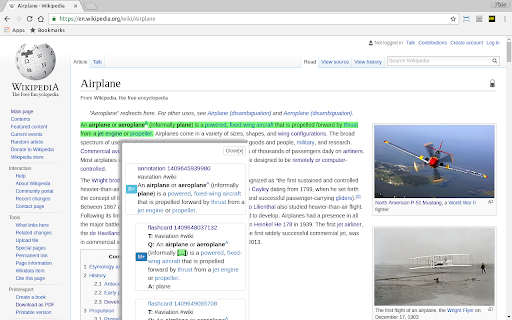
helps with learning BUBOFLASH IS A COMPLETE LEARNING SYSTEM * You read internet or pdfs (why give up on paper books? scan them & upload them and use them privately). * You annotate interesting parts or... * ... you follow your friends' annotations. * Buboflash collects all annotations in a priority queue for reviewing. * You review for days and weeks, and when you want to memorise a fact, * you convert an annotation to a flashcard: a pair of question and answer. * You repeat it and Buboflash schedules repetitions for you - completely automatically. BUBOFLASH IS SMART * Repetitions will guarantee that you remember it all - almost all actually! * Buboflash will be increasing intervals between repetitions - 1 day, 3 days, a week, 10 days, a month etc - adapting to YOUR memory and to every flashcard individually * You will repeat only what you need and only when you need it. No time wasted. Relax. All planning is done for you. * 100 flashcards, 1,000 flaschards, 10,000 flashcards, more! BUBOFLASH IS SOCIAL * Annotate books together. * Share annotations, flashcards and even pdfs - if you choose to do so. * No conflicts anymore, everything is versioned, everybody can pick their "version of truth" :-)

Online Dictionary Helper
A translation popup tool to show online dictionary content (with anki support) It's a tool to show online dictionary content and help make note in anki desktop (with ankiconnect installed). When users are reading web page online, they can move mouse cursor to the unkown word, press shift key, and then a pop up windows with that word definition will be displayed. It also can help make an anki note filling fields with word, definition and context (the surrounding sentence of selected word).

FlashTabs
FlashTabs is a digital flashcard app in your new tab screen. Create decks, add some cards, then learn every time you open a new tab. FlashTabs is a simple Chrome Extension that makes learning easy. No longer do you have to load up a flashcard application to process through your deck, now you can create a deck and process through it as part of your daily workflow, every time you open a new tab screen. Feature List: -> Create multiple decks of flashcards -> Have multiple decks active at the same time -> View your flashcards in your new tab screen -> FlashTabs uses a spaced repetition algorithm, only showing you cards at the optimal times to increase knowledge retention. -> Import and Export your decks to share with others -> Upload an image to the front and back of your cards -> With FlashTabs Pro, choose different colours for your Decks

ReClipped: YouTube Notes & Screenshots
Take timestamped notes and screenshots from videos on YouTube and many other platforms 🚀🚀🚀 Harness the full potential of videos to learn, to analyse, and to improve ❤️❤️❤️ Loved by Students, Teachers and Professionals around the globe 📝 Learn from online videos Take timestamped notes, screenshots and transcripts (YouTube only) from videos on large number of online platforms to elevate your productivity and enhance your knowledge retention. Now, you can just highlight the transcripts to generate video segments and create a video summary or slideshow from your clips. 🔎 Analyse and review videos Analyse own videos for skill improvement, or provide specific and actionable feedback, or share important moments with the team members. Keep the conversations on videos private, contextual and reference-able 📌 Tag, search, color code and organise ReClipped gives you the power to organise and connect the knowledge in your own ways. Search not just videos but specific snippets in them, use colored markers to visually code the importance and collect similar ideas in one Board 🤝 Export notes as PDF/Markdown or Sync to your favourite productivity apps Simply export notes in a pdf or markdown formats or Connect ReClipped with your favourite note-taking and productivity apps such as Obsidian, Evernote, Notion, Readwise. So that your video notes automatically sync into the productivity system of your choice. 🤷 CANNOT INSTALL THE BROWSER EXTENSION? NO PROBLEM Use the ReClipped web app at reclipped.com. This method works for web browsers on Desktop as well as Mobile 💻 📱 1️⃣ Copy the share link of the video 2️⃣ Log on to reclipped.com and click on Add Video 3️⃣ Paste the share link 4️⃣ Start taking notes ⭐⭐⭐⭐⭐ Please rate us on the webstore and leave your comments, ideas & feedback to help us make ReClipped the best productivity tool for all things related to videos

Anki generator, powered by open ai GPT
Maximize your study effectiveness and learning retention with the AI Flashcard Creator Extension! Harnessing the power of advanced Artificial Intelligence, this extension takes your learning experience to the next level, enabling seamless creation of insightful flashcards from your study materials. With our AI Flashcard Creator, you can simply select the text you want to learn, and the AI will instantly generate a set of comprehensive flashcards. The AI identifies key points, important facts, figures, and concepts, turning them into an interactive learning tool that's perfect for memory retention and periodic review. Don't just study, study smart. Let our AI Flashcard Creator Extension supercharge your learning experience! Try it today and experience the future of learning. You will need to install the anki add-on ankiconnect, the instruction are on the settings page. Features: - Highlight text and create flash cards related, you can modify the prompts - Drag images directly - Open the card in anki editor - Easily search images related to the content of the flash card on different engine - Works on pdf with chrome by using the sidepanel options and right-click menu
