
kablckeallljpgnkaifaeckgkaejhpjp
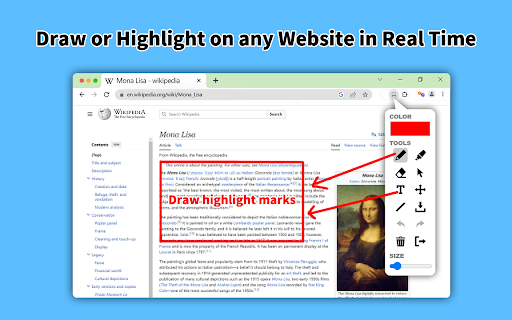
Draw or highlight on any website in real time. Add text, lines, and shapes, then make screenshot the result. Draw or highlight on any website in real time. Add text, lines, and shapes, then make screenshot the result. Are you accustomed to highlighting important text in books or do you want to draw directly on websites in real-time from your browser? Perhaps you need to share your screen for tasks like reporting technical issues, creating product demonstrations, or crafting how-to tutorials. Whether you're a student, a professional, or just someone who loves browsing the web is a must-have extension. You'll have access to an array of advanced annotation tools, including a pencil, highlighter, color picker, arrow, polygon, text, emoji, and more. It contains the tools you need: - Pencil tool - draw custom lines - Text tool - add annotation - Emoji - add fine emoji on any web pages - Bucket fill tool - fill shapes and drawn with any color from palette - Line tool - put start and end point to paint straight line - Quadratic curve - draw a quadratic curve with the selected line width - Bezier curve - paint a bezier curve with the selected line width - Polygon tool - paint a polygon with the selected line width - Ellipse tool - draw an ellipse or a circle with the selected line width - Eyedropper tool - pick a color from the web page or your drawings - Screenshot tool - screenshot maker allows saving result in PN or JPG Privacy Policy By design, your data stays at all times on your Google account, never saved in our database. Your data aren’t shared with anyone, including the add-on owner. We complies with privacy laws (especially GDPR & California Privacy Act) to protect your data. All data you upload are automatically deleted every day.

Web Paint - Page Marker & Editor
Web Paint - Page Marker & Editor enables you to make annotations and modifications on websites. This extension allows you to draw, add text, insert lines, and highlight content directly on web pages and PDFs. The tool is compatible with both mouse and touchscreen inputs, giving you the ability to create and save your edits to your device. Whether you're a student, a professional, or simply an avid web user, this extension is a valuable addition. It offers a range of advanced annotation tools, such as a pencil, highlighter, color picker, arrow, polygon, text, and emojis. Are you accustomed to highlighting important text in books or do you want to draw directly on websites in real-time from your browser? Perhaps you need to share your screen for tasks like reporting technical issues, creating product demonstrations, or crafting how-to tutorials. Here's why you should consider using our extension: - It includes all the features found in MS Paint. - You can adjust the thickness, transparency, and choose preset colors. - Capture a screenshot of the entire page. Paint Online is a lightweight and free Chrome extension designed for educational purposes, introducing anyone to the world of drawing right within their browser. Additionally, it offers the opportunity to practice the alphabet, numbers, and artwork while learning. The extension allows for full-page screen captures, saving the screenshots as PDFs or images. These instant captures are stored locally and don't generate online traffic. The screenshot tool functions offline and is incredibly user-friendly. You can easily choose between full-screen or partial area captures with a single click. Furthermore, you have the flexibility to customize the screenshots by adding text, drawing lines, arrows, and shapes. The extension provides the following features: 1.Convenient hotkeys for each tool 2. Save drawings along with screenshots 3. Save images to your PC or print them 4. Crop and save specific image areas We value your feedback! Our team is dedicated to offering you the best Chrome experience possible. If you find our extension helpful, please consider giving it a 5-star rating.

Draw Quick
Draw free‑hand on any web page. Modern work happens at the speed of a scroll. Ideas spark while you browse a design mock-up, scan a news article, or present a slide deck in a live call. Yet the moment you need to sketch a quick arrow, circle a typo, or jot a note, you’re forced to reach for screenshot apps, graphic editors, or clunky browser plugins that interrupt your flow. Draw Quick eliminates that friction. With a single click it overlays a transparent, high-resolution canvas on top of any web page, lets you draw free-hand in real time, then saves the result as a single composite image—website plus annotation—ready to share or archive. Core features at a glance Instant overlay – Click the toolbar icon or use a configurable shortcut and a full-page canvas appears, automatically scaled for high-DPI displays. No page reload, no permissions prompt, and zero impact on site performance. Lightweight drawing tools – Five colour swatches, a pressure-style size slider, eraser, one-click clear, and an intuitive save button are all you need for rapid markup. Strokes are anti-aliased and perfectly round, giving even hurried scribbles a crisp, professional look. Why users choose Draw Quick Speed of expression – Whether you’re pair-programming, tutoring, or critiquing a landing page, speed matters more than pixel-perfect shapes. Draw Quick launches in under 100 ms and lets you draw immediately, capturing stream-of-consciousness feedback before it evaporates. Fewer apps to juggle – Traditional workflows require taking a screenshot, opening an editor, annotating, saving, then re-uploading. Draw Quick compresses that five-step dance into one action, saving teams minutes per annotation and countless context switches over a project lifetime. Universal compatibility – Because the canvas floats above the DOM, it works on static sites, Single-Page Apps, and even locked-down corporate portals. No extensions, fonts, or injections are required on the viewer’s side; the final PNG is just an image anyone can open. Product managers & QA testers – File richer bug reports by highlighting exact problem areas without wrestling with third-party screenshot tools. Educators & tutors – Annotate articles, code snippets, or math problems during live lessons, keeping students engaged with on-screen visuals. Customer-support agents – Create quick “how-to” callouts on websites or dashboards, reducing back-and-forth with clients. Remote teams – In distributed stand-ups or design reviews, Draw Quick becomes a shared whiteboard for instantaneous visual feedback.

Paint Tool for Chrome
Paint tool to draw anything and anywhere in real-time, paint online. Take a screenshot of your drawing use screenshot tool. Paint Tool - draw on any website, add text, add lines, and highlight! With Web Paint, you can use your mouse or touchscreen to draw on the web or on PDF and save it to your computer. Paint, draw, and mark on any webpage or website. Whether you're a student, a professional, or just someone who loves browsing the web is a must-have extension. You'll have access to an array of advanced annotation tools, including a pencil, highlighter, color picker, arrow, polygon, text, emoji, and more. Easy to set up extension: 1. Install the Web Paint extension, and reload the page to let the extension work. 2. Click on the extension whenever you need to draw or highlight something. 3. Drawings are automatically saved. 4. Take Screenshot. 5. Reload the page to exit the draw mode from the browser. Accustomed to reading books and highlighting important texts or just wanted to draw on any website in real time in the comfort of your browser or want to share your screen for cases like reporting technical issues, making product demos or how-to tutorials? Here are reasons to choose our extension: 1. Has all the features of MS Paint. 2. Adjustable thickness, transparency, and preset color. 3. Take a screenshot of the page. Paint Online is lite weight and a free extension for Chrome that can be used for educational purposes and introduce anyone to drawing right from your browser. In addition, it can practice the alphabet, numbers, and paintings while educating. The creation of a screen capture is easy as it ever could be. Choose from the full-screen or partial area and take it in a click. Then you can fully customize screenshot like add text, drawing lines, arrows, and shapes. You can share your images on Pinterest board. It also contains the functions you need: - Hot-keys to each tool - Save drawing with a screenshot option - Save image to your PC or Print - Crop the necessary area of an image and save it Important Notice After installation/update, please reload the active tabs in your browser for the extensio to work. Rate us! We work hard to provide you with the best experience for Chrome. If you like our extension, please provide us with a 5 star rating!

Marker
Finds the most relevant phrases in any text and highlights them so you can understand it at a glance. Marker makes it very easy to find the relevant information in a long text, by reading it for you and highlighting the important parts. 📖 If you are in front of a long article, use Marker to highlight the relevant phrases automatically. Just click on the marker icon and watch it work for you! 🤖 Marker uses Artificial Intelligence to find the most important sentences and highlights them. It works with most websites. 💻 Marker works inside your device. It doesn't need to send your data to an external server. 👀 Marker is powered by an open-source implementation of the TextRank algorithm. You can find more about it here: https://github.com/NachoBrito/ts-textrank
