
jplpdefjkhbikdmdepjnbmleokafcnjf
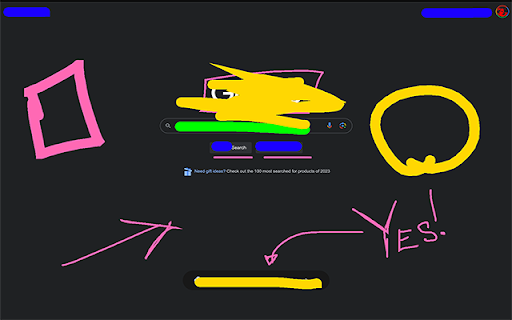
Allows you to draw on any webpage and wipe it all away with a stab of your Delete key. Li’l Scribbler is a Chrome extension that lets you draw, write, and annotate directly on web pages. It’s designed to be a companion when presenting over a video conference. The UI focuses on keyboard control to switch between tools and options quickly and never get in the way of your communication. Quick Start * Activate Drawing Mode: Click the Li’l Scribbler icon in your Chrome toolbar to enable the drawing tools. * Select a Tool: Use the left arrow key to cycle through tools: Pen, Rectangle, Arrow, Text, and Eraser. * Choose a Color: Press the right arrow key to switch between colors. * Adjust Size: Use the up arrow to increase and the down arrow to decrease the size of your selected tool. * Draw or Type: Click and drag to draw; click to place text, then type. * Finish Up: Press Enter to finalize text entries. Press the Delete key to remove annotations. * Deactivate Tools: Click the Li’l Scribbler icon again to turn off drawing mode. ===Detailed Features and Shortcuts=== Tools: * Pen Tool: Freehand draw; ideal for highlighting or sketching. * Rectangle Tool: Draw rectangles; click and drag to define the area. * Arrow Tool: Click, drag, and release to create arrows pointing to specific items. * Text Tool: Click to position your cursor and start typing. Press Shift+Enter for a new line. * Eraser Tool: Wipe away the stuff you don’t want on the screen. Color and Size: * Colors Available: Hot Pink, Lime Green, Deep Ocean Blue, Hazard Yellow, Pitch Black. Toggle through with the right arrow. * Size Adjustment: Increase with the up arrow, decrease with the down arrow. Text Manipulation: * Multiline Text: Shift+Enter to add new lines. * Adjustable Text Size: Cmd+Up Arrow to increase; Cmd+Down Arrow to decrease. * Moving Text: Hold Cmd, click and drag your text box. Finalize with Enter. * “Finalize” Text: Enter/Return Keyboard Shortcuts: * Switch Tools: Left Arrow. * Change Colors: Right Arrow. * Tool Size: Up Arrow to increase, Down Arrow to decrease. * Clear Annotations: Delete. * Undo/Redo: Ctrl/Cmd + Z for undo, Ctrl/Cmd + Shift + Z or Y for redo. Troubleshooting: * Toggle Drawing Mode: If the tools aren’t appearing, try turning the drawing mode off and on again. * Check Page Support: Li’l Scribbler won’t work on ‘chrome://’ or ‘chrome-extension://’ URLs. You'll see an "OFF" badge on the extension's icon if this is the case.

Cloudmark - Collaborative Bookmark Manager
Cloudmark is a collaborative bookmark manager that allows you to save and organize your bookmarks in the cloud. Introducing Cloudmark Chrome Extension: Your Collaborative Bookmark Manager in the Cloud Cloudmark is the ultimate collaborative bookmark manager designed to revolutionize the way you save, organize, and access your favorite online resources. With the Cloudmark Chrome Extension, keeping track of your bookmarks has never been more effortless and efficient. Gone are the days of worrying about losing your bookmarks due to browser crashes or device changes. Cloudmark empowers you to store your bookmarks securely in the cloud, ensuring that they are accessible from any device with an internet connection. Also, it allow you to create folder to share links with your team. 1. Cloud-Based Bookmark Storage: Cloudmark takes your bookmark management to the next level by providing a secure cloud-based storage solution. Say goodbye to the limitations of local bookmark folders, as now all your bookmarks are backed up and readily available whenever you need them. 2. Collaborate and Share: Sharing bookmarks / links with friends, family, or colleagues has never been easier. With Cloudmark's collaborative features, you can effortlessly share collections of bookmarks, fostering seamless collaboration and knowledge-sharing. 3. Intuitive Organization: Cloudmark lets you create custom folders enabling you to efficiently organize your bookmarks. 4. Sync Across Devices: Seamlessly sync your bookmarks across multiple devices, ensuring you have access to your favorite webpages, articles, and resources, no matter where you are. 5. User-Friendly Interface: Cloudmark's intuitive interface makes bookmark management a joy. Our user-centric design ensures that both beginners and seasoned users can maximize the full potential of the extension effortlessly. Get started with Cloudmark Chrome Extension today and embrace a smarter, more collaborative approach to bookmark management. Streamline your web browsing experience and never lose another valuable resource again. Discover the freedom of cloud-based bookmarking, and stay connected to your favorite links, wherever you go.

Scribbles
The extension allows users to draw annotations directly on web pages using tools like pencil, highlighter, and eraser.

CrecenTech Utilities
It's a simple chrome extension which will hide password showing method.It will also hide code inspection with all ways like short cut keys etc.

Page Marker - Web Annotation Tool
Advanced web page annotation tool with drawing, highlighting, and marking capabilities Page Marker is a powerful web annotation tool that transforms how you interact with web content. With an intuitive interface and comprehensive drawing tools, you can highlight, mark up, and annotate any webpage for research, teaching, collaboration, or personal reference. Key Features Versatile Annotation Tools • Precision Pen Tool: Draw freehand with customizable colors and line thickness • Semi-Transparent Highlighter: Emphasize important text while keeping it readable • Eraser Tool: Remove annotations with pixel-perfect precision • Selection Tool: Navigate webpages without accidentally drawing User-Friendly Interface • Floating Tool Panel: Clean, modern interface that stays out of your way • 16-Color Palette: Choose from preset colors or use the custom color picker • Adjustable Brush Sizes: Fine-tune your drawing with sizes from 1-20px • Undo/Redo: Full history management for mistake-free annotation Seamless Data Management • Automatic Saving: Annotations persist between browser sessions • Domain-Based Storage: Annotations are saved per website, keeping your work organized • Export/Import: Back up your annotations or transfer them between devices • One-Click Clearing: Remove annotations from a single page or globally Productivity Enhancements • Keyboard Shortcuts: Quick access to tools for efficient workflow • Responsive Design: Works on any screen size or device • Non-Intrusive: Doesn't interfere with normal webpage functionality • Performance Optimized: Smooth drawing experience with minimal resource usage Whether you're a student annotating research materials, a teacher creating visual explanations, a developer marking up design changes, or simply someone who likes to highlight important information, Page Marker provides the perfect toolset for your web annotation needs.
