
jopeffckoclcfjgnmohcnmhljkiagacn
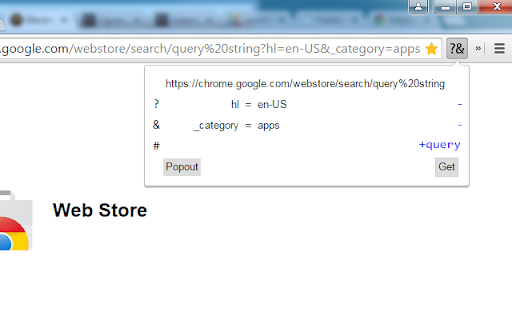
View and edit long URL search query string with relative ease Do you ever have to scroll the URL bar all the way over trying to read the value of query params? Have you ever tried to edit these parameters only to loose your place? Not anymore. This extension is open source https://github.com/qufighter/QueryParser

Webmapper
Constructs a map of the web using the user's browser history. Webmapper uses your browsing history to construct an interactive, personalized "map of the web as you see it". Every webpage you visit is placed on the map and sized by how often you visit it. Similar pages are grouped into clusters. **Interactive -- click on text to visit pages, or zoom in on domain names** **Zoomable -- use mousewheel / scrolling to zoom in and out on clusters** **Searchable** **Site-Specific -- click on polygons to construct a map specific to a site, e.g. a map of all your Google searches, or Wikipedia entries** **6 quality color palettes** **Map sites visited in the last 10, 20, 30, 50, or 100 days** Developers: Ryan Hamerly, Scott Chung, Sheta Chatterjee, and Milinda Lakkam

Linkumori (URLs Cleaner) - formerly Neat URL
Remove tracking parameters from URLs and protect your privacy Remove tracking parameters from URLs and protect your privacy Linkumori (Clean URLs) - Reclaim Your Online Privacy In today's data-driven world, your browsing habits and online activities are constantly being tracked and analyzed by a myriad of third-party services. One of the primary ways this is accomplished is through the use of tracking parameters embedded in the URLs you visit. These parameters allow advertisers, analytics providers, and other companies to follow your digital footprint across the web, compromising your privacy. The Linkumori (Clean URLs) Chrome extension is designed to combat this pervasive issue by automatically cleaning and purifying the URLs you encounter. It methodically removes the various tracking identifiers and parameters that are appended to URLs, preventing these third-party services from collecting and aggregating your personal data. By installing Linkumori, you can enjoy a more private and secure browsing experience, where your online activities are shielded from unwanted surveillance and profiling. The extension works seamlessly in the background, ensuring that your URLs are cleansed without interrupting your normal browsing workflow. Automatic URL cleaning: The extension automatically identifies and removes tracking parameters from the URLs you visit, protecting your privacy. Comprehensive coverage: Linkumori is equipped with an extensive set of rules to handle a wide range of URL-based tracking mechanisms, ensuring a robust and effective cleaning process. Whitelist support: You can easily add domains to a whitelist, allowing you to exclude specific websites from the URL cleaning process if needed. Minimal impact: The extension's efficient design ensures that the URL cleaning process has negligible impact on your browsing performance, providing a seamless user experience. Customizable settings: Linkumori offers the flexibility to enable or disable the extension's features, allowing you to tailor the privacy protection to your preferences. In today's digital landscape, where our online lives are increasingly exposed to data collection and monetization, the Linkumori (Clean URLs) extension stands as a powerful tool to reclaim your privacy. By installing this extension, you can take a proactive step in safeguarding your personal information and regaining control over your digital footprint. Download Linkumori (Clean URLs) now and experience the freedom of browsing the web with enhanced privacy protection. Before: http://www.phoronix.com/scan.php?page=news_item&px=Ioquake3-Auto-Updater&utm_source=feedburner&utm_medium=feed&utm_campaign=Feed%3A+Phoronix+(Phoronix) After: http://www.phoronix.com/scan.php?page=news_item&px=Ioquake3-Auto-Updater Custom rules can be added in the settings. Bug reports and feature requests -------------------------------- You can open an issue on GitHub: https://github.com/Linkumori/Linkumori-Extension/issues/new

URL Decode/Encode
A nifty tool for decoding URLs that have been encoded. Useful when you've encoded a URL and actually want read it! URL encoding (also known as percent-encoding) is a mechanism for encoding information in a Uniform Resource Identifier (URI). This is a developer utility that allows you to paste (or type) an encoded URL string into a text field and see a decoded version. This is useful if you often deal with encoded URLs and want a quick way to read easily it. The last URL you entered is remembered and shown the next time you open the extension. This extension also includes links to other tools from LinangData, the LinangData main website, and our Youtube channel from the menu bar. The following tool buttons are available: - Decode/Encode - toggle between decoding and encoding URLs - Clear - clear the URL - Paste - paste from clipboard (replacing existing URL) - Append - pastes URL from clipboard (appending to existing URL) - Copy - copy encoded/decoded URL to clipboard - Replace - copies the encoded/decoded URL to the input text area (replacing existing URL)

Bloomreach Pixel Validator
Enables you to effortlessly track and validate Bloomreach pixel requests Ensure accurate implementation of Bloomreach pixels with real-time validation and troubleshooting. 1 .Validate required parameters and data accuracy 2. Color-coded status indicators (Red/Yellow/Green) 3. Filter records, copy parameters, and export PDF reports 4. Session-based recording with easy toggle controls 5. Quickly identify missing/invalid parameters and optimize your Bloomreach integration. Includes search functionality and one-click documentation access for efficient debugging. For more details please check https://documentation.bloomreach.com/discovery/docs/validating-pixels
