
joocnhnjenjbgpgcldfiliibifpaogpk
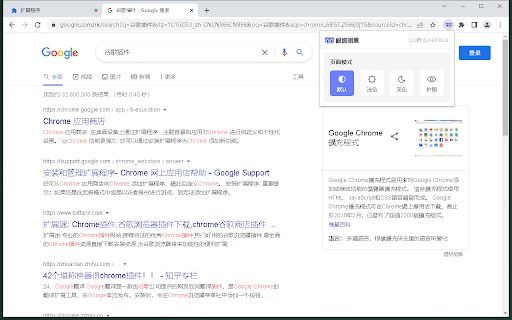


为您提供各种最舒适的浏览模式(暗黑模式、浅色模式、护眼模式),减少长时间浏览网页内容时对眼部的伤害。如果您对网页浏览模式有更深层次的需求,欢迎加入QQ群631893828。 为您提供各种最舒适的浏览模式(暗黑模式、浅色模式、护眼模式),减少长时间浏览网页内容时对眼部的伤害

Dark Reader
Dark mode for every website. Take care of your eyes, use dark theme for night and daily browsing. This eye-care extension enables night mode by creating dark themes for websites on the fly. Dark Reader inverts bright colors to make web pages high contrast and easier to read. Adjust brightness, contrast, the sepia filter, font preferences. Enable dark mode on every web page or give websites a sepia tone. Enable or disable Dark Reader for specific websites, automatically sync with system dark mode, or detect already dark websites and leave them unchanged. This is the original Dark Reader extension. Since 2014, we continuously evolve alongside modern web technologies to deliver fast and reliable dark mode support for people sensitive to bright light. By installing the extension you agree to these terms of use https://darkreader.org/terms/

DARK VISOR — darkmode for the web
Dark mode for the web. Protect your eyes with Dark Visor. Customize brightness, contrast, and night shift for comfortable browsing. Tired of the web's blinding white backgrounds? Welcome to the ultimate solution for comfortable and healthy browsing in your Chrome browser. Our extension seamlessly transforms your online experience by activating a perfect dark mode on every website you visit. Say goodbye to eye strain and hello to a soothing digital environment. 🌙 This is not just a simple color inverter. We provide a sophisticated and intelligent dark theme that respects colors, images, and media. Enjoy a consistent and aesthetically pleasing presentation across all your favorite sites, from news portals to complex web applications. This is the most reliable darkmode Chrome has to offer. Your eyes deserve the best protection. This extension functions as a powerful Chrome eye protector, significantly reducing digital eye fatigue. By applying a gentle dark theme, it creates a relaxed viewing experience, making it an essential eye care PC download for students, professionals, and anyone who spends time online. We give you complete control over your visual experience. The dark mode extension features an intuitive popup that allows for instant one-click enabling or disabling of the darkmode. This makes it easy to quickly adapt to any website or lighting condition. Create your personal comfort zone with a suite of adjustable filters. Fine-tune the display to your exact preference: • Brightness: Adjust the overall light output of your screen, acting as a precise screen dimmer. • Contrast: Enhance text legibility and make elements pop for a sharper view. • Sepia: Apply a warm, brownish tint to further reduce eye strain and emulate a paper-like reading experience. We understand that not every website is better in darkmode. That is why we include a comprehensive exclusion list feature. Simply add the URLs of sites where you prefer the original design, and our intelligent chrome dark mode will automatically be disabled there. 🎓 For those late-night browsing sessions, our extension becomes an indispensable night light app with darkmode. The combination of a dark theme, blue light reduction, and adjustable screen dimmer settings helps minimize sleep disruption and provides a wind-down experience for your eyes. 🎓 Think of this as a versatile computer screen brightness app and a chrome screen protector all in one. You can manually adjust the dim screen levels to perfectly match your ambient lighting, providing ultimate comfort whether you are in a bright office or a dark room. 🎓 For ultimate eye comfort and potential battery savings on OLED displays, push the settings to create a deep chrome black mode. This setting maximizes the use of true black pixels, offering an extreme yet comfortable viewing experience. We are proud to utilize the renowned Dark Reader library, which is used under the MIT license, to power our core functionality. This ensures a reliable, high-performance, and continuously improved dark mode experience for all our users. Your well-being is our priority. This is more than just a dark mode; it is a comprehensive eye saver utility. We combine multiple technologies—including a superior dark theme, advanced blue light reduction, and a configurable screen shader—to create the most comfortable browsing experience possible with darkmode. Key benefits of installing this darkmode extension: 1️⃣ One-click activation for instant google dark mode on any page. 2️⃣ Customizable filters for brightness, contrast, and sepia. 3️⃣️ An exclusion list to disable dark mode on specific sites. 4️⃣ Significant blue light reduction for better sleep. 5️⃣ Acts as a full-featured screen dimmer and night mode for Chrome. Download the ultimate dark mode chrome extension today. It is free, easy to install, and instantly transforms your Chrome browser into a sanctuary for your eyes. Embrace the dark side and see the web in a whole new, comfortable way. 👁️ Join millions of users who have already discovered the benefits of a proper dark theme and effective eye protector darkmode. Install now and give your eyes the relief they deserve. Your vision is priceless; protect it with the chrome dark mode extension available.

Dark Mode - Dark Reader for Chrome
Simple dark mode for Google Chrome. Switch all websites to dark mode as desired. Take care of your eyes by the night theme. Dark mode for Chrome can turn the dark theme on any website. Now surfing the Internet is more comfortable, as your eyes will feel much better! Apart from this, your browsing experience will be more stylish. Features of the extension: - Completely free, no in-app purchases. - You can turn on dark mode for any website. - You can install the plugin with one click. - The plugin is small, it does not make your computer slower. Our eyes perceive the dark theme better at night or indoors with poor lighting. It also just looks cool. This design is completely sleek and minimalist. Works on the toggle button in the upper right corner. It's so easy to switch from day to night mode. The dark mode is an extension that helps you quickly turn the screen (browser) to dark at night time. Social networks, mainstream sites, and all other websites will be all together covered in black colors.

Dark Mode - Night Eye
Dark Mode: Switch to dark reading for night & day browsing. More than dark theme style, it ensures optimal eye protection. Night Eye brings dark mode to almost any website, helping you browse, read, work, and study more comfortably in low-light environments. Instead of simply inverting colors, Night Eye analyzes each page and converts bright interfaces into a smooth dark theme while preserving important images, videos, and media. You can also fine-tune the look of each website with brightness, contrast, saturation, warmth, dimming, and other visual controls. Night Eye is used by over 1,000,000 users across major browsers and has been actively maintained since 2018. ➤ Dark mode for websites that do not offer one ➤ Custom brightness, contrast, saturation, warmth, and dim controls ➤ Blue light reduction for late-night browsing ➤ Schedule dark mode to turn on and off automatically ➤ Support for PDFs ➤ Integration with websites that already have built-in dark themes ➤ Sync with your operating system or browser color scheme ➤ Import and export settings between browsers ➤ Per-website and global customization ➤ No ads ➤ No selling of user data Dark Mode Converts website colors, icons, and small visual elements to create a comfortable dark browsing experience. Filtered Mode Keeps the original website colors while allowing you to adjust brightness, contrast, warmth, and other visual settings. Normal Mode Turns Night Eye off for the current website and restores the original page appearance. Night Eye gives you control over how each website looks. You can apply settings globally or customize individual websites. Images Night Eye focuses on converting small images, icons, and interface elements. Larger media such as photos, videos, and social media posts are preserved so websites remain usable and natural. Brightness, Contrast, and Saturation Adjust the visual intensity of websites to match your personal preference and reduce discomfort during long browsing sessions. Blue Light / Warmth Reduce cold screen light during evening or late-night browsing by increasing warmth. Dim Lower overall page brightness when browsing in a dark room or when your screen feels too bright. Some websites already include their own dark themes. Night Eye can work with supported built-in dark themes, giving you easier control from one place. Night Eye Lite is the forever-free version of Night Eye. It allows dark mode on up to 5 websites of your choice, with no ads and no hidden charges. New users can try Night Eye Pro for 3 months with no credit card required. Paid plans are available for users who want more websites and additional usage options: • Night Eye Pro • Night Eye Pro Max • Night Eye Ultimate - one-time purchase option For the latest pricing and plan details, visit: https://nighteye.app/how-to-start/ Night Eye needs permission to read and change website content so it can detect page colors and apply dark mode. This is how the extension changes bright pages into darker, more comfortable versions. Night Eye does not sell your data and does not use third-party analytics such as Google Analytics inside the extension. Your visual preferences, such as website-specific color settings, brightness, contrast, saturation, warmth, and dim level, are stored locally on your device. These settings are used to remember how you want each website to look. For more information, see our privacy policy: https://nighteye.app/privacy-policy/ Need help or found a website that does not look right? Contact our support team and we will help you resolve the issue. You can also follow product updates and release notes here: https://nighteye.app/changelog
