
jokmnalkdbmbjehcjjnhmeibpfcblddm
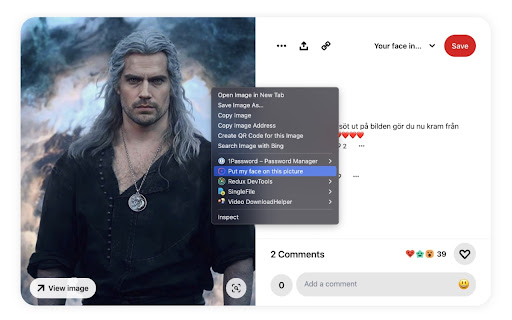
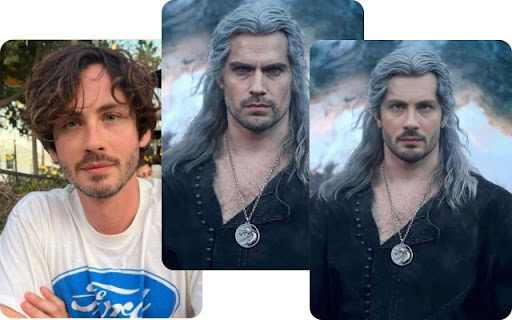
Put your face in any picture Click on any picture and put your face on it, it only takes a second. With this you don't need any PhotoShop ability, just load the picture you want and get the result in less than 5 seconds! It is the easiest way to swap your face with any picture in the world. - Find an image on the internet - Right click - Select "Put my face on this picture" - Select a photo of your face - You are done!

AI Face Swap - Photo & Video Face Swap
AI Face Swap is a fast, fun tool for swapping faces in photos and videos. Create memes, try new looks, enjoy secure AI technology! AIFaceSwap: ✨ Unlock the Magic of AI Face Swapping! ✨ Transform your browsing experience with our cutting-edge AI Face Swap extension. This powerful tool brings the fun and creativity of face swapping right to your fingertips, anytime you're online! 🌟 Why You'll Love AIFaceSwap: Instant Face Swaps: Turn any image on the web into a personalized masterpiece with just a click. User-Friendly Interface: No tech expertise required – swap faces effortlessly as you browse. Privacy First: Your data stays secure; all processing happens right in your browser. Endless Possibilities: Create memes, reimagine historical figures, or just have a laugh with friends. 🚀 Perfect for: High-quality AI algorithms for natural-looking results Batch processing for multiple images Easy sharing options to spread the joy Don't just browse – transform! Install AIFaceSwap now and experience the web in a whole new, face-swapped way. It's time to let your imagination run wild and see yourself (quite literally) in a new light online. 🎭 Swap, Smile, Share – AIFaceSwap makes it all possible!

Best Cursors - Bloom of Custom Cursor
Funny, cute and original custom cursor collections with popular topics. Use Best Cursors to change the default pointer with custom Do you like to customize your Chrome browser experience? If you do, then you will love the new Best Cursors extension for Chrome. This neat extension allows you to customize the look and feel of your mouse pointer within the Chrome browser. You can choose from a variety of options to make your mouse arrow look just the way you want. The Best Custom Cursor extension can be found within the Chrome web store. It is a free extension and can be quickly added to your browser. Once added, you can find the extension’s settings menu when you open it and navigate to extensions. In the settings menu, you can browse through a selection of different cursor styles. You can choose from illustrated mouses and pointers such as a hand, a laser pointer, a star, and more. In addition to changing the look of your cursor, you can also set different sizes. This feature allows you to have your mouse pointer bigger or smaller depending on the screen. The Best Cursor extension for Chrome is a great way to bring a personal touch to your browsing experience. Whether you are a fan of the characters arrows or you just want to add colors, this extension has something for everyone. Plus, it is free and easy to install and set up. Give it a try and let your personality shine through your cursor today!

Unlimited Photos & Videos Face Swap
Free AI face swap plugin allows unlimited face swap for photo, video, and multiple face swap! This extension lets you swap faces in photos and videos entirely for free. Unlike other services that limit free trials, this one offers unlimited access with no restrictions. You can enjoy face swapping as much as you want, experimenting with different faces in your favorite images and videos without ever needing to make a payment. It's the perfect tool for endless creative fun, all at no cost to you. Key features: Advanced Swapping Technology: Utilizes cutting-edge AI to accurately recognize and replace facial features for seamless face swaps. Instant Face Swap: Effortlessly swap faces in photos or videos with just a few clicks, all within seconds. Realistic Results: The swapped faces blend naturally with the original content, leaving no visible traces of AI interference. No Login Required: Start swapping faces instantly without the need for any account or login. 100% Free: Enjoy unlimited face swaps with no fees or hidden costs. While many face-swapping tools claim to be free, most only offer limited trials or require additional fees. In contrast, this extension provides truly free, unlimited face swaps for photos, videos, and GIFs. No registration is required—simply open the extension and start swapping faces instantly. Enjoy endless creative possibilities with no restrictions and no hassle! Moreover, we prioritize your privacy. We do not store any of your information—once you download your images or videos, they are deleted from our system. Your data is never sold to third parties. Start your magical face swapping journey with complete peace of mind!

FaceChange - Free Face Swap
FaceChange is a free AI face swap plugin that allows photo swaps, video swaps, and multiple face swaps for free! FaceChange is a completely free AI face swapper that allows users to switch faces in photos or videos without any cost. It offers unlimited swaps with no login required. Enjoy unlimited face swaps with no limitations! Key Features 1 Photo Face Swap Our advanced AI algorithm makes face swapping quick and easy. Just upload a photo, wait a few seconds, and get a realistic swapped image. 2 Video Face Swap Have fun swapping faces in videos. Our AI changes faces in every frame, recognizing and replacing all faces with the one you want. 3 Multiple Face Swap Swap faces in group photos from family parties or weddings. Share the joy of face swapping with friends and family. 5 No Login Required No login is needed to use our service, providing a smooth and unlimited swapping experience. 6 Unlimited Swaps for Free Switch faces on any picture without any limitations. You won't be interrupted by payment prompts. 7 Privacy Your privacy is our priority. We guarantee that we will not store or share your personal data with anyone. 8 No watermark All your swapped photos and videos will be free of watermarks, ensuring a clean and professional look. Tips for realistic face swapping There are some tips to make reface more natural and realistic: 1 Use High-Quality Photos and Videos Start with high-resolution images or videos. The better the quality, the more realistic the swapping results will be. 2 Match Lighting and Angles Ensure the lighting and angles of both faces are similar. Matching these aspects will help the new face blend seamlessly into the original photo or video. 3 Choose Similar Face Shapes Select faces with similar shapes and proportions. This ensures that the swapped face fits naturally onto the original. 4 Align Facial Features Pay attention to the alignment of eyes, nose, and mouth. Proper alignment is crucial for a realistic look.
