
jogbieljjfngmlfllepobdfdmhgbflki
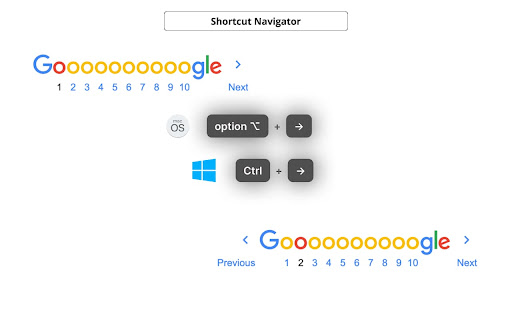
Navigate through websites using customizable shortcuts, boosting efficiency and minimizing clicks. Tired of endless clicking and scrolling while navigating through your favorite websites? Our browser extension revolutionizes the way you interact with websites by providing lightning-fast navigation using customizable shortcuts. 💡 Customizable in extension settings. • Go to previous page: `⌥ + ←` / `Ctrl + ←` (macOS / Windows) • Go to next page: `⌥ + →` / `Ctrl + →` (macOS / Windows) • Go to previous page in a new tab: `⌥ + ⇧ + ←` / `Ctrl + Shift + ←` (macOS / Windows) • Go to next page in a new tab: `⌥ + ⇧ + →` / `Ctrl + Shift + →` (macOS / Windows) 1. **Effortless Navigation**: Navigating through the pages of a website becomes as easy as a keystroke. Effortlessly jump from one page to another without lifting a finger from your keyboard. 2. **Customizable Shortcuts**: Tailor your browsing experience to your preferences by assigning your own shortcuts to specific actions. 3. **Enhanced Productivity**: By reducing the time spent on navigating, you can focus more on the content that matters. Whether you're researching, shopping, or simply reading articles, extension enhances your productivity. 4. **Multi-Site Support**: Use the same extension to navigate across multiple websites. Save different shortcut configurations for each site you frequent, optimizing your experience everywhere you go. 5. **Security and Privacy**: Extension is designed with your security in mind. Rest assured that your data and browsing history are kept private and never shared. Source code and bug tracker: https://github.com/NekitCorp/shortcut-navigator/issues

Batch Cache
The Batch Cache allows you to organise your extensions in a neat dashboard. You can create lists for different use cases and edit the names of the lists and listed extensions. The next feature we added was the ability to append URLs. This is really helpful and saves time by taking a URL you are visiting and by clicking the extension and one of your saved sites you can open in a new tab and run the URL through a scan like a website page speed loading test as an example. Some use cases: Ahrefs Wayback Machine Google Page speed Insights and many more. This extension was designed to keep your browser clean and organised and to save you time. Enjoy using the Batch Cache. We dont capture any personal information, we do bookmark your saved URL addresses to your account for quick reference as is the nature of this extension.

GoldDust
Ask a question about a company or a person. If the answer is on the internet - our AI agent will locate, synthesize, and display it. Welcome to GoldDust, the Chrome extension that automates the tedious and repetitive research you need to effectively qualify leads, prioritize opportunities, and customize outbound messaging. ⭐ Seamless Integration: Whether you're scrolling through LinkedIn, checking out a company’s website, checking latest news or deep in your CRM, GoldDust is there to enrich your experience without the hassle of switching tabs or tools. ⭐ Rich Info, On Demand: You've got a treasure trove of information, when and where you need it. It’s like magic, but for work. ⭐ Custom Insights: You’re getting the good stuff – customized insights that matter to you. Say goodbye to info overload and hello to insights that make a difference

Arrow Navigation
Use the arrow keys to go to the previous page or the next page, support common websites such as Google, Bing, Yahoo, etc. Try to automatically analyze web page content and add arrow key page turning function for websites that have paging bars but do not support keyboard page turning, so as to improve the efficiency of web browsing. The plug-in is enabled by default. If there is a paging bar in the web page content and there are previous and next page links that meet the preset, the shortcut keys will be automatically activated: - Press → to trigger the next page - Press ← to trigger the previous page If there is a conflict between the shortcut keys, or you do not want to use this function on a specific website, you can turn off the function for the current website in the plug-in menu. Currently supports web content in English, Chinese, Japanese, and Korean. If you need to support more languages or pages, please let me know.

Better WorkFlowy
Extension for improvement workflowy. Source code and bug tracker https://github.com/nekitcorp/better-workflowy
