
jocphnnmclhlbgoocgbjpochbmclcgbf
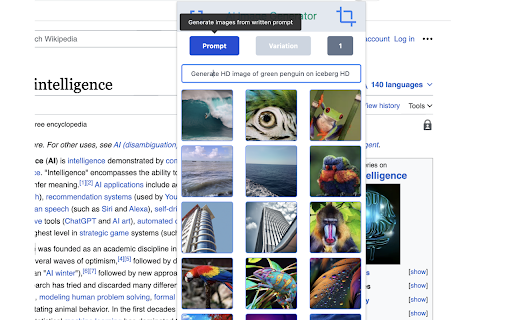
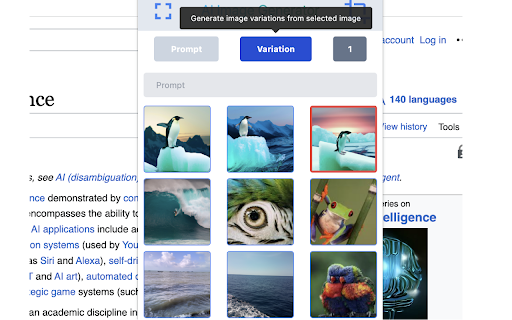
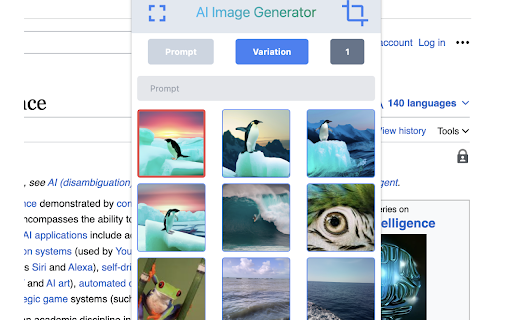


AI Image Cropper - Revolutionizing Image Handling and Creativity Meet AI Image Cropper, your ultimate companion for image… AI Image Cropper - Revolutionizing Image Handling and Creativity Meet AI Image Cropper, your ultimate companion for image manipulation and creation. Leveraging OpenAI generation technology, this extension transforms your image handling capabilities to the next level. It's the perfect tool for content creators, graphic designers, marketers, bloggers, and anyone who regularly deals with images online. Text to Image AI Generation: Forget about stock photos or generic images. With AI Image Cropper, you can convert textual ideas into vibrant, unique images. Just input your text, and watch as our AI crafts a unique image that embodies your description. Perfect for when you need to create custom visuals quickly and easily. Image to Image AI Variation: Want to alter an image but maintain its core elements? Our AI can generate variations of any image, giving you endless possibilities while preserving the original's essence. Great for brainstorming design concepts or just having fun with your photos. Cropping: Crop your images directly in your browser, without needing to open any external tools. AI Image Cropper supports precise cropping, allowing you to highlight the focal points of your images effectively. Select any text to Image Generation: With just a right-click, you can convert any text on a webpage into a compelling image. Ideal for making standout social media posts, engaging blog images, or powerful presentations. Save Image for Variation: Loved the variations and want to save them for future reference? With a single click, you can save any image or its AI-generated variation. AI Image Cropper is more than just an image tool – it's a gateway to endless creativity. Get started today and redefine how you work with images.

imgBuddy: Text to Image & Awesome Image Tools [ AI Powered ]
All the greatest image tools under one roof ✅ Text to Photos, Image Compression, QR Code Maker, Picture Search & more 🟢 Why imgBuddy extension is created? These days images play a very crucial role in everyone’s life no matter which field of work one is in. For each different needs we tend to go for different tools, grasp and then use them. Hence it becomes cumbersome for all of us. I’m sure you have landed on a tool page and wondered if I forgot what I did last time. So how can we make all these interesting image tools simple and accessible for all? That was the burning question for us at Team imgBuddy. imgBuddy is a modern tool for crafting images from text by designing or through AI. It can generate beautiful image files from any text written by you or selected by you while browsing the internet, without any effort or editing knowledge. The simple and user-friendly interface makes the image creation process from any text file absolutely quick and smooth. You can easily tweak the image according to your personal artistic sensibilities, and download and share it easily. It also has many different utility features related to images other than the text to image converter. 🟢 What does the imgBuddy extension offer? Think of imgBuddy as the personal assistant to your all image-related needs. This awesome extension elevates your image-specific experience in some pretty brilliant ways. Here's the lowdown: 1️⃣ Convert Text to Image: Select any text on any website, right-click and that's all, the extension provides you with a window with an image created with the selected text. Tweak it according to your need and download the picture on your device. 2️⃣ AI Image Generation: Want to create an image from what you are reading online? look nowhere, just select the text and tap on generate an image by AI. Voila, it just saves you the indefinite time of beating the bush through multiple websites, and provides you with high-quality quality realistic AI-powered images. 3️⃣ Image Compression: Reduce image size significantly by our intelligent algorithm which keeps the quality of your images intact and decreases the file size significantly. 4️⃣ Webshots: Take Screenshots of websites, download all images from an website, create cool previews of websites and generate website cards with QR codes for sharing. 5️⃣ Search Images: Find royalty-free images according to your needs with a click of a button. 🟢 Why Choose imgBuddy as Your Go-To Chrome Extension for Images? 1️⃣ One-Stop Shop: Forget juggling multiple extensions. imgBuddy's got it all in one sleek package. 2️⃣ User-Friendly: Despite being an all-in-one solution, imgBuddy keeps things simple and intuitive. 3️⃣ Always Evolving: We're in the game for the long haul, continually upgrading features and performance. 4️⃣ Platform Agnostic: Whether you're on Edge, Safari, iOS, Android, MacOS, or Windows, we've got you covered. Our website runs on any platform that has access to the internet. Why juggle multiple tools when you can have a Swiss Army knife? imgBuddy integrates numerous helpful utilities under one roof and it’s always improving and adding new features to it. No compromises, just smarter executions. 🚀🚀imgBuddy isn't just an extension; it’s your dearest companion for day-to-day chores with images. So, are you in? Click 'Add to Chrome' and choose a productive life ahead. 🚀🚀 📪If you have any questions or feedback, please feel free to contact us at connect@textintoimages.com. We will always be here to help you along the way. We've updated the privacy policy to ensure the privacy policy contains details about user data collection, handling, storage and sharing https://textintoimages.com/privacy/

OmniGen AI|Free Online AI image editing
OmniGen AI: Unified platform for text-to-image creation, advanced editing, and visual condition generation. OmniGen AI: The Next-Generation AI Image Generation Suite OmniGen AI is an AI-driven visual creation extension that revolutionizes digital artistry through unified image synthesis. Transform text concepts into stunning visuals, execute professional-grade edits, and generate multi-style masterpieces – all within your browser's creative workflow. OmniGen AI Extension Overview As the ultimate text-to-image AI generator, OmniGen AI bridges imagination and digital reality. Designed by AI researchers for content creators and digital artists, this innovative extension delivers enterprise-grade generation tools through an intuitive browser interface. First pioneered as a breakthrough in conditional image generation, OmniGen AI now combines three revolutionary capabilities in its Chrome extension: intelligent text-to-visual conversion, context-aware image manipulation, and cross-style adaptive rendering – powered by proprietary machine learning models. Developed through collaboration between neural network engineers and concept artists, OmniGen AI redefines creative boundaries by merging generative AI precision with artistic flexibility. OmniGen AI Extension Features Contextual Image Remastering AI-powered object replacement, background reconstruction, and style fusion with automatic scene consistency preservation. Multi-Style Generation Matrix Parallel output of 12+ artistic styles (cyberpunk, oil painting, pixel art, etc.) from single text input for rapid concept exploration. Precision Semantic Controls Dynamic sliders for fine-tuning composition balance, lighting physics, and thematic coherence at granular levels. Cross-Platform Asset Sync Automated cloud storage with version history tracking and smart metadata tagging for seamless workflow continuity. How to Use OmniGen AI Extension? Install OmniGen AI Extension Begin your AI art journey by installing the official Chrome extension or visiting https://omnigenai.online/. Explore interactive tutorials demonstrating core text-to-image generation workflows. Activate Creation Mode Choose between text-driven generation, image remastering, or hybrid mode. Input detailed prompts or upload source images to initialize your creative session. Refine & Export Utilize the control panel to adjust style parameters, apply context-aware enhancements, and preview multi-style variants. Finalize your masterpiece in PNG/PSD format for professional use. With OmniGen AI, the frontier of AI-powered visual creation is now seamlessly integrated into your browser – empowering both novices and professionals to materialize visionary concepts with unprecedented efficiency. How to Use MagicQuill Extension? 1.Visit the MagicQuill Extension or Website Start your creative journey by visiting the official MagicQuill website or installing the Chrome extension. Here, you can familiarize yourself with the tool's features and watch tutorial videos to help you get started effortlessly. 2.Select Your Editing Tools in MagicQuill Once you’re on the platform, choose from a variety of editing tools and effects. Each option can significantly alter the look of your images. Experiment with different combinations and let your creativity flow as you begin crafting your unique visual masterpieces! 3.Start Editing on magicquill.online Now that you've selected your tools and effects, it's time to start editing! Use the drag-and-drop interface to apply changes, create distinct visual patterns, and enjoy the process. Share your creations and unleash your inner artistic genius! 4.With MagicQuill, the power of professional image editing is at your fingertips, making it easier than ever to create stunning visuals that stand out.

AI Image Generator - Text to Image Online
Turn text prompts into an image with AI; you can get the best free stock photos without searching from Pexels or Unsplash. Whether you're a blogger, social media marketer, or just looking to add some creativity to your personal projects, our AI-powered tool will help you create eye-catching images in seconds. Turn a single line of text into a beautiful, high-resolution image in seconds. Our image generator is easy to use and perfect for any project. Choose from several output styles: photos, paintings, pencil drawings, 3D graphics, icons, abstract art, and more. Let's create stunning, one of a kind images instantly. We use the latest AI models to create images such as Nano Banana, seedream, flux, Qwen Image, ideogram and 4o image. Use cases A good picture is worth a thousand words. AI generated images have the ability to turn a thousand words into a million. Whether you’re writing an article, building a webpage, or running an ad campaign, build up an instant library of creatives and resources to fully express yourself. ➤Marketers Distinguish yourself from the competition with one of a kind pictures that speak to the heart of your audience. Supercharge your marketing collateral ideas. ➤Artists and designers Inspire and fuel creativity. Use AI generated images to springboard your ideas and kickstart the creation process. Don't start from a blank canvas. ➤Entrepreneurs Unlock and express the ideas you have without huge budgets. Build your brand, spread the word and communicate your message with unique images for your website or product. 🔹How to write the right AI prompts? Writing prompts for our AI image generator can be easier than you think. You just need to put your imagination to work and follow these tips. You'll be a master in no time! ➤Be bold Put your creativity to the test and try anything you dream of! Craft impossible prompts—you’ll be surprised every time. The possibilities are endless. ➤Keep it simple The perfect prompt is all about simplicity. Don’t over-explain or use unnecessary words. Focus on taking small steps and including the most valuable details in your description. ➤Be detailed This is good: Colorful bird This is even better: A mixed media painting of a bird, volumetric outdoor lighting, midday, high fantasy, cgsociety, cheerful colours, full length, exquisite detail, post - processing, masterpiece. Your data aren’t shared with anyone, including the add-on owner. We complies with privacy laws (especially GDPR & California Privacy Act) to protect your data.

AI Image Generator - Text Generate Image
Use AI image Generate to quickly get the desired image. Suitable for art design, brand images and other fields AI Image Generator: Create stunning images with ease, Instantly Visualize Your Ideas Unlock your creativity with the AI Image Generator that transforms your descriptions into stunning visuals directly in your browser. 🚀 Elevate Your Creative Process with AI Image Generator Experience unparalleled visual creativity with this innovative AI Image Generator. Seamlessly integrated into your browsing experience, it opens up a world of artistic possibilities. 🎨 How to Use the AI Image Generator Install the AI Image Generator Extension: Download it from the Chrome Web Store. Launch the AI Image Generator Tool: Click the extension icon in your browser toolbar. Input Your Prompts: Enter detailed descriptions of the images you wish to create. Generate Visuals Instantly with AI Image Generator: Watch as the AI brings your ideas to life with breathtaking, high-quality visuals. 🌐 Instant Access to Visual Inspiration with AI Image Generator One-Click Activation: Access AI-powered visuals effortlessly with a single click using the AI Image Generator. Limitless Creative Potential: From concept art to product designs, let the AI Image Generator fuel your imagination. 🖼️ Generate Stunning Visuals with AI Image Generator Prompt-Based Creation: Describe your desired image; the AI Image Generator generates visuals tailored to your input. Highly Detailed Results: Expect realistic, high-resolution images that meet your creative needs. 🎨 Fuel Your Creative Projects with AI Image Generator Concept Exploration: Visualize characters, scenes, or ideas for your artistic endeavors using the AI Image Generator. Design Inspiration: Effortlessly create product sketches, logo concepts, or mood boards with the help of the AI Image Generator. 🔍 Explore and Discover with AI Image Generator Visual Search: Upload an image to find similar or complementary visuals that inspire you through the AI Image Generator. Expand Your Creative Vision: Discover new perspectives through AI-generated imagery. One-Click Access: The AI Image Generator is always just a click away for quick visual creation. Dynamic Image Generation: Describe your visuals, and let the AI Image Generator craft them based on your prompts. Visual Search Capability: Easily find similar visuals by uploading your images through the AI Image Generator. Adaptive Learning: The AI Image Generator evolves with each prompt, enhancing its understanding of your preferences. 🌟 Why Choose the AI Image Generator? Unlock Visual Creativity: Bring your imaginative ideas to life with the AI Image Generator. Instant Inspiration: Enjoy a continuous stream of visual inspiration right within your browser thanks to the AI Image Generator. Streamline Your Creative Workflow: Generate visuals alongside your browsing experience for maximum efficiency with the AI Image Generator. Stay Ahead in Technology: Leverage the latest advancements in AI image generation technology. 💡 Get Started with AI Image Generator Now Unleash your visual creativity with the AI Image Generator extension for Chrome. Whether for personal projects, professional design work, or artistic exploration, this tool empowers you to transform ideas into stunning visuals effortlessly. Download now and embark on a journey of limitless creativity with the AI Image Generator. 🚀 Join the Visual AI Revolution with AI Image Generator Step into the future of image creation with the AI Image Generator. Enhance your creative process with stunning visuals and discover the full potential of AI with every click. 💻 Download the AI Image Generator extension today and unlock a world of visual possibilities. The future of image creation is here—powered by artificial intelligence. Welcome to a new era of creativity and visual expression at your fingertips.
