
cklcbialnlfojcdhikklkgkmngopligc

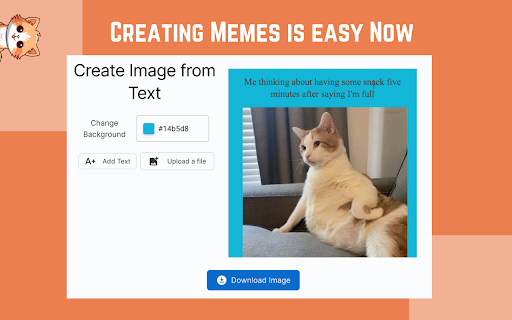
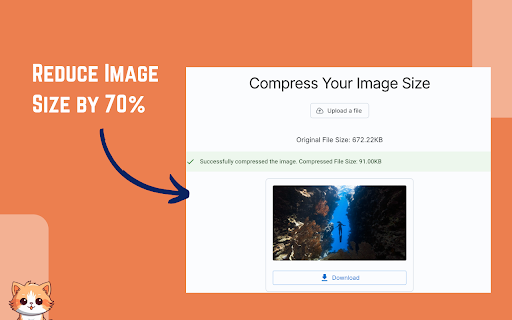
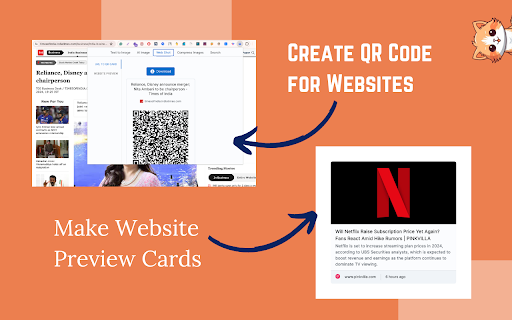

All the greatest image tools under one roof ✅ Text to Photos, Image Compression, QR Code Maker, Picture Search & more 🟢 Why imgBuddy extension is created? These days images play a very crucial role in everyone’s life no matter which field of work one is in. For each different needs we tend to go for different tools, grasp and then use them. Hence it becomes cumbersome for all of us. I’m sure you have landed on a tool page and wondered if I forgot what I did last time. So how can we make all these interesting image tools simple and accessible for all? That was the burning question for us at Team imgBuddy. imgBuddy is a modern tool for crafting images from text by designing or through AI. It can generate beautiful image files from any text written by you or selected by you while browsing the internet, without any effort or editing knowledge. The simple and user-friendly interface makes the image creation process from any text file absolutely quick and smooth. You can easily tweak the image according to your personal artistic sensibilities, and download and share it easily. It also has many different utility features related to images other than the text to image converter. 🟢 What does the imgBuddy extension offer? Think of imgBuddy as the personal assistant to your all image-related needs. This awesome extension elevates your image-specific experience in some pretty brilliant ways. Here's the lowdown: 1️⃣ Convert Text to Image: Select any text on any website, right-click and that's all, the extension provides you with a window with an image created with the selected text. Tweak it according to your need and download the picture on your device. 2️⃣ AI Image Generation: Want to create an image from what you are reading online? look nowhere, just select the text and tap on generate an image by AI. Voila, it just saves you the indefinite time of beating the bush through multiple websites, and provides you with high-quality quality realistic AI-powered images. 3️⃣ Image Compression: Reduce image size significantly by our intelligent algorithm which keeps the quality of your images intact and decreases the file size significantly. 4️⃣ Webshots: Take Screenshots of websites, download all images from an website, create cool previews of websites and generate website cards with QR codes for sharing. 5️⃣ Search Images: Find royalty-free images according to your needs with a click of a button. 🟢 Why Choose imgBuddy as Your Go-To Chrome Extension for Images? 1️⃣ One-Stop Shop: Forget juggling multiple extensions. imgBuddy's got it all in one sleek package. 2️⃣ User-Friendly: Despite being an all-in-one solution, imgBuddy keeps things simple and intuitive. 3️⃣ Always Evolving: We're in the game for the long haul, continually upgrading features and performance. 4️⃣ Platform Agnostic: Whether you're on Edge, Safari, iOS, Android, MacOS, or Windows, we've got you covered. Our website runs on any platform that has access to the internet. Why juggle multiple tools when you can have a Swiss Army knife? imgBuddy integrates numerous helpful utilities under one roof and it’s always improving and adding new features to it. No compromises, just smarter executions. 🚀🚀imgBuddy isn't just an extension; it’s your dearest companion for day-to-day chores with images. So, are you in? Click 'Add to Chrome' and choose a productive life ahead. 🚀🚀 📪If you have any questions or feedback, please feel free to contact us at connect@textintoimages.com. We will always be here to help you along the way. We've updated the privacy policy to ensure the privacy policy contains details about user data collection, handling, storage and sharing https://textintoimages.com/privacy/

ChatGPT, OpenAi and Dall-E 3 Image Generator
Get Ai Images by Free Dall-E 3, ChatGPT Image Generator and Openai Image Generator extension Welcome to the "Free Dall-E 3, ChatGPT and OpenAi Image Generator" Chrome extension! This extension lets you easily generate AI images using the powerful ChatGPT and OpenAI image generation tools. With this extension, you can add commands and create unlimited AI images effortlessly. 🔴Extension Features: ✅ Easy Keyword Input: Simply add Keyword to generate images. ✅ Unlimited AI Images: Create as many AI images as you need without any limitations. ✅ User-Friendly Interface: Intuitive and easy-to-navigate design for a seamless experience. ✅ Fast Dall-E 3 Image Generation: Get your AI-generated images quickly and efficiently. ✅ You can filter Image quality like: HD or Standard ✅ Have 3 Size, like: 1024X1024 , 10244X1792, 1792X1024 ✅ Have 2 Styele, one is 'VIVID', another is 'Natural' ✅ You do not need to enter any Command or Prompt, Cause this extension already have prompt , so you just need to enter keyword. Thats it Note: You must Enter your Openai API Key Before click 'Generate Image' ➡️Step-1: Create an OpenAI Account If you don't already have an OpenAI account, navigate to the OpenAI website. Here, you will see a "Sign Up" button at the top right corner of the website. Click on it and fill in your details to create an account. ➡️Step-2: Verify Your Account After signing up, you'll receive an email from OpenAI to confirm your account. Open this email and click on the verification link. This step helps to ensure the security of your account. ➡️Step-3: Log into Your Account Now that your account is verified, return to the OpenAI website and click on the "Log In" button. Enter the username and password you used to sign up. ➡️Step-4: Navigate to the API Section After logging in, in the top right corner of your screen you'll see an icon with your account name. Click it to open the dropdown menu then click "View API keys". ➡️Step-5: Generate a New API Key Now you're in the API keys section, you should see a button "Create new secret key". Click on that button to generate a new API key. A box will pop up, asking you to name your secret API key. It's a good idea to have different keys for different apps and sites so make sure you name it something that will you will remember what it's for when you look at it one day in the future. After you enter a name for your key, click the "Create secret key" button. ➡️Step-6: Save Your API Key Next, you will see your secret key that has been generated. Make sure to copy your secret key and paste it into whatever application you need it for. It's very important that you copy this key and save it somewhere secure, as you won't be able to retrieve it again for security reasons. You'll need this key to authenticate your applications with OpenAI's services. ➡️Step-7: Set Up Billing OpenAI charges for use of its API on a usage basis, so, if you haven't already set up a payment method for billing, you'll need to do so. Otherwise, the API Key you just created won't work. To set up billing, click "Billing" on the left menu then click "Payment methods". Next, you'll see the payment methods screen. Click "Add payment method". A box will pop up where you can enter your credit card and billing details. Click "Submit" once you've entered your information. ➡️Step-8: Set Usage Limits Now you've set up billing, it makes sense to set usage limits so you can control how much you spend each month on the API. Simply click "Usage limits" on the left menu, then enter figures for hard and soft usage limits. Then click "Save". ➡️Step-9: Ensure You Follow OpenAI's Usage Guidelines As a final note, be sure to familiarize yourself with OpenAI's use case policy and terms of use. These rules help to ensure that the technology is used responsibly. And there you go! You're all set to start using OpenAI's powerful machine learning services. Remember to keep your API key secure. 🛠️ Visit the Chrome Web Store: Go to the Chrome Web Store and search for "ChatGPT and OpenAi Image Generator Free." ➕ Add to Chrome: Click on the "Add to Chrome" button. ✅ Confirm Installation: In the pop-up window, click "Add Extension" to confirm the installation. 🚀 Start Generating Images: Once installed, you can start using the extension to generate AI images right away! 🔴Disclaimer: This extension is provided as-is without any warranties or guarantees. The images generated are based on the commands provided by the user and the capabilities of the ChatGPT and OpenAI image generation tools. The creators of this extension are not responsible for any misuse or unintended consequences resulting from the use of the generated images. Always use the extension responsibly and ensure compliance with relevant laws and regulations.

Free AI Art Generator - ArtGenify
Create stunning AI art and images from text descriptions. Transform your ideas into beautiful artwork. ArtGenify is a free browser extension that lets you create stunning AI-generated art directly from your Chrome browser. Transform your text descriptions into beautiful images with just a few clicks, choosing from various art styles. Whether you're an artist, designer, or simply curious about AI art, ArtGenify makes it easy to bring your imagination to life. Features ArtGenify offers a powerful set of tools to enhance your creativity: - Generate images from text: Simply describe what you want to see, and let AI turn your words into visual art. - Choose from dozens of art styles: From classic paintings to modern designs, find the perfect style to match your vision. - Unlimited and free: There are no limits on how many images you can generate, and it's completely free to use. How to Use Getting started with ArtGenify is straightforward: - Click on the ArtGenify icon in your browser toolbar. - Enter a description of the image you want to create. - Select your preferred art style from the dropdown menu. - Click "Generate" to create your image. Once generated, you'll be taken to a page where you can view and download your AI-generated artwork. ArtGenify stands out for its convenience and accessibility. It allows you to create art without leaving your browser, eliminating the need for additional software or accounts. With a vast range of art styles to choose from, it caters to diverse creative needs, whether you're a professional artist or just exploring AI art for fun. Best of all, it's completely free, with no hidden fees or subscriptions, making it accessible to everyone. Whether you're looking to generate unique visuals for your projects or simply experiment with AI technology, ArtGenify is the perfect tool. Data Privacy ArtGenify prioritizes keeping your information secure and confidential. We do not collect your usage information or share your data with third parties.

Mellow - DALL-E Image and prompts Bulk Download
🐱 Mellow is a Chrome extension designed for users of ChatGPT who utilize GPTs or DALL·E to generate AI images 🐱 With Mellow, you can easily save generated images and prompts to third-party applications like Fibery or generate PDF files for local download. Whether it's a single image and prompt or all images and prompts from the entire session, saving them is just a click away. 🐱 Mellow streamlines the management of AI-generated images, making the entire process smoother and more convenient. It caters to all users of DALL·E, ChatGPT, and Fibery, and seamlessly integrates into your browser without the need to open the Fibery application separately.

AI Images & Prompts Directory
Organize and search your AI-generated images and prompts across multiple platforms with ease. AI Images & Prompts Directory is your comprehensive solution for managing a library of AI-generated visuals and their corresponding prompts. Designed for enthusiasts and professionals alike, this extension supports popular AI platforms like Midjourney, Leonardo, Firefly and ChatGPT. Key Features: - Unified Library: Centralize your images and prompts from various AI services in one accessible location. - Advanced Search: Quickly locate your images using intuitive 'and/or' search logic and text-based queries. - Effortless Organization: Create and manage folders to categorize your content for efficient retrieval. - Instant Access: All data is stored locally in your browser's storage, ensuring rapid access and enhanced privacy. - User-Friendly Interface: Enjoy a clean and responsive design that makes navigation and management a breeze. With AI Images & Prompts Directory, streamline your workflow by keeping track of all your AI-generated assets in a structured and efficient manner. Whether you're a digital artist, a designer, or just experimenting with AI imagery, our tool enhances your creative process by providing an organized, searchable, and instantly accessible repository. Install AI Images & Prompts Directory today and transform the way you interact with your AI-generated creations!
