
bnhmpplknkpgddeeippmpomgokhkiadi
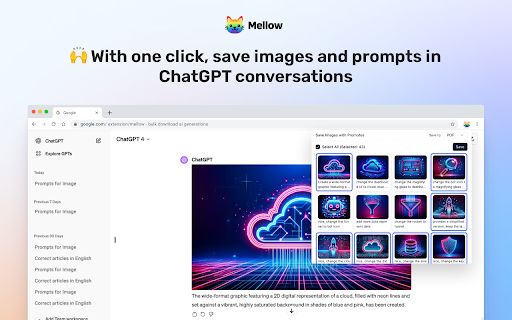

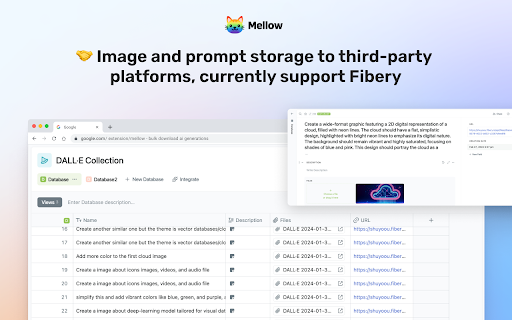
🐱 Mellow is a Chrome extension designed for users of ChatGPT who utilize GPTs or DALL·E to generate AI images 🐱 With Mellow, you can easily save generated images and prompts to third-party applications like Fibery or generate PDF files for local download. Whether it's a single image and prompt or all images and prompts from the entire session, saving them is just a click away. 🐱 Mellow streamlines the management of AI-generated images, making the entire process smoother and more convenient. It caters to all users of DALL·E, ChatGPT, and Fibery, and seamlessly integrates into your browser without the need to open the Fibery application separately.

DALL-E 3 Prompt Generator - 100% Free
Create stunning DALL-E image prompts effortlessly with the "DALL-E 3 Prompt Generator - 100% Free" Chrome extension. Generate detailed prompts using AI and copy them with a single click. You can Generate Chatgpt, Openai, DALL-E Image Prompt using DALL-E 3 Prompt Generator. Its based on Openai API. ✅Add your keyword and background scene to customize prompts ✅Generate detailed image prompts using AI ✅Copy the full prompt with a single click ✅Simple and user-friendly interface 🔴How to Install This Extension: ✅Open the Chrome Web Store on your browser. ✅Search for "DALL-E 3 Prompt Generator - 100% Free." ✅Click on the extension from the search results. ✅Click the "Add to Chrome" button. ✅Confirm the installation by clicking "Add Extension" in the pop-up window. This extension is not affiliated with or endorsed by OpenAI. The "DALL-E 3 Prompt Generator - 100% Free" Chrome extension is an independent tool designed to help users generate image prompts for DALL-E using AI. Users are responsible for ensuring they have the necessary rights to use the generated prompts and the resulting images. Use this extension at your own risk.

MyPrompts
Easily save, manage, and share your artificial intelligence prompts from any website with MyPrompts. How It Works: - Right click on any image you want to save and choose "Save my Prompt" - Your image, prompt and all the settings will be saved. - Open the extension popup in order to see all of your assets What's New: - Allowing you to save any image online and connect prompts to it. - See all your saved settings to replicate the asset What's nexts: - Save you history for 24 hours in case you forgot to save - Get access from any device to your saved assets. - Add collections to organise multiple assets under one subject - Filter and sort your assets - Allow saving not only images but all AI generated assets For more information or feature requests, join our Discord channel: https://discord.gg/SEVHwZ4n

MidPrompts · Your Midjourney Prompt Organizer
Your Style - Your Prompt !!!Free Version included. No signups or payments upfront. Just install and start prompting!!! Are you Creative and working with Midjourney on a daily basis for fun, moods or even real creative assets? You have to deal with many different scenes but you are tired of endless scrolling through Discord, searching old Prompts, copy, paste, write again and again? Then this Chrome extension could become your new friend and helps you to build and organise all your prompts. MidPrompts · Your Midjourney Prompt Generator / Organizer for Chrome. ------ 🎨 Your personalized & license free Image Library Setup your brand or job related Topics/Scenes to produce unique & license free Image Assets that fit your creative imagination. Everything you can /imagine is just a click away. 📸 Keep Track of your Prompts - With Prompt Snapshots Happy with your prompt? Just save and keep it. Keep track of all your Ideas, Topics, Themes, etc. so you can focus more on other important things - Creating creative assets. ⏰ Huge Timesaver - No repetitive Prompt Writing! MidPrompts is your time-saving Chrome extension, streamlining the process and allowing you to focus on what truly matters – Mindblowing Midjourney prompts. 🎨 Fully Customizable - Your Style, Your Prompt! Take control of your creativity with MidPrompts. Every aspect is fully customizable, allowing you to craft prompts that align perfectly with your unique style and preferences. 🚀 Made for Creatives - 12 Presets, 300 Parameters! MidPrompts comes equipped with 12 presets and 300 predefined parameters, giving all Creatives & Designers full flexibility and variety in their prompt creation. 🎨 Turn on and off prefix "/Imagine prompt:" for Discord You can deside if you want to add the prefix if you work on Discord. If you want to use it on Midjourney.com just leave it off and no prefix will be added. ⏳ 60 Minutes Trial - Only real Usage Counts! You want to give MidPrompts a try? You get 60 Minutes without Limits. Good news! The timer only ticks when you're actively using the plugin, so find out if MidPrompts works for you. 🎯 Easy-to-Use Interface - Clear, Focused, and Efficient! MidPrompts boasts a super easy interface, ensuring that generating prompts becomes a breeze. Dive into your creative flow without the hassle. 💳 One-time Payment - Lifetime License: Say goodbye to subscription hassles. MidPrompts offers a one-time payment for a lifetime license, ensuring you have uninterrupted access to creativity. Get your Lifetime License here https://turbulenz-visuals.gumroad.com/l/MidPrompts_License

ChatGPT, OpenAi and Dall-E 3 Image Generator
Get Ai Images by Free Dall-E 3, ChatGPT Image Generator and Openai Image Generator extension Welcome to the "Free Dall-E 3, ChatGPT and OpenAi Image Generator" Chrome extension! This extension lets you easily generate AI images using the powerful ChatGPT and OpenAI image generation tools. With this extension, you can add commands and create unlimited AI images effortlessly. 🔴Extension Features: ✅ Easy Keyword Input: Simply add Keyword to generate images. ✅ Unlimited AI Images: Create as many AI images as you need without any limitations. ✅ User-Friendly Interface: Intuitive and easy-to-navigate design for a seamless experience. ✅ Fast Dall-E 3 Image Generation: Get your AI-generated images quickly and efficiently. ✅ You can filter Image quality like: HD or Standard ✅ Have 3 Size, like: 1024X1024 , 10244X1792, 1792X1024 ✅ Have 2 Styele, one is 'VIVID', another is 'Natural' ✅ You do not need to enter any Command or Prompt, Cause this extension already have prompt , so you just need to enter keyword. Thats it Note: You must Enter your Openai API Key Before click 'Generate Image' ➡️Step-1: Create an OpenAI Account If you don't already have an OpenAI account, navigate to the OpenAI website. Here, you will see a "Sign Up" button at the top right corner of the website. Click on it and fill in your details to create an account. ➡️Step-2: Verify Your Account After signing up, you'll receive an email from OpenAI to confirm your account. Open this email and click on the verification link. This step helps to ensure the security of your account. ➡️Step-3: Log into Your Account Now that your account is verified, return to the OpenAI website and click on the "Log In" button. Enter the username and password you used to sign up. ➡️Step-4: Navigate to the API Section After logging in, in the top right corner of your screen you'll see an icon with your account name. Click it to open the dropdown menu then click "View API keys". ➡️Step-5: Generate a New API Key Now you're in the API keys section, you should see a button "Create new secret key". Click on that button to generate a new API key. A box will pop up, asking you to name your secret API key. It's a good idea to have different keys for different apps and sites so make sure you name it something that will you will remember what it's for when you look at it one day in the future. After you enter a name for your key, click the "Create secret key" button. ➡️Step-6: Save Your API Key Next, you will see your secret key that has been generated. Make sure to copy your secret key and paste it into whatever application you need it for. It's very important that you copy this key and save it somewhere secure, as you won't be able to retrieve it again for security reasons. You'll need this key to authenticate your applications with OpenAI's services. ➡️Step-7: Set Up Billing OpenAI charges for use of its API on a usage basis, so, if you haven't already set up a payment method for billing, you'll need to do so. Otherwise, the API Key you just created won't work. To set up billing, click "Billing" on the left menu then click "Payment methods". Next, you'll see the payment methods screen. Click "Add payment method". A box will pop up where you can enter your credit card and billing details. Click "Submit" once you've entered your information. ➡️Step-8: Set Usage Limits Now you've set up billing, it makes sense to set usage limits so you can control how much you spend each month on the API. Simply click "Usage limits" on the left menu, then enter figures for hard and soft usage limits. Then click "Save". ➡️Step-9: Ensure You Follow OpenAI's Usage Guidelines As a final note, be sure to familiarize yourself with OpenAI's use case policy and terms of use. These rules help to ensure that the technology is used responsibly. And there you go! You're all set to start using OpenAI's powerful machine learning services. Remember to keep your API key secure. 🛠️ Visit the Chrome Web Store: Go to the Chrome Web Store and search for "ChatGPT and OpenAi Image Generator Free." ➕ Add to Chrome: Click on the "Add to Chrome" button. ✅ Confirm Installation: In the pop-up window, click "Add Extension" to confirm the installation. 🚀 Start Generating Images: Once installed, you can start using the extension to generate AI images right away! 🔴Disclaimer: This extension is provided as-is without any warranties or guarantees. The images generated are based on the commands provided by the user and the capabilities of the ChatGPT and OpenAI image generation tools. The creators of this extension are not responsible for any misuse or unintended consequences resulting from the use of the generated images. Always use the extension responsibly and ensure compliance with relevant laws and regulations.
