
jnmbpmkphhcbhbfbcillhegbkipedapp
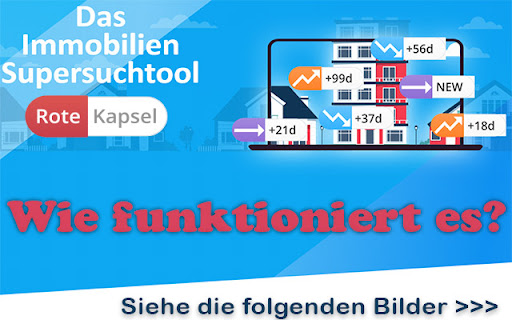

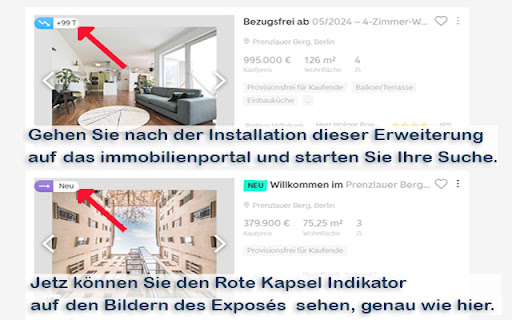

A smart & easy tool to navigate rental and sales real estate property ads in Germany (Immobilien Anzeigen) on the most popular… New!📢 We have updated the list of websites and added more interesting places! We hope to be able to offer you a better and more comprehensive service very soon! Please keep your fingers crossed!😊 With this extension, users could get enhanced information about property listings from the major property sites in Germany, i.e. immobilienscout24.de , immonet.de , immowelt.de. Information such as when the listing was originally submitted and any price changes to the listing. Very easy to install and use! ★★ How does it work? ★★ 1. first install the extension, directly on this page (button above - "Add")! 2. after installing the extension, go to the real estate portal and start your search. 3. you can see the Rote-Kapsel indicator on the pictures of the exposé. 4. the indicator is also displayed on the image of the full exposé pages 5. Rote-Kapsel is accessible for everyone ★without registration, without tracking!★ ★If you had an Exposés open, just refresh the page after installation and: Viola! You will then see the indicator on the page★ Please note that this extension is available on desktop computers (laptops etc.) only and not on mobile devices (phones, tablets etc.)

Google Search Maps Button
Adds back the Maps button to Google search pages and makes the search result map images clickable again for seamless navigation. The "Google Search Maps Button" Chrome extension brings the Google Maps button back to the Google Search navigation bar for users in Europe. If you've found the Google Maps button gone or missing from your search experience, this extension is designed to address exactly that. What it Does: This extension ensures you can access Google Maps with just one click from the Google Search page. It also makes map images clickable within search results, significantly improving your navigation experience. Why it's Needed: In response to the Digital Markets Act (DMA), which is aimed at fostering fair competition and innovation, the Google Maps shortcut was removed for European users. This tool effectively restores that lost convenience. Privacy and Security: Operating without saving any user data, the extension ensures your privacy and security are protected. For anyone who's noticed the Google Maps button gone from the Google Search navigation bar in Europe, this extension provides a straightforward and effective solution, seamlessly reintegrating this essential feature into your browsing routine. Troubleshooting steps if the extension is not working: 1. Check Plugin Status: Make sure that the plugin is enabled in your Chrome browser. 2. Verify Site Access: Open the details for this plugin under "My Extensions" and ensure that "Site Access" is enabled. NB! For Opera users: Go to the Manage Extension section and tick the „Allow access to search page results” option. Otherwise the plugin wont work. If you'd like to say thanks, you can do so via PayPal at henripp94@gmail.com. I'm truly grateful for any support, though it's absolutely not necessary or expected.

IS24 Address Finder
Displays the normally hidden addresses of property listings on Immobilienscout24. IS24 Address Finder reveals the full address of property listings on Immobilienscout24 that are often hidden – helping you make faster, more informed decisions. • Full address (street, house number, ZIP code, city, district) • Listing creation and update date • Open in Google Maps, OpenStreetMap, or Apple Maps • Google Earth button for satellite view • Copy address with one click • Customizable: position (4 corners), dark/light mode, languages (DE/EN/ES/IT) • Works automatically on Immobilienscout24 • No data transfer – everything stays local in your browser • Supports Chrome, Edge, and Firefox

AMALYZE - for Amazon Sellers and Vendors
Searchvolume, related keywords, index checker and much more - for Amazon sellers and vendors Amazon Keyword Tool and Index Checker with analysis widgets for the SERP. The easy way to check your listing and the SERP and find new keywords. The AMALYZE Chrome Extension offers a range of tools for a variety of marketplaces, FBA Private Label Sellers and Vendors. Check whether the respective ASIN for the desired search terms and keywords can be found. Check with a single click for which parts of the title, description and bullet points the respective ASIN can be found. With the keyword AMALYZER you have the possibility to find new search terms in real time - actually used by the buyers. The widgets added with version 1.4 offer you data on a set of KPIs at the touch of a button! - How has the search volume changed in the course of the last days, months or last year? - What are the related search terms to my keyword? - What about the ratings and reviews of the products on the SERP? - What about the average price of the products? - And how many of them are available as Prime? Get all this data granularly displayed in comparison to organic ranked and spa products! In the search volume widget you will get the search volume in a graph to follow the changes historically. You can also adjust the time span of the graph by clicking on "30 days", "90 days", "1 year" or "Total" at the top. The related keywords widget shows you a set of keywords sorted by relevance. We get the keywords from the SERP via the organically ranking products, as well as keywords to which they rank. That way you will be shown a lot of potential keywords. You also have the possibility to click through the keywords to discover more ASINs, dates and keywords. The advantage of this is that you can also use the paper icon in the upper rightcorner to copy all the keywords to your clipboard. With the rating widget you can find out with how many stars the products on the SERP were rated. We get this data for the organic ranking products as well as for the sponsored products. In the review’s widget, you will see the number of reviews that the products on the SERP have received on average. As usual, a distinction is made here between organically ranking products and sponsored products. The price widget shows you in which price ranges the products on the SERP are being sold. Here again, we distinguish between organically ranking products and sponsored products. Finally, the Prime widget shows you the percentage of products available as Prime as well as “not” Prime on the SERP. Historical BSR trends and sales figures for most products Find out at a glance which is the top-selling variant and what share it has of total sales.

Lumaly - Gutscheine & Cashback
Jetzt mit Lumaly Geld sparen. Mit Lumaly erhalten Sie beim Online-Einkauf immer die besten Gutscheine & Cashback. Jetzt mit Lumaly Geld sparen. Mit Lumaly erhältst Sie beim Online-Einkauf immer die besten Gutscheine & Bitcoin Cashback. Nie wieder zu viel bezahlen! Jetzt mit Lumaly Geld sparen. Lumaly findet automatisch die besten Gutscheine für deine Lieblingsshops, sodass du immer den besten Preis bekommst. So funktioniert Lumaly… 1) Gratis installieren – Lumaly ist und bleibt für immer kostenfrei! In nur 2 Klicks ist die Erweiterung bereits installiert. 2) Wie üblich Shoppen – beim Einkaufen in deinen Lieblings-Shops sagt dir Lumaly im Warenkorb bescheid, ob es Gutscheine gibt und probiert diese automatisch für dich aus. 3) Geld sparen – Lumaly wendet den Gutschein mit der größten Ersparnis automatisch für dich an. Du hast bares Geld gespart! ------------------- - Kostet die Erweiterung was? Nein! Die Erweiterung ist komplett kostenlos und wird auch immer kostenlos bleiben! Wir ersparen dir nur die lästige Coupon Sucherei im Internet und geben dir den besten Preis auf deinen Einkauf. Wir schenken dir im Endeffekt also Zeit und Geld. Was gibt es besseres? - Woher weiß ich, dass die Erweiterung funktioniert? Nachdem du Lumaly mit 2 Klicks installiert hast, siehst du das Lumaly Logo oben in deiner Browserleiste. Ist das Logo lila, ist Lumaly aktiv und funktioniert auf der besuchten Seite. Lumaly gibt dir dann im Warenkorb Bescheid, ob du Geld sparen kannst. - Welche Daten sammelt Lumaly? Um Lumaly zu nutzen benötigst du keinen Account und musst auch keine persönlichen Daten von dir preisgeben! Wir sind ein deutsches Unternehmen und halten uns an die strengen Vorgaben der DSGVO. Außerdem ist Lumaly Mitglied in der Gesellschaft für Datenschutz und Datensicherheit e.V. und unterstellt sich regelmäßig Prüfungen um die Sicherheit deiner Daten zu gewährleisten. - Wie verdient Lumaly Geld? Wenn du Lumaly bei unseren Partnershops benutzt, erhalten wir eine Provision. ------------------- 📧 Fragen? Dann kontaktiere unser Support-Team unter support@lumaly.de ⚖️ Unsere Datenschutz findest du auf folgender Seite: https://lumaly.de/datenschutz/ Mit 💜 in Berlin entwickelt.
