
jmnbkpglphcpbpodllgifeiegfemmmjp
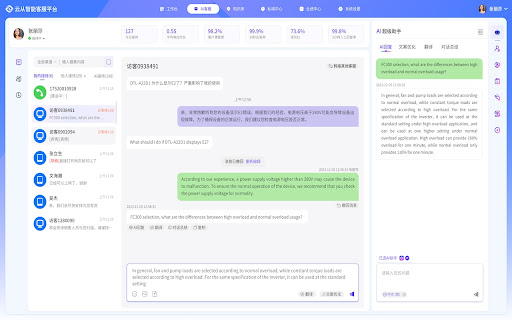
你的AI客服助手,具备AI回复、文案优化、内容总结、智能翻译等能力,驱动客户服务效率和质量提升 AI客服助手基于云从科技自研大模型,具备AI回复、文案优化、内容总结、智能翻译等能力,并提供一站式智能客服解决方案,完成全场景联接,驱动企业服务效率和质量提升。

Quillbot: AI Writing Assistant to Grammar Check, Paraphrase & Translate
Write better emails, essays and messages with Quillbot's Grammar Checker, Paraphrasing Tool, Generative AI, Summarizer and more! Quillbot for Chrome: AI Writing Assistant, Grammar Checker, and Paraphrasing Tool Quillbot is a multilingual writing assistant extension that helps you write clearly, quickly, and with more control, right where you work. This AI writing assistant combines a Grammar Checker, paraphrasing tool, and AI writing tool to improve your writing in real time. From quick emails to full drafts, Quillbot helps you say what you mean without overthinking it. ➤ How It Works Install the extension and keep writing like you normally do. Quillbot works in the background, ready when you need it. Write in any text field across the web, then highlight text or open the toolbar to get instant suggestions. You can fix grammar, use the sentence rewriter to adjust phrasing, or generate new text with the AI text generator. Everything happens in one place, so you don’t have to copy, paste, or switch tabs. ➤ Privacy and Data Safety Your writing is personal. We treat it that way. Quillbot processes only what’s needed to provide suggestions and does not sell your data. Our systems are designed with modern security standards in mind, and we continuously improve how we handle and protect user information. You stay in control of what you write and what gets changed. ➤ Key Features A writing productivity tool that does more than just fix typos; it helps you communicate better. ✓ AI Writing Assistant Get real-time suggestions as you write. Improve clarity, tighten structure, and keep your ideas moving without stopping to edit. ✓ Grammar Checker Catch grammar, spelling, and punctuation issues instantly. Get clean, readable writing immediately to improve communication. ✓ Paraphraser Rewrite text to sound clearer, more concise, or more natural. Adjust tone without losing your original meaning. ✓ Sentence Rewriter Quickly reshape awkward or unclear sentences into communication that reads smoothly and lands the point. ✓ AI Cursor Access Quillbot’s AI tools directly where you write. Use the AI Cursor to generate text, refine drafts, and take action without leaving the page. ✓ AI Text Generator Draft emails, outlines, or full responses in seconds when you need a starting point—or a reset. ✓ Tone and Clarity Suggestions Understand how your writing comes across. Make it more direct, more polished, or more conversational as needed. ✓ Multilingual Writing Tool Write and edit across languages, including English, Spanish, French, German, Portuguese, and Dutch. ✓ Translation Translate text as you write or edit, helping you communicate clearly across languages. ✓ In-Page Editing Make changes directly in emails, docs, and forms. No switching tabs or breaking your flow. ✓ GIF Insertion Drop in relevant GIFs directly from the editor to add context or personality to your messages. ✓ AI Image Generation Create images from prompts without leaving your workflow—useful for quick visuals, drafts, or ideas. ✓ Custom Modes Tailor writing style to your needs, whether that’s formal, simple, or aligned to your voice. ➤ Use Cases Quillbot works for anyone who writes—and wants fewer rewrites. ✓ Professionals Send emails and updates that get to the point faster and don’t need a follow-up to clarify. ✓ Students and Researchers Turn rough drafts into clear, structured writing without losing your original ideas. ✓ Marketers and Creators Adjust tone across channels without rewriting everything from scratch. ✓ Multilingual Writers Write confidently across languages with built-in support and suggestions. ➤ Why Quillbot? Quillbot focuses on improving your writing—not replacing it. It works directly where you write, so you don’t lose time switching tools. Suggestions are fast, practical, and easy to apply. You get more than surface-level fixes, with support for tone and clarity when you need it. And with frequent updates, the extension keeps getting better at helping your writing do its job. ➤ Free vs Premium Start with the essentials. Upgrade when you want more control. ✓ Free Plan Includes: • Grammar checker and basic corrections • Limited paraphrasing tool access • Core writing suggestions • Multilingual writing support ✓ Premium Unlocks: • Full paraphrasing and rewriting capabilities • Expanded modes for tone and style • Advanced tone and clarity insights • More detailed, sentence-level suggestions ➤ Supported Languages Quillbot supports writing and editing in English, Spanish, French, German, Portuguese, and Dutch, with continued expansion to additional languages over time. Get Started Install Quillbot in seconds and start improving your writing immediately. Write faster. Say it better. Keep your voice intact.

TinaMind - The most powerful AI Assistant!
Your AI Assistant powered by AI models. Chat, YouTube summary, search, write, TTS, OCR and more. Your AI assistant, powered by GPT-4, Gemini Pro, and Sonnet, can chat, search, write, translate, perform TTS and OCR, manage personal prompt words, process selected text with one click, translate and summarize YouTube videos, and more. 🎉 Features: 💡 Search: Based on your query, we use various keywords to conduct comprehensive searches and analyses, provide precise answers, and enhance search results through responses from ChatGPT and renowned search engines like Google and New Bing. 💡 Chatbot: Open the sidebar to chat with TinaMind, gain inspiration and knowledge, just like having an intelligent assistant by your side. 💡 Writing: Efficiently write papers, reports, or emails, manage length, format, and tone. Simply provide the original text and a brief summary of your reply, and it will automatically generate the desired response. 💡 Translation: Beyond basic translation, you can manage the length, format, and tone of the translation, and it will automatically help you detect and correct subtle grammatical errors. 💡 Shortcuts: With one click, you can process selected text from web pages, PDFs, and more, including translation, rewriting, and optimization tasks. You can also customize tasks to greatly improve work efficiency. 💡 Personal Prompt Word Manager: Manage personal prompt words and access over 800 high-quality public prompt words. Quickly access the prompt word panel in chat input boxes on platforms like ChatGPT, Gemini, Claude, Bing, and more. 💡 YouTube Videos: Translate and summarize YouTube videos. 💰 Is it free? You can get 30 free queries per day and all advanced features are available. If you seek higher performance and faster response times, you can subscribe to our service.

AnswerAI - Homework AI Tutor & Study Helper
Your AI assistant ChatGPT Plugin.Answer questions and get AI answers quickly,write emails,articles,chatbot,learning assistant. Ask anything and learn everything with one of the leading AI educational apps for student success. Answer.AI is the only app that is there for students both in and out of the classroom, and revolutionizing the way you learn. With Answer.AI's web extension, your screen will become a powerhouse of personalized education and learning. You can screenshot or highlight any question on your browser and get step-by-step solutions, generate brainstorming drafts for any type of writing, chat with AskAI about tough concepts, master complex math questions with Geometry mode, and more. With over 6 million users, our mission is to help our evergrowing community achieve their milestones and crush their goals both in and out of the classroom. 🥳Here are some features you can look out for: 📍Upload a screenshot for instant answers Easily upload a screenshot of your question, and Answer.AI will analyze it to provide accurate answers—perfect for complex math problems and more. 📍Ask and Answer Click the Answer.AI icon to initiate a real-time conversation, or select any text on a webpage to receive detailed answers instantly. No matter the complexity, Answer.AI offers clear explanations. 📍Writing Assistant Answer.AI also serves as an AI-powered writing assistant, helping you create high-quality content in seconds, making it perfect for essays, articles, and more. 📍Smart Homework Solutions Submit your questions and get step-by-step solutions, ensuring you not only get the correct answer but understand the underlying concepts. 📍Highlight and Solve Answer.AI works on any website you visit and integrates smoothly into your Chrome browser. Simply highlight text or use the extension to get answers quickly and efficiently. 🌟 Getting Started: 1️⃣ Click the Answer.AI icon on your screen to start a conversation. 2️⃣ Highlight text on any webpage, click the Answer.AI icon, and receive an answer immediately. 🧑💻 How to use the Chrome Extension: 1️⃣ Click the "Add to Chrome" button. 2️⃣ Log in to your Answer.AI account. 3️⃣ Start using Answer.AI! You can open the Answer.AI sidebar anytime you need help. Answer.AI offers both free and premium versions. Free users receive limited access, while premium users enjoy enhanced features and unlimited usage. 📍What platforms does Answer.AI support? Answer.AI is available on iOS and Android (download via the Apple Store or Google Play), as well as a Chrome extension for Windows and Mac users. 💯Ready to upgrade your learning experience? Install Answer.AI today and leave your feedback—your suggestions help us continue to innovate. You can contact us at support@answerai.pro or go to our website, https://answerai.pro for more info. We love hearing from you!

Prompt Optimizer
Optimize any prompt instantly with intelligent AI refinement. For writers, developers, students. Made by Kshitij AI Stop wrestling with lazy AI responses. Prompt Optimizer is the missing bridge between your raw thoughts and high-performance LLM outputs. Whether you are a developer debugging code, a writer crafting a novel, or a student researching complex topics, this extension transforms simple text into architecturally precise system instructions. 🚀 Under the Hood: The Engineering Behind the Magic This isn't just a simple "rewrite" tool. We built this based on extensive research. Agnostic Production-Grade Architecture: Developed by analyzing top-tier prompt engineering resources and GitHub repositories. We iterated through hundreds of variations to build a robust "Meta-Prompt" that works universally across models. Dynamic Decision Branching: The extension intelligently analyzes your input. It determines if you are providing raw content (to be fixed/analyzed) or an abstract request (to be created from scratch) and adapts its optimization strategy in real-time. Context-Aware Preservation: Unlike basic tools that "hallucinate" or forget your data, our Data Preservation Protocol ensures your original code, emails, or drafts are locked into a dedicated input section, ensuring the AI strictly adheres to your specific content. Few-Shot Reasoning: We utilize advanced few-shot prompting techniques to force the AI into a "Chain of Thought" process, ensuring the optimized prompt assigns the perfect Expert Persona before it even starts writing. Please refresh your LLM provider webpage after activating this extension. (PS: Only to be done when you install this extension for the first time) ✨ Key Features One-Click Optimization: A non-intrusive button that appears only where you need it. Cyberpunk UI: A sleek, modern interface designed for speed and focus. Privacy by Design: We do not store your prompts. Your data is processed securely and ephemeral. 🌐 Supported Platforms Seamlessly integrates with the world's leading AI models, including ChatGPT,Gemini, Claude, and other major LLM interfaces. 🔒 Privacy & Usage Note Secure: Your inputs are sent directly to the optimization endpoint and are never saved or sold. Powered by Gemini: This extension leverages the advanced reasoning capabilities of Google's Gemini models. Note: Heavy usage may result in temporary rate limits as we utilize the free tier to keep this tool accessible to everyone. Elevate your AI workflow today. Stop prompting. Start engineering.
