
jmmkhgopncnabnhkedjfbeappnhfecej
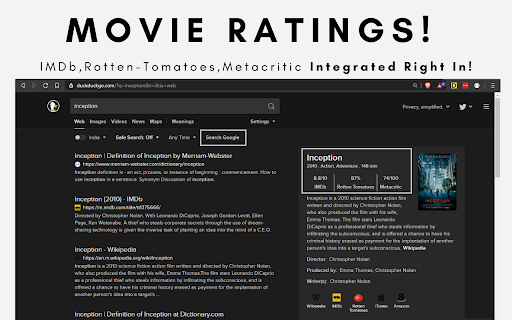
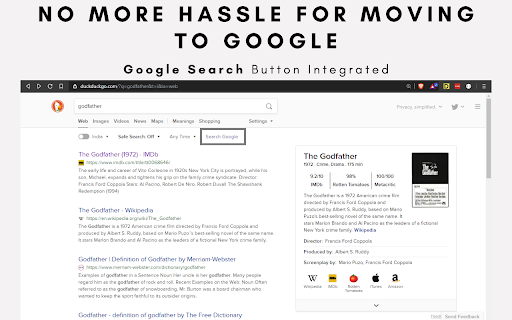
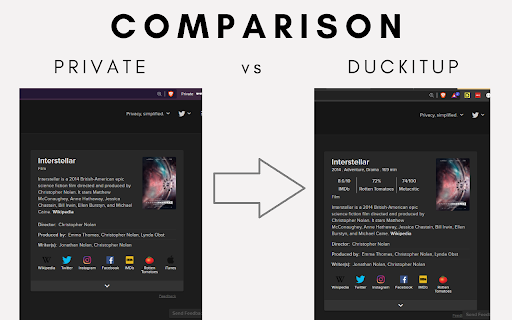

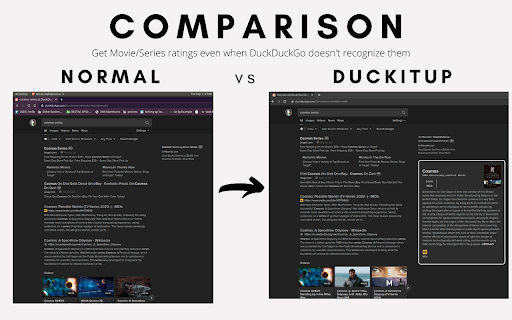
DuckItUp integrates search google button and movie rating system. Open-Source DuckDuckGo Enhancer or DuckItUp is an extension that provides few productive features for its users. DuckDuckGo is a very good search engine which respects users privacy. But it lacks some productive features. This extension aims to bridge that productivity gap. This is an Open-Source Project - https://github.com/Sayak9495/DuckItUp --------------------------- Why? - Sometimes DuckDuckGo doesn't provide the desired result which forces users to move to google with the same search query. DuckDuckGo doesn't provide Movie or TV-Series ratings which is a bummer. Install DuckItUp to reduce your hassle until DuckDuckGo itself implements the features. --------------------------- Productive Features - 1. Dedicated Search Google button. [Redirects to google with the same search query] 2. Movie & TV-Series Ratings info gets integrated when searched for a movie. [like year of release, genre, run-time, IMDb/Rotten-Tomato/Metacritic ratings] 3. Shows Movie/Series Info even when DuckDuckGo doesn't detect the query as a valid movie/series. [Suffix such queries with movie/series and DuckItUp will integrate the movie/series info into the view. Ex- Cosmos series]. --------------------------- This is an Open-Source project, any contribution or suggestions is highly appreciated. And this extensions in no way related to official works of the DuckDuckGo team. This is an independent project.

Search It All
Search across multiple search engines with one click - no retyping needed ## 🔍 Search It All - The Ultimate Multi-Search Chrome Extension **Transform your search experience!** Search across 10+ popular search engines with one click. No more retyping queries or opening multiple tabs. 🚀 **Multi-Engine Search** - Instantly search across 10+ popular search engines ⚡ **One-Click Switching** - Switch between search engines without retyping ⌨️ **Keyboard Shortcuts** - Quick access with Ctrl+Shift+S (Cmd+Shift+S on Mac) 🔢 **Number Keys** - Use 1-9, 0 keys for instant search engine selection 🌙 **Dark Mode** - Complete dark theme with system preference detection 🎯 **Smart Detection** - Automatically detects current search queries 🖱️ **Context Menu** - Right-click selected text to search instantly 📊 **Usage Analytics** - Search engines auto-reorder by frequency 🔧 **Customizable** - Add your own custom search engines 🌐 **Privacy Focused** - No data collection, everything stays local 1. **Navigate** to any search engine (Google, Bing, DuckDuckGo, etc.) 2. **Perform a search** for your desired query 3. **Click the Search It All extension icon** in your toolbar 4. **Select any search engine** to search the same query instantly - **Ctrl+Shift+S** (Cmd+Shift+S on Mac) - Open extension popup - **Number keys 1-9, 0** - Quick select search engines (when popup is open) 1. **Select text** on any webpage 2. **Right-click** and choose "Search with..." 3. **Pick a search engine** from the submenu - **Dark Mode**: Toggle in settings for complete UI theming - **Custom Search Engines**: Add any search engine with custom URL patterns - **Usage Analytics**: Frequently used engines automatically move to the top - **Backup & Restore**: Save and restore your configurations Search It All works seamlessly with over 10 popular search platforms, giving you the flexibility to find exactly what you need: **🔍 Web Search**: Access major search providers including the world's most popular engine, privacy-focused alternatives, and regional options. Switch between different search philosophies - from comprehensive results to private browsing. **📺 Media & Video**: Find videos, channels, and playlists across video platforms with the same query, perfect for content creators and researchers. **🛒 Shopping & Commerce**: Compare products and prices across major e-commerce platforms instantly. No need to manually search each marketplace separately. **🔐 Privacy Options**: Choose from multiple privacy-respecting search alternatives that don't track your searches or build user profiles. The extension supports traditional web search, specialized platforms, and privacy-focused alternatives, ensuring you have the right tool for every search need. - **Website**: Visit https://bigbeartechworld.com and use the chat in the lower right corner - **GitHub Issues**: https://community.bigbeartechworld.com - **Twitter**: https://x.com/bigbeartech - Added keyboard shortcuts (Ctrl+Shift+S / Command+Shift+S) to open popup - Implemented numbered keyboard selection (1-9, 0 keys) for quick search engine access - Added dark mode toggle with complete UI theming for both popup and options pages - Implemented usage analytics to track and auto-reorder search engines by frequency - Added context menu integration for searching selected text - Visual shortcut number badges in popup interface - Fixed dark mode persistence and storage synchronization issues - Enhanced search engine sorting based on usage patterns - Enhanced popup UI with modern glass morphism design and gradient backgrounds - Added settings button with gear icon for direct access to options page - Implemented responsive layout with smooth animations and hover effects - Improved typography, spacing, and accessibility features - Added shimmer animations and enhanced visual interactions - Major UI overhaul of options page with modern responsive design - Fully responsive layout supporting desktop, tablet, and mobile breakpoints - Modern visual design with enhanced shadows, gradients, and animations - Improved element alignment using flexbox layout system - Enhanced typography and color scheme for better visual hierarchy - Better user experience with smooth hover animations and optimized touch interactions - New UI on options - Added a search box on the popup - When user is not on a search engine in database it shows disabled message - Added were you can sort the search engines in the options panel - Fixed delete image in options panel and added updown image to options panel **Made with ❤️ by [BigBearTechWorld](https://bigbeartechworld.com)** _Transform your browsing experience today! Install Search It All and never retype a search query again._

Extension Manager
Extension that manages other extensions If you have tons of extensions but don't want to leave them all on at the same time - this extension is for you. You can use this to turn them on and off. Ctrl+L is the default keybinding to open the popup Move with arrow keys Press enter to turn toggle extensions on and off This is mostly for personal use but if you find it useful as well then great :)

Extentie - extension manager
A simple and elegant Chrome extension manager allows you manage your extensions in a popup window. Extentie is a simple and beautiful tool that allows you to toggle and manage Chrome extensions in a popup. Latest update: - Now you can create your own groups to manage your extensions - Revamped from ground up, added more features

Forget — clear history with one click
Protect your privacy and clear your browsing history with one simple click! Clear your browsing history and cache with one easy click! Take control over your privacy and browsing data. Browsers keep track of your online activity and websites you visit may gather cookies or collect personal information about you. Protect your private data with our extension.
