
jmmjjcddjldjdjgckdiokhfokccdnekc
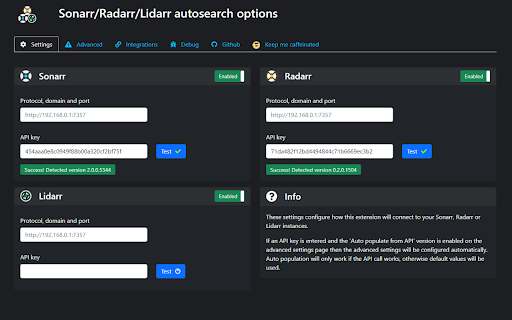
Exposes a context menu that enables direct searching for tv shows, movies and other text in Sonarr, Radarr, Lidarr and Readarr. Exposes a context menu that allows any highlighted text to be searched in Sonarr, Radarr or Lidarr instances. Allows a modified search URL to automate the search functionality on the add series, add movie or add artist pages. Adds Sonarr or Radarr icons as direct search links on various websites, including IMDb, Trakt and many more.

Add Remote Torrent
Add Remote Torrent is a browser extension for power users who manage remote file-transfer clients. It streamlines adding new transfers (via magnet links or .torrent file URLs) to various client WebUIs. It supports multiple server profiles, giving you a centralized experience directly from your browser. Privacy and security: all server configurations are stored locally on your device and are never transmitted to external servers. It also works with private trackers by fetching the .torrent file content in the browser (with your session cookies) before sending it to your client when needed. Key features: - Add via magnet links or .torrent URLs - Multiple server profiles (different clients / different seedboxes) - Right-click context menu “send to…” per server - Optional on-page link catching / quick add - Per-server defaults (tags/categories/directory/paused; varies by client) - URL-based rules to auto-select a server by site Reporting issues: If you encounter a bug, please open an issue on GitHub: https://github.com/jgkme/Add-Remote-Torrent/issues Please include: - Extension version - Torrent client name + version - Steps to reproduce (what you did / expected / what happened) - Exact error text from the popup under “Last Action” For deeper logs: - Options page → Debug & Log Settings → enable content-script + background-script logs - Reproduce the issue - Options page → Inspect → Console → copy relevant lines - Please remove sensitive info (passwords/tokens/IPs) before posting Fix (Shortcuts): Quick-add-from-clipboard has no default shortcut (was Ctrl+Shift+V / ⌘⇧V, which blocked Chrome paste-without-formatting). Assign at chrome://extensions/shortcuts if wanted; clear the old Ctrl+Shift+V binding there after update if paste-without-formatting still fails (#59). Fix (Synology Download Station): Restore SID-only Web API auth like v0.4.23 (no enable_syno_token / SynoToken on requests). Newer builds had added SynoToken flow; some DSM setups responded with API 105 or failed adds until reverted—validated against working v0.4.23 behaviour. Fix / UX (Synology): Clearer user-visible messages for common Synology API error codes (e.g. 105 permission). Feat / Fix (Diagnostics): Persist last connection error per server for offline checks; dashboard Show Details lists it; failed adds append a short technical hint to “Last Action” / notifications when available. Fix (qBittorrent): Accept successful auth/login with an empty body or HTTP 204 (Web API 5.2+), not only legacy Ok. text—fixes false “connection failed / CSRF” errors when username and password are correct. v0.4.39 (2026-05-13) Fix (qBittorrent): Cookie-based Web UI login is now tracked per server profile instead of one global session. After logging into one qBittorrent server, calls to another profile no longer skipped auth/login, which previously caused HTTP 401 on the API and confusing messages about needing a Web API key (common with multiple seedboxes and qBittorrent 5.2+). Fix (qBittorrent): Refined unauthorized and connection-test wording so users check username/password and CSRF first; the optional Web API key (5.2+) is described only as a fallback when cookie access still cannot reach the API. Build: Generated release artifacts for v0.4.39. - v0.4.38 (2026-05-08): Deluge — apply custom label/category after adding (Label plugin); create missing label; retry for Deluge 2.x timing. - v0.4.37 (2026-05-05): qBittorrent — Web API 2.14+ torrents/add JSON responses (incl. 202/409) with legacy “Ok.” fallback; optional Web API key (Bearer); clearer auth vs network errors; startup status checks; packaging/signing fixes. Supports qBittorrent 5.2.

torrent2box
Upload torrents from your browser to your ruTorrent seedbox. This extension only transfers .torrent files and magnet urls from your computer to the ruTorrent seed box that you specify in the extension options. It does not collect, track or transmit any other data.

Linkwarden
The browser extension for Linkwarden. Extension for Linkwarden, a self-hosted, open-source collaborative bookmark manager to collect, organize and archive webpages.

Universal Trakt Scrobbler
A universal sync for Trakt.tv. Scrobble your watched shows/movies from Netflix, Amazon Prime, HBO Max, and other streaming services, to Trakt.tv! You can use this extension to: - Scrobble shows/movies that you're watching in the supported streaming services to Trakt.tv in real time. - Sync your watch history from the supported streaming services with Trakt.tv. - Make it so that the sync runs automatically every specified number of days. Each functionality is completely optional. For each functionality to work, you must be logged in to the streaming service that you're scrobbling/syncing from. For some streaming services, the extension might store a cache of the credentials that are needed to make requests to the service's API, but this information is never shared with any external services, and you always have the option to clear the cache. For other services, it simply scrubs the web page for information about what you're watching. None of the data collected by the extension is ever shared with any external services without your consent, and it's only ever used to scrobble/sync the shows/movies that you watch across several different streaming services to Trakt.tv. You have the option to share some data to: - Rollbar: you can share information about bugs so that they can be more easily fixed. - Our Server: you can share information about corrections that you made to wrong matches between the streaming service and Trakt.tv so that they can be of use to other users.
