
pnidmkljnhbjfffciajlcpeldoljnidn
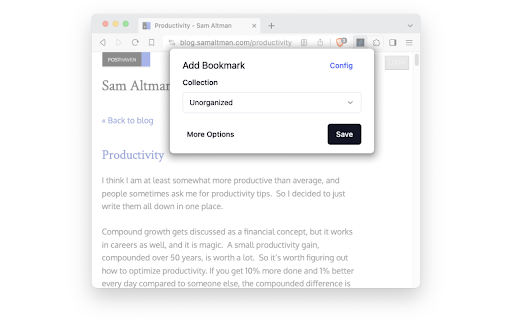
The browser extension for Linkwarden. Extension for Linkwarden, a self-hosted, open-source collaborative bookmark manager to collect, organize and archive webpages.

TubeArchivist Companion
Interact with your selfhosted TA server. Automatically send links from your Browser to Tube Archivist.

Raindrop.io
Manage bookmarks, highlights, annotations and tabs. Save Anything from the Web Clip articles, photos, videos, PDFs and pages from the web and apps. Organize with Ease Thematic collections, suggested tags and custom filters. Sort items by date, title, site or manually by drag'n'drop. Full-Text Search & Permanent Library Entire content of every web-page and PDF that you’ve saved is fully searchable. Even if a page you’ve saved is taken down, you’ll still have a copy of it. For Teams and Individuals Enable access to your collection by team members or entire web. Permissions let you control who can access each of your collections. Take Your Bookmarks Everywhere Securely access the bookmarks you’ve saved in from anywhere — even outside of the browser. Extension for all popular browsers. Apps for Android, iOS, macOS and Windows. More than 2,600 integrations and programatic access through API. Private by Default Your privacy comes first. We keep your data safe, never sold. 256-bit encryption protects you while syncing. No tracking or intrusive advertising. 13 years in a business.

linkding extension
Companion extension for the linkding bookmark service linkding is a self-hosted bookmark manager. This is a companion extension that allows to quickly add bookmarks to your linkding instance. Features: - Quickly add a bookmark for the current tab (keyboard shortcut: Alt+Shift+L) - Search bookmarks through the Omnibox / address bar (enter 'ld', followed by Space, then enter the search term) NOTE: This extension is only useful if you are already using or are interested in installing linkding.

linkding injector
Injects search results from the linkding bookmark service into search pages like google and duckduckgo Community browser extension for the self-hosted linkding bookmark service. Ever created bookmarks, only to forget about them later? Don't regularly search within your bookmarks? This extension is designed to help with this kind of problem. - When searching on a search engine the search term is also sent to your linkding instance and results are added in a new box in the sidebar right to the search engine results. - Supports the following search engines: google, duckduckgo, SearX/SearXNG*, Brave Search, Kagi, Qwant - Automatic light or dark theme detection * experimental, please read https://github.com/Fivefold/linkding-injector/wiki/SearX-SearXNG-support if you have problems After installation the extension needs to be configured and connected to your linkding instance. Either open the extension options in the browser extension manager or follow the link in the new linkding injector box on the search page of google or duckduckgo. Once the extension is properly configured linkding search results will show in the right sidebar. If there are no search results nothing will appear. This extension needs to request permissions to all websites because the linkding instance URL is not known beforehand and it's not possible to send a request to the linkding instance otherwise. The only websites it actually accesses the data of are the listed search engine websites and the configured linkding instance. The search term is sent to your configured linkding instance to get results and display them on the website. The extension saves no search-related data, only the settings of the extension itself are saved (locally). For a more thorough explanation see here: https://github.com/Fivefold/linkding-injector/wiki/Why-request-permissions-for-ALL-websites%3F
