
jmgefnoecdghkgopjefhfjiaeckpcobk

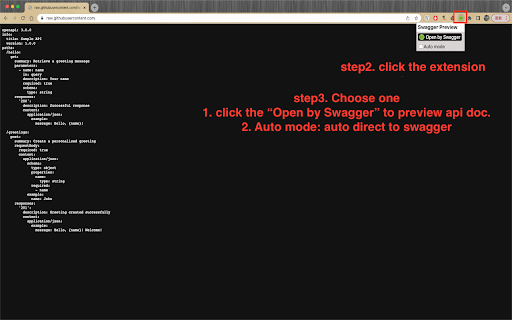
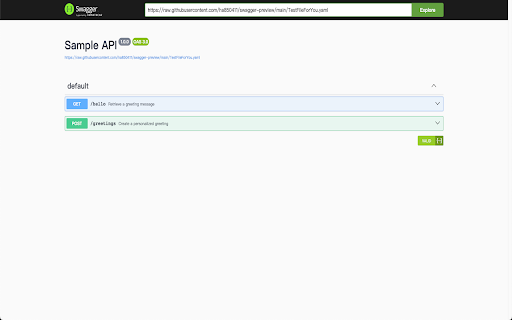
功能說明: - 透過 swagger-ui 套件解析 openapi 格式的 yaml / json 類型的 api 文件 - 自動模式 auto mode 僅支援 github 點擊『raw』情境下使用 - 若需要開啟本機 local 的檔案,需到此 chrome extension 的設定中開啟『允許存取檔案網址』功能 Feature Description: * Parses OpenAPI-format YAML/JSON API documents using the **swagger-ui** package. * The **Auto Mode** is only supported when clicking **“Raw”** on GitHub. * To open local files, you must enable **“Allow access to file URLs”** in this Chrome extension’s settings.

Rent Offers: Renter Calculator
Calculate your move-in, monthly costs, and keep notes on the rentals you've run calculations on. The Rent Offers Renter Calculator will allow renters to calculate and estimate how much money they'll need to move into a rental property. It also helps calculate how much how money they'll pay each month and the percentage of their overall income it'll be. The calculator will work on many of the real estate listings sights you already know and love.

redoc viewer
Shows OpenAPI (swagger) yaml/json rendered by redoc. This extension previews github or url openapi yaml/json file shows in the github.com or file tab of your browser to swagger-ui external rendering site(https://redoc-viewer.vercel.app/) in a new tab. For file views on the github.com site, the login cookie information is used to obtain and display the tokenized URL of the private repository.

OpenAPI Viewer
一个专注于查看和浏览 OpenAPI/Swagger 规范文档的工具。支持 JSON 格式,提供清晰的文档结构展示和 API 端点导航。 # OpenAPI Viewer - API文档查看利器 ## 🚀 主要功能 ✨ 核心特性: • 支持 OpenAPI/Swagger 规范文档查看 • 支持 JSON 格式解析 • 提供清晰的文档结构树形展示 • API 端点快速导航功能 • 接口详情一目了然 🎯 使用场景: • 后端开发人员查看 API 文档 • 前端开发人员对接接口 • API 文档审查和测试 • 接口功能快速预览 💡 使用方法: 1. 点击扩展图标 2. 粘贴您的 OpenAPI JSON 3. 即可浏览完整的 API 文档结构 🛠️ 技术支持: • 支持 OpenAPI 3.0 规范 • 支持 JSON 格式 • 支持文档结构导航 • 支持接口详情展示 📌 更新计划: • 持续优化用户体验 • 定期更新支持新特性 • 根据用户反馈改进功能 🔒 隐私承诺: • 不收集任何用户数据 • 不需要任何特殊权限 • 所有操作均在本地完成 ## 🤝 反馈与支持 如有问题或建议,请通过以下方式联系我们: • GitHub Issues: https://github.com/develop-assistant/openapi-viewer/issues • 电子邮件: cuishiying163@gmail.com 感谢您选择 OpenAPI Viewer!

Swagger fields generator
Automatically convert Swagger API definitions into form fields and columns, supporting custom field converters. Swagger Fields Generator Swagger Fields Generator is a browser extension designed to simplify API transformations, quickly generate forms and tables, and accelerate interface development. Features Automatic Conversion: Automatically converts Swagger documents into form fields and table columns. Custom Converters: Supports user-defined conversion rules to meet specific requirements. Multilingual Support: Provides multilingual interfaces for global users. Single Project Configuration: Supports single project configurations, allowing users to switch projects quickly. Installation The plugin is available for download in the plugin store; you can install it directly. Alternatively, you can manually install the plugin by following these steps: Download the plugin's .crx file. Enter chrome://extensions/ in the browser's address bar to open the Extensions page. Enable "Developer mode," then drag and drop the .crx file onto the page to install. Usage Open the target Swagger website. Click the plugin icon in the browser toolbar to open the plugin popup. In the popup, click the "Enable" button to activate the plugin. The plugin will automatically attempt to fetch data from the configured JSON request URL. After successful retrieval, refresh the current page to see the generator buttons added by the plugin. Click the generator buttons, and the generated code will appear in a popup for you to copy and use. Configuration Number of Buttons Displayed: Sets the maximum number of buttons displayed in the API section on the Swagger page. The default value is 5. When the number of buttons configured in the project exceeds this value, they will be presented in a collapsed manner. JSON Request URL: Configures the JSON request URL for the current Swagger. Supports adding multiple URLs, separated by line breaks. Supports both full and relative paths. Select Buttons to Display: Selects the buttons to display on the current Swagger page. Supports drag-and-drop sorting. Swagger Fields Generator aims to simplify API transformations, quickly generate forms and tables, and accelerate interface development.
