
mbohipomlkdokppohciinldcngheddne
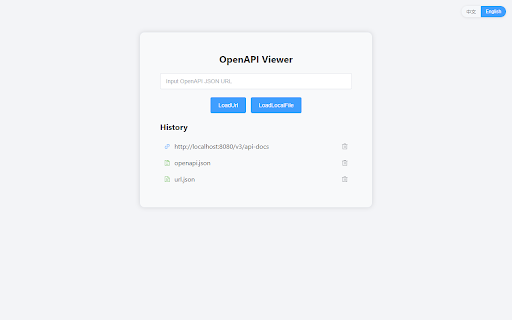
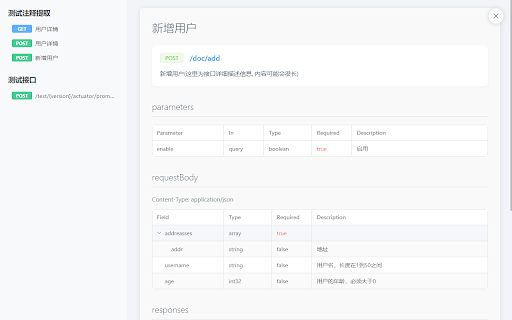
一个专注于查看和浏览 OpenAPI/Swagger 规范文档的工具。支持 JSON 格式,提供清晰的文档结构展示和 API 端点导航。 # OpenAPI Viewer - API文档查看利器 ## 🚀 主要功能 ✨ 核心特性: • 支持 OpenAPI/Swagger 规范文档查看 • 支持 JSON 格式解析 • 提供清晰的文档结构树形展示 • API 端点快速导航功能 • 接口详情一目了然 🎯 使用场景: • 后端开发人员查看 API 文档 • 前端开发人员对接接口 • API 文档审查和测试 • 接口功能快速预览 💡 使用方法: 1. 点击扩展图标 2. 粘贴您的 OpenAPI JSON 3. 即可浏览完整的 API 文档结构 🛠️ 技术支持: • 支持 OpenAPI 3.0 规范 • 支持 JSON 格式 • 支持文档结构导航 • 支持接口详情展示 📌 更新计划: • 持续优化用户体验 • 定期更新支持新特性 • 根据用户反馈改进功能 🔒 隐私承诺: • 不收集任何用户数据 • 不需要任何特殊权限 • 所有操作均在本地完成 ## 🤝 反馈与支持 如有问题或建议,请通过以下方式联系我们: • GitHub Issues: https://github.com/develop-assistant/openapi-viewer/issues • 电子邮件: cuishiying163@gmail.com 感谢您选择 OpenAPI Viewer!

JSON Viewer
Validates and makes JSON documents easy to read. Open source. JSONViewer port for Chrome is an updated version of Gildas' JSOnView extension. Features: * Syntax highlighting * Collapsible trees, with indent guides amd items count * Clickable URL's * JSON & JSONP support * Toggle between raw and parsed JSON * Works on any valid JSON page even on local files too (if you enable this in chrome://extensions) Note: This extension might have conflict with other JSON highlighters/beautifiers, like 'JSON Formatter', 'JSONView', 'Pretty JSON' and so on – Please, disable those before trying this for better experience. Try it out on these URLs: https://jsonplaceholder.typicode.com/todos/1 1 todo https://jsonplaceholder.typicode.com/posts 100 posts https://jsonplaceholder.typicode.com/comments 500 comments https://jsonplaceholder.typicode.com/albums 100 albums https://jsonplaceholder.typicode.com/photos 5000 photos https://jsonplaceholder.typicode.com/todos 200 todos https://jsonplaceholder.typicode.com/users 10 users Original firefox extension is here: http://benhollis.net/software/jsonview/ v.0.8.17 - Removed Traffzilla for interfering with other websites v.0.8.13 - Removed Traffzilla for interfering with other websites v.0.8.11 - Added Traffzilla and disclaimer v.0.8.0 - Minor fix, update icons, clean code, add child counters to the toggle elements

JSON Viewer
Most aesthetic & customizable JSON/JSONP viewer with themes, custom search, syntax highlighting/checking & copy features. 🧩 JSON Viewer – The Ultimate JSON & JSONP Formatter for Chrome Beautiful, blazing-fast, and fully customizable. Visualize and format JSON like never before with 27 themes, collapsible nodes, raw/highlight toggles, and advanced editing options – all in one lightweight Chrome extension. 🔥 Why Choose JSON Viewer? Make raw JSON readable, searchable, and stunningly presented. Whether you’re a developer, data analyst, or API tester – this is the must-have tool in your browser. 🎨 27 Gorgeous Built-in Themes – Choose what suits your eyes 🧩 Fully Customizable – Colors, tab size, formatting limits, line numbers, and more 📎 Collapsible Nodes – Navigate complex objects with ease 🔍 Clickable URLs & Omnibox Support – Type json + TAB to paste and preview JSON instantly 📁 Works with Local Files – Just enable permissions in the Extensions page 🔄 Scratchpad Mode – Type, paste, and format JSON in a standalone editor 📊 Sort by Keys + Editable JSON – Tweak and analyze live data ⏱️ Header Options – Add timestamp and source URL to your previews ⚙️ Quick Tips 💡 Enable Incognito and Local File Access in chrome://extensions for full functionality 🛠️ Conflicts with other JSON formatters? Disable the others for best results 🔁 After updates, Chrome may reset permissions—simply recheck the access boxes if needed 🌐 Perfect for: REST API developers Front-end and back-end engineers Anyone working with structured data in the browser 📥 Install now to transform the way you view JSON in Chrome!

JSON Formatter
based on https://github.com/callumlocke/json-formatter add force to return application/json content-type action; change the font; fixed JSONP leading semicolon bug; dark mode.

JSON-handle
It's a browser and editor for JSON document.You can get a beautiful view. And transcoding Unicode Base64 URL with decode & encode. Edit and browse JSON document in a node tree diagram. After installed, open the URL will trigger JSON-handle: 安装后打开下面网址可以看到JSON-handle启动的效果: http://jsonhandle.sinaapp.com/demo.json
