
jmfleijdbicilompnnombcbkcgidbefb

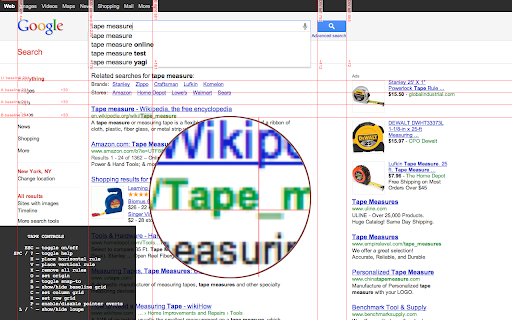
Measurement tools, rulers and grids Tape is a tool for pixel-perfect website development. It lets you put down guides that snap intelligently to the page content (and stick to it if it moves on scroll or resize), and helps you easily measure positions and sizes of elements. It knows about borders and padding, and will even snap to the baseline of text. There is on-screen help, the ability to display user-defined column and row grids, a built-in magnifying glass for pixel-perfect measurement, and all guides can be quickly toggled on and off with a single keystroke. Unlike some extensions it will not interfere with any webpage you visit unless you click the Tape icon. Once installed: Click icon to activate. Read help, or press Space to dismiss it. Mouse over document, observe that rules snap to useful positions (including baselines!), and use keys as follows: H – drop Horizontal rule here (or remove if there's one here already) V – drop Vertical rule here (or remove if there's one here already) B - drop Both horizontal and vertical rules here arrow keys – fine adjustment (+shift, +alt for larger adjustment) S – toggle snapping on and off. P – toggle pointer events on and off O – set origin to current position. C / R – set column or row grid L or backquote – toggle loupe. (To refresh loupe image, press L twice.) Space – toggle help Press ESC to toggle everything on and off. Press X to reset all guides on a page.

Grid Ruler
Create grids and measure their distance easily. It allows web developers to create vertical and horizontal grids, Photoshop style. It has a ruler to measure distance between your grids too. - click & drag from main vertical/horizontal ruler to create grid guides. - click on intersection of vertical ruler and horizontal ruler to go into measurement mode. - while in measurement mode, hold `Shift` key to get a straight line.

Measure-it
Draw a ruler across any webpage to check the width, height, or alignment of page elements in pixels. Draw a ruler across any webpage to check the width, height, or alignment of page elements in pixels. Customize the overlay and selector from extension options.

Hover inspector like in Zeplin , Figma
Inspector is the tool which mimic display dimension between selected and hover element. It would be good for designers, QA version 3.0.2 - fix bug: prevent click(thanks Marcelo Alejandro) - add background rule permission for save setting version 3.0.1 - fix bug: extension dropped (thanks @invisioN7) version 3.0.0 - refactor core(prepare for the new features) - add sidebar (setting, more details of selected element) - add freezing selected element after 2 click - press 'space' for unfreeze selected element - add link to discord - add uninstall form - fixed calculation position of popup version 2.0.0 - used ReactJS (expected simplifying of maintain and support) - add data: padding, margin, font, color, background, line-height, class, id - fixed calculation position of popup version 1.1.0 - add highline padding(green color) and margin(orange color). - fix bugs version 1.0.5.1 - minify file for more faster loading version 1.0.5 - add top bar with styles(padding, margin, font-size, height, width) for hover and selected element - fixed bugs (when user scroll label and lines position not display correctly) - add change style for label which display height and width hovered element - change active and regular icon: - add 2 hotkeys: -- command + enter / ctrl + enter - for hide/show topbar -- esc for close extension

Simple Ruler Beta
Measure it! THIS EXTENSION IS FOR BETA TESTING This simple and easy to use tool allows you to measure elements on the web page. Click to start selection, click again to complete it. See the width and height of the area you selected. You can change the color of background and selection in the Options tab.
