
jmeldfibneeolkjmjojmafcnmnmaikhp
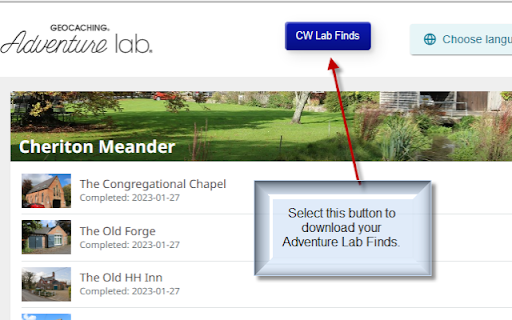
Export Found Adventure Labs data as a CSV file for processing with a GSAK macro for user statistics. Once the user has successfully logged in to their Geocaching Adventure Lab Finds web page, this extension adds a button to the page that when selected, will export all their Adventure Lab finds as a CSV file. This file can then be imported into GSAK by a companion GSAK macro and then used to gather additional information that is not available on the web page. It then creates waypoints of all their found Adventures and associated Lab Stages. In addition, the macro can also produce statistical reports from this data.

chatGPT角色扮演
chatGPT角色扮演,通过 / 唤起 通过输入/触发chatGPT的角色扮演,如扮演产品经理来写prd,如扮演变量命名来起变量名 通过tab和shift+tab切换 通过方向键切换 自行新增角色,保存在本地

Geocaching.com Google Drive™ Notes
This extension will fully integrate a Google Document into Geocaching.com. This way you can make advanced notes for puzzles and multies. You can create a new document from the Geocache page itself in geocaching.com with a single click! You can use (styled) long text, tables, images, just like in Office. You can make use these on the go, with an internet connection, or even make them available offline with the Google Drive app. It will automatically create a folder named "Geocaching" inside your Google Drive. The Groundspeak Geocaching Logo is a registered trademark of Groundspeak, Inc (http://www.groundspeak.com). Used with permission. I do not have any relation with Geocaching.com and do not work at Geocaching.com! Also have no relation with Google! 1.4.2.1 | 2023-05-16 - Small improvement/fix for the attachments 1.4.2.0 | 2023-05-07 - Show attachments (Other files with [GCCODE] in filename) 1.4.1.0 | 2023-05-05 - Reuse session token after page refresh (not perfect, well, not if it expires) 1.4.0.0 | 2023-03-31 - Upgrade to Google Identity Services for Web (deprecated after 31 march 2023) https://developers.google.com/identity/sign-in/web/deprecation-and-sunset - Update to Google Drive API v3 - Bring back Preview and Inline Edit - Remove most of jQuery dependency 1.2.0.0 | 2020-03-21 - Fixed the loading mechanism 1.1.1.1 | 2020-01-14 - Fixed the problems with duplicate loading etc. - Unfortunately removed preview and inline editing because of increased browser security............. 1.1.0.0 | 2018-09-16 - Finally! I changed the [gdnoteid] tags to the real Google Drive URLs, this way you can easily open it in c:geo etc. :D (Why did nobody ever requested it!) :P 1.0.0.0 | 2018-08-11 - Fixes problems with Google Drive API (Thanks Warboel!) - Changed some other inner workings 0.9.9.9 | 2018-04-10 - Compatibility with Geocaching.com Friends! extension 0.9.9.8 | 2018-03-19 - Fixed cutoff at 500 characters for geocaching.com personal note (Thanks again Locke!) 0.9.9.7 | 2018-02-21 - Hmm. Something went wrong in previous release, now again: - Fix z-index for VIP list for Matthias Eckert (Thanks again Locke!) 0.9.9.6 | 2018-02-13 - Fix z-index for VIP list for Matthias Eckert (Thanks Locke!) 0.9.9.1 | 2015-07-03 - Support Unicode for cache names 0.9.9.0 | 2015-05-15 - Use the same buttons as Geocaching.com's design - Small layout fixes and improvements - Removed Edit button, not that usefull and has a lot of usability issues, please use Inline Edit or Popout :) 0.9.7.1 - Add a line break before the standard Geocaching.com personal notes 0.9.7 - Add Remove background button for the annoying animated gif backgrounds - Multiline Geocaching.com standard notes 0.9.2.2 - Make extension work with old and new version of Geocaching.com - Wait an extra second to make sure the Document exists when creating - When gdnoteid was used, be able to create a document after it was deleted 0.8.7 - Also fix when moving over the preview frame 0.8.5 - Fixed moving / resizing of Edit dialog - Added shadow around the Edit dialog

BetterCacher
The BetterCacher Chrome extension will show you on the geocaching.com page if the cache is listed on BetterCacher. Powered by the BetterCacher API. Supports the languages English, German, Dutch and Polish.

CG No Login Master - ChatGPT cannot log in to special tools
Specially serve for education, scientific research, games, news, foreign trade, cross-border e-commerce, overseas shopping and… ChatGPT Unable to Login Master is an efficient, free, safe, and stable plug-in for Magic Internet access. It can break through network blockade, browse various contents and resources of ChatGPT freely in an anonymous manner, and avoid being tracked and monitored. ChatGPT Unable to Login Master is an efficient, free, safe, and stable scientific online plug-in, which can help users break through network blockade and access foreign websites and applications across borders. Users can easily access blocked websites and applications, including ChatGPT's social networking, entertainment, academic, news, e-commerce, games, video, music and other platforms in different fields to obtain more and wider information and resources , Improve the efficiency and quality of work and study. It is dedicated to education, scientific research, games, news, foreign trade, cross-border e-commerce, online shopping and developers, solving the problem of ChatGPT not being able to log in and Internet acceleration tools, dedicated to the Chrome kernel browser, and can access GPT-4, DALL.E2, OpenAI's products such as Whisper, Alignment, and API. It can be used with one-click installation, and the operation is simple, and you can access and browse after getting started. The best Chrome acceleration plug-in, which can help users increase the speed and regional restrictions of visiting websites overseas, and improve the efficiency of work and study! trial version: You can experience the trial version of TRY for free every day. It is free and does not require any payment. You can enjoy a trial period of 5 to 30 minutes every day. After logging in, the TRY logo will be displayed in the upper right corner of the user, and the selectable node has the word "trial"; Premium version: You can also upgrade to the PRO professional advanced version, which requires payment. There is no limit to the use of nodes, duration, and bandwidth every day. After logging in, the PRO logo will be displayed in the upper right corner of the user, and all the selectable nodes "trial" and "professional" have no Any restrictions, the subscription price is: ¥14.8/month, ¥138.6/year, the pricing may fluctuate according to the exchange rate, please refer to the display on the official website. Rest assured, the premium version is not enabled by default unless you actively upgrade!
