
ohogogidlhjodneindfimpmfhbjmgddm
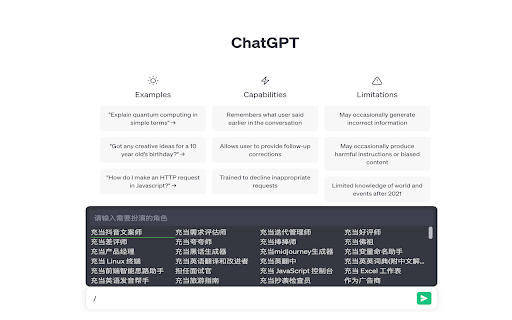
chatGPT角色扮演,通过 / 唤起 通过输入/触发chatGPT的角色扮演,如扮演产品经理来写prd,如扮演变量命名来起变量名 通过tab和shift+tab切换 通过方向键切换 自行新增角色,保存在本地

AskGo:AI Chat Assistant: ChatGPT, DeepSeek, Claude, Gemini, Grok, etc
AskGo Sidebar: Integrates multiple AI models like ChatGPT, DeepSeek, Gemini, Claude, and Grok into a single AI sidebar for chatting, searching, reading, writing, programming, translation, and image generation. 💡 AskGo offers you a one-stop solution! AskGo is committed to continuously integrating and optimizing top-tier models and tools, providing you with comprehensive intelligent support for daily Q&A, office efficiency, learning assistance, academic research, and more. 🔥 Why Choose AskGo? ✅ Continuously updated cutting-edge AI think tank—GPT-5.4, DeepSeek, Gemini 3.1 Pro, Claude 4.6, Grok 4.1, and more—meeting all your needs. ✅ Instantly summon the sidebar on any webpage without switching tabs, effortlessly enabling multitasking. ✅ Supports document/image chat functionality, compatible with dozens of formats like PDF, Word, XLSX, JPG, helping you quickly extract key insights and deeply understand content. ✅ Supports web search, allowing you to access the latest information in real time. 💻 How to Use: 🔸 Click the "Add to Chrome" button and pin it to your toolbar. 🔸 Log in to your account. 🔸 Start chatting with AskGo! ❓ Frequently Asked Questions: 📌 Do I need OpenAI/Google/Anthropic accounts? - No, AskGo provides direct access to all major models. 📌 Is it free to use? - Yes, you can use the free version with daily limits. For higher quotas, a membership plan is available.

ChatGPT Token Counter
Counts tokens in the ChatGPT active conversation on chatgpt.com The ChatGPT Token Counter is a Chrome extension designed to help users keep track of their token count during long conversations with the ChatGPT language model on chat.openai.com. OpenAI is hiding what the context window is on the web version. ChatGPT 4o in Plus and Team should have a context window of 32,768 tokens (~24,000 words). 3 words ~ 4 tokens. When your conversation becomes longer than that, ChatGPT will start to "forget" what was discussed earlier. The box in the corner of the window lets you monitor the token usage and ensure that the conversations do not exceed the context window, which is particularly important for coaching, idea generation, and working with longer articles where retaining the context is crucial. With this extension, you will know when context can be missing and will have more productive and meaningful conversations with ChatGPT. This extension is written 99% by ChatGPT. The logo icon is created 100% by MidJourney. The number IS NOT exact but should be in the range of +/- a dozen.

ChatGPT Widescreen
Enhances ChatGPT with wide/full/tall-screen + spamblock modes. Also works on poe.com #2 UX Product of the Week on Product Hunt! ⚡ Works with: chatgpt.com + poe.com 💻 Programming code — Improves readability by preventing single lines from wrapping and obfuscating code 📃 Multi-step instructions — Keeps more steps on ONE page for easier review 📙 Long recipes — Allows you to cook without getting mouse or trackpad greasy from having to scroll • Taller Chatbox: Expand the chatbox vertically • Wider Chatbox: Expand the chatbox horizontally in Wide Screen mode • New Chat Button: Show New Chat button in chatbox • Hidden Footer: Hide site footer • Hidden Header: Hide site header • Mode Notifications: Show notifications when toggling modes/settings • Spam Block: Hide spam banners from cluttering the page • One-click button access to browse more AI extensions NOTE: Settings auto-sync to other tabs for the same site (e.g. activating Hidden Header on chatgpt.com will apply to all chatgpt.com tabs, but poe.com headers will remain visible)

GPThemes - ChatGPT Widescreen, Fonts & Color
📝 FEATURES 📝 • 🎨 CUSTOM ACCENT COLORS – Choose any accent color with a live preview • 📐 ADJUSTABLE LAYOUT – Resize chat & chatbox widths for better readability • ✍️ TYPOGRAPHY CONTROL – Customize font family, size, line height, and spacing • 💬 CHAT BUBBLES – Toggle bubbles for better message distinction • 🌓 MODERN THEME – Light, Dark, and AMOLED-friendly Black mode • 🪟 DISTRACTION FREE VIEW – Hide disruptive elements like the header, footer and upgrade chip to maximize screen space • ⬆️ EXPAND PROMPT BOX – Increase the height of the chatbox for more typing room • 🚀 QUICK THEME SWITCHER – Floating button for instant theme changes • 🪟 SPACIOUS & CLEAN UI – Comfortable chatting with reduced clutter • ✨ SMOOTH ANIMATIONS – Subtle feedback for a polished experience • 📱 MOBILE FRIENDLY – Customize ChatGPT on your phone browser too. Available for Firefox Android and Cromite (open-source Chromium-based browser for Android) 🔒 PERMISSIONS EXPLAINED 🔒 • Storage: To save your theme preferences locally on your device. • ChatGPT access: To apply your custom themes on "chat.openai.com" and "chatgpt.com" GPThemes believe in transparency. All settings are stored locally on your machine. It does not collect any personal data. You can find the extension's source code here : https://github.com/itsmartashub/GPThemes ⚠️COMPATIBILITY ⚠️ • GPThemes is designed to provide customization experience for the core ChatGPT interface. It is optimized to work with free accounts and key features. • While the extension will likely function with a Plus subscription and Pro models, some of its styling may not be fully optimized for the advanced UI elements or features unique to that version. • The extension is built to work with all languages, but its visual appearance is currently fine-tuned for English. I'm actively removing English-specific selectors in favor of more multilingual methods with almost every update. • Regular updates to maintain compatibility with ChatGPT changes. I appreciate your patience during any brief disruptions. 🧵 HOW TO 🧵 1️⃣ Install the GPThemes. 2️⃣ On ChatGPT, there should be floating palette button (top-right) — click it to switch between Light, Dark, AMOLED, or open ⚙️ Settings to customize Colors, Fonts, and Layout. 3️⃣ Pin the extension's icon to your browser toolbar (if it's not already). 4️⃣ Click the icon to open the popup. 5️⃣ Use the toggle in the popup's top-right to show or hide the floating palette button on the ChatGPT page. 💌 SUPPORT & KEEP IT ALIVE 💌 • 🍵 If you can afford it and find GPThemes valuable, you can support its development with a pay-what-you-want contribution on KO-FI. Even small contributions help keep it alive, up-to-date and accessible. 🤝 FEEDBACK 🤝 • If you encounter persistent issues or have suggestions for improvement, please feel free to open an issue on GitHub or contact me via email. Your feedback is invaluable and helps me identify and resolve problems more effectively. Elevate your ChatGPT experience with GPThemes - where functionality meets style
