
jmcaliaignbbcngoipecmoahnjdmocon

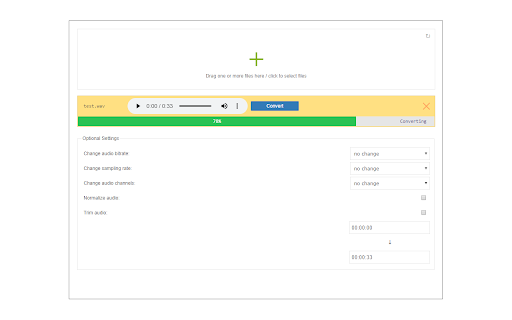

Convert and download video & audio files to .mp3 file format! Convert to MP3 is an extension that let you easily convert audio or video files to mp3 file format. Simply, drag the audio or video file in the addon's UI (top section). Once the media is added to the UI, click on the convert button to start the conversion process. Before conversion, you can adjust some settings including audio bit rate, audio sample rate, and audio channels. Moreover, you can trim the audio at desired periods. The core for this add-on, is lame.js (https://github.com/zhuker/lamejs) JavaScript library. Please read FAQ (https://eccorem.com/apps/convert-to-mp3.html) page for this add-on to get more info on how to work with this addon.

MP3 Downloader
Instructions: - Click to icon on the current page for display popup. - In the popup is showing mp3 files from current page. - Click to downloading one song or download all files. - You can playing mp3 in popup. Notice: MP3 Downloader is not responsible for media content which you download. We recommended to check media copyright permissions. Download of Youtube m3p to HDD is is intentionally locked.

MOV to MP3
Use MOV to MP3 to convert MOV to MP3. Easy extract audio from video. Enjoy quick MP3 convert and extract audio in seconds! 🔊 Looking for a quick and easy way to convert MOV to MP3? Our Google Chrome extension is the perfect tool for extracting audio from your favorite MOV and MP4 videos in just a few clicks! Whether you're a content creator, musician, or someone who simply wants to save audio tracks, our MOV to MP3 converter has you covered. 🌟 Why Choose Our MOV to MP3 Converter? 🚀 Fast & Efficient: Convert MOV to MP3 and MP4 to MP3 in seconds without losing quality. 🎯 Easy to Use: No complicated settings—just upload, extract, convert, and download! 🖥️ No Software Installation: Works directly in your Chrome browser. 🎼 High-Quality Audio Extraction: Get crisp, clear sound from your MOV and MP4 files. 🔒 Secure & Private: We do not store any files—your data remains safe. 🎞 Extract from Various Video Formats: MOV, MP4, AVI and more! 💡 How to Convert MOV to MP3? 1️⃣ Upload your MOV or MP4 file to our extension. 2️⃣ Click the Convert to MP3 button. 3️⃣ Download your high-quality MP3 file instantly. 🎧 🔥 Our tool is designed for anyone who needs to convert MOV to MP3 quickly and efficiently. Whether you want to extract audio from video for a podcast, ringtone, or music playlist, this extension makes the process seamless. 🎯 Features You’ll Love ➤ ⚡ High-Speed Processing – No long waits, just instant results. ➤ 🔄 Universal Compatibility – Works with QuickTime to MP3, MOV file to MP3, and more. ➤ 🎞 Extract High-Quality Audio – Keep your sound crisp and clear. ➤ 🔊 Extract & Convert in One Click – Simplify your workflow and save time! 🎙 Who Can Benefit from This Tool? 🎬 Content Creators – extract audio from video for podcasts, tutorials, or background music. 🎵 Musicians – convert from MOV to MP3 to save instrumentals or vocal tracks. 🎓 Students – Save lecture audio from video recordings. 🎥 Video Editors – Quickly extract background audio for new projects. 🏋 Fitness Coaches – Convert instructional videos into MP3 for audio workouts. 👥 Anyone! – Whether you’re converting MOV to MP3 for fun or work, this tool is perfect for all. 📁 Supported Formats Our extension is designed to handle a variety of file formats, including: 🎥 MOV to MP3 (Perfect for QuickTime videos) 🎬 MP4 to MP3 📽️ AVI to MP3 And more! 💻 No Experience Needed—Just Click & Convert Not tech-savvy? No worries! Our tool makes extracting and converting MOV to MP3 as easy as possible. Just drag and drop your file, hit convert, and download your MP3 instantly. 🏆 🔄 Extract & Convert Anytime, Anywhere Whether you’re at home, at work, or on the go, our MOV to MP3 converter ensures you can extract audio whenever you need it. The extension is lightweight and doesn’t slow down your browser, so you can keep working without interruptions. You can extract audio from video whenever you need it. The extension is lightweight and doesn’t slow down your browser, so you can keep working without interruptions. 🎧 Convert Video to MP3 with Ease Want to convert to MP3? Our service offers a fast and reliable way to extract audio from video files in seconds. Just upload your video, and we’ll handle the conversion—no experience required! 🔁 Effortless Audio Extraction and Conversion Looking to convert MOV to MP3 or extract audio from video? It’s simple and efficient. With just a few clicks, you’ll have high-quality audio ready for download. Never miss a beat with our tool that works wherever you are. ▸ 📦 Can I use this tool for large MOV or MP4 files? Yes! Our tool supports various file sizes without compromising audio quality. ▸ 🎧 Does this extension work offline? No, our tool requires an internet connection to process files quickly and efficiently. ▸ 🔊 Will the extracted audio be the same quality as the original? Yes! Our advanced processing ensures that the extracted audio retains the highest quality possible. 🚀 Start Extracting & Converting MOV to MP3 Today! Why wait? If you need a reliable MOV to MP3 converter, install our Chrome extension now and enjoy audio extraction. Whether you’re extracting and converting MOV to MP3 for personal or professional use, our tool guarantees quick and high-quality results every time. 🎧 Convert from MOV to MP3 in just a few seconds and experience the best way to extract audio from video. Extract, convert, and enjoy crystal-clear sound—try it today! 🔥

Video to mp3
Try our Video to mp3 Converter! Convert avi, mp4, mov, and more to audio easily—ideal for extracting sound from videos. Meet our Video to mp3 generator! You've got a video file of one of the following types: AVI, MP4, mov, m4a, MPEG, WebM, or any other. If everything you need to acquire from your videography is the sound, choose the proposed MP3 video converter! It's a great solution for students and everyone who needs to listen to what is said in their videos. After recording their live lectures, they can share audio versions and make their learning more simplified. With this video to mp3, users can have much fun, while being involved in videoconference communication. They can better understand what the speaker says, staying on point, without spending time on watching visual material. If you need a free, open-source instrument to change your favorite video to audio files, use this video to MP3 tool! ⁉️ How to convert video to mp3? 1. Access the video to mp3 download asset! 2. Choose a digital file from your comp by clicking the relevant button! 3. Start the process by pushing the BTN with the same name! 4. Wait for the status change notification! You'll see DONE status when the conversion of mov to MP3 is completed! 5. Press to download the available high-quality audio! 💯 Key features • Easy-to-use interface: You don't have to think hard about how to convert video to audio. Thanks to the provided prompts, it's as easy as 1, 2, 3 to press the required buttons! • Great solution: Handle the video to mp3 as a useful functional to convert video to audio within a short time and without any problems. • Reliable resource: The video to mp3 transformation is important if you wish to pay special attention to the speaker's message but not to visuals. • Excellent results: Apply the mp3 converter to download the chosen file without the loss of quality! • Support for multiple formats. ⁉️ How does the video converter to mp3 operate? To convert mp4 video to mp3, or m4a to mp3, a series of steps should be implemented. The system of vid to mp3 conversion is based on the usage of a special technique. It focuses on computer video output, which is grounded in transforming a component video signal into audio. This system incorporates hardware for signal conversion and software for gaining the actual performance. When a performer accesses the Video to mp3 product and presses the proper button, the chosen file appears in the area of conversion. The mov to mp3 converter performs certain actions to provide the expected result. Once a doer has got the audio file, it's possible to download it. ☝️ Special functionalities of the video to audio converter 1️. Do not pay for the conversion of .mov to mp3! This technology if absolutely free to use. Don't waste money on format transformation! Pick the MP3 format if it suits you better! 2️. The recommended video to mp3 generator is very effective. To get the desired outcomes, don't look for any advanced settings! 3️. Make the most of the offered video to mp3! Programmers guarantee the high quality of this resource. 🏆 Cutting-edge capabilities of the Video to mp3 👍 Accessibility • Understanding how to convert video to audio, users can complete their tasks with confidence. • The video to mp3 converter is known for its smooth operation. Acquire the necessary formatting as quickly as possible! • Employ the present video to MP3 transformer any time you like! It's available online without installation on your PC. 👍 High Reliability • The video mp3 converter is regarded by lots of net-workers as a fantastic technological advancement for optimizing their virtual work. • No wonder that the public needs speedy access and immediate results. This extension helps to convert your files to mp3 with the snap of a finger. • Follow the prompts to convert video to audio with ease! It couldn't be any easier to do it! 👍 Advanced Functionality • The Video to mp3 alters popular videoformats so that users can share their content in the most suitable way for them! • With this amazing option, it's not difficult to work with diverse videofiles. • Consider that the high speed of operation makes the Video to MP3 easy-to-handle! 🤔 How to Take Advantage of the Video to mp3 ☑️ Make sure your Internet connection is quite good! ☑️ Utilize this user-friendly video to mp3 program with pleasure! ☑️ Enjoy the flexibility of its action! ☑️ Get your audios and share with your fellows! ⁉️ FAQ: - Is the Video to mp3 a free extension? Yes, you can convert the selected videos to mp3 audio assets free of charge. - Should I create an account to start using this service? No, you shouldn't do it. It is accessible with no need to install the program.

Video & Audio Downloader
Video & Audio Downloader is an extension that enhances the process of downloading media files (video & audio) from the internet. Badge icon text shows the number of captured items. ### Important note ### : Video & Audio Downloader add-on is NOT working for YouTube website or any other YouTube videos embedded in other websites due to Google, YouTube, and Chrome web store policies and restrictions. ### Important note ### : Video & Audio Downloader add-on is NOT responsible for the media content(s) that you download with this add-on. You are responsible for verifying the media's copyright permission before downloading anything from the internet. To work with this add-on, simply browse to a website with online media content. Once the media (video or audio) is loaded and played, the addon automatically detects the media and renders it in toolbar popup. Within the popup, you can download media items easily. Moreover, there is also a button to copy the download link to the clipboard. You can download all media items at once as a "zip" file. Please note that this add-on only shows media items for the active tab (current tab). Once you switch tabs, the list in the popup will be updated. If you have a feature request or found a bug to report, please fill the bug report form in the add-on's homepage (https://mybrowseraddon.com/video-audio-downloader.html).
