
dklpoegflpcjifjkecojebbpahjmakgp
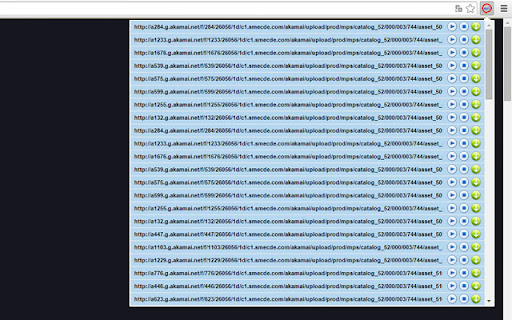
Instructions: - Click to icon on the current page for display popup. - In the popup is showing mp3 files from current page. - Click to downloading one song or download all files. - You can playing mp3 in popup. Notice: MP3 Downloader is not responsible for media content which you download. We recommended to check media copyright permissions. Download of Youtube m3p to HDD is is intentionally locked.

Video downloader that works! Save online videos
Download video now, watch it later. Fast, light and reliable video downloader Video Downloader is a free video downloader browser extension that lets you save videos from Facebook, Instagram, Twitter, and hundreds of other websites directly to your device. Free Video Downloader – Download videos from Facebook, Instagram, Twitter, and more at no cost. Fast Downloads – Consistent and reliable download speeds across all supported websites. One-Click Download – Detect and download any video with a single click directly from your browser. Multiple Formats – Save videos in MP4 and other popular formats compatible with any device. Auto Video Detection – Automatically detects downloadable videos on Facebook, Instagram, Twitter, and any webpage you visit. Unlimited Downloads – No caps on the number of videos you can save from any website. Lightweight – Designed to be resource-efficient so it doesn't slow down your browser. Easy to Use – Simple, clean design that's easy for anyone to use. Quick Support – Friendly and responsive support team available anytime. Save Facebook Videos – Download any public Facebook video directly to your device for offline viewing. Download Instagram Videos – Save Instagram videos, reels, and stories before they disappear. Download Twitter Videos – Capture and save Twitter videos and GIFs instantly with one click. Download Videos from Any Website – Save streaming videos, tutorials, and clips from hundreds of websites. Offline Viewing – Keep your favourite videos saved locally so you can watch them anywhere without internet.

YouTube Audio Only
Listen to YouTube, providing sound without video, displaying a black screen for minimal distractions, with YouTube audio only. 🤔 Why YouTube Audio Only? Introducing the audio only from extension, the perfect solution for those who want to focus on sound rather than visuals. This extension transforms video into a seamless sound-only platform, making it easier for you to listen to YouTube content anytime, anywhere. 🌟 Key Features 1️⃣ Save Data Reduce your data usage by audio only for youtube, making it perfect for limited data plans or slow connections. 2️⃣ Reduce Distractions Focus on your tasks without visual interruptions, enhancing productivity and concentration provided by audio Only from YouTube. 3️⃣ Background Play Keep the running even when your screen is off or you're using only audio in YouTube, ideal for multitasking. 4️⃣ Battery Saver Extend your device's battery life by playing audio only YouTube, eliminating the need to power the screen continuously. 5️⃣ Accessibility Enhance accessibility for users who are visually impaired or prefer auditory content, making YouTube for audio only. 🚀 Why Choose YouTube Audio Only? ✅ Convenience: easily toggle between video and only modes. ✅ Data Saving: reduce data usage by streaming only the portion of videos. ✅ Battery Efficiency: conserve your device’s battery by avoiding video playback. 👨💻 Benefits of Using YouTube Audio Only ➤ No Video in Site: eliminate video content and enjoy. ➤ Play Only YouTube Audio: stream sound from videos with ease. ➤ YouTube Only Audio No Video: focus solely on the content you love. 🌟 Optimize Your Listening Experience 📍 Efficient Data Management: by streaming Audio Only YouTube Player, you can save significant amounts of data, allowing you to enjoy more content without worrying about exceeding your data limit. 📍Enhanced Mobility: with the ability to play music in the background, with No Video Only Audio on YouTube you can turn off your screen and carry on with your daily activities without interruption. 📍Boosted Productivity: by removing visual distractions, you can listen to YouTube while focusing on other tasks, enhancing your productivity and multitasking capabilities. 🎯 Ideal for Various Use Cases 🟠 Music Lovers: enjoy video as your primary music player without video interruptions. 🟠 Podcast Enthusiasts: listen to podcasts on site without the need to watch. 🟠 Multitaskers: stream content while working, studying, or exercising. 🔥 Additional Features 🎯 Custom Playlists: access your favorite content with Youtube only audio no video. 🎯 Offline Listening: download content to listen without an internet connection using player music YouTube. 🎯 Sound Quality Settings: adjust the music quality to suit your preferences and data availability with MP3 YouTube Online. ❓ Frequently Asked Questions: 1️⃣ How to Enable Audio Only on YouTube? ✅ Click the extension icon to switch to only mode. 2️⃣ Does It Save Data? ✅ Yes, streaming audio only significantly reduces data usage. 3️⃣ Can I Use It for Any Video? ✅ Absolutely, the extension works with all videos. 📋 Step-by-Step Guide ▸ Download: install the extension from the Chrome Web Store. ▸ Toggle: use the extension icon to switch to only mode. ▸ Right-Click: access the right-click menu to select Audio Only for any link. 🌟 Enhance Your Experience Players provide you the opportunity to transform your site usage into a sound-centric experience. Whether you're a music lover, podcast enthusiast, or someone who likes to multitask, this extension is designed to cater to your needs. 🖥️ Advantages • Streamlined Listening: focus on the sound content without visual distractions. • Energy Efficient: save battery life by not playing videos. • Data Savings: use less data by streaming audio only. 🔗 Technical Details 👉 Compatibility: Fully compatible with the latest version of Chrome. 👉 Privacy Focused: Does not collect or use your data. Browsing history remains private. 🌿 Troubleshooting We understand that occasionally you might encounter issues or have ideas on how we can enhance our service. Rest assured, we are here to assist you every step of the way. Our support team is dedicated to helping you resolve any problems you may face while using our service. 🚀 Get Started Today Download the YouTube Audio Only extension from the Chrome Web Store today and start enjoying video in a whole new way. Transform the way you listen to YouTube with this powerful and convenient tool. Click Add to Chrome now and take your experience to the next level.

MP3 Converter
Pure JavaScript MP3 converter to encode media files into MP3 format and add ID3 Tags This extension adds a button to the toolbar area which brings up the actual conversion tool. Just drop one or multiple media files (both video or audio types are supported) and wait for the extension to convert audio streams to MP3 format. After a successful conversion, files will be placed in your default download directory. You can press each item in the UI to navigate to the converted MP3 file. Note that you can copy media links to the clipboard and then use the "Parse content from clipboard" option to extract media links from the clipboard. Also, it is possible to select media links in a browser tab and drop selection into the converter window. The extension will extract all the links and convert media links Notes: 1. This extension uses pure JavaScript engine to convert media files to MP3 format. There are no external dependencies. 2. This extension uses your browser's internal engine to decode media files so to be able to convert a media file to MP3 format, your browser should be able to play the media file. This means if a format is not yet supported by your browser, the extension will not be able to convert 3. You can convert from right-click context menu over links, audio and video elements too. Just press "Convert to MP3" context menu item. 4. You can stop the conversion process at any time by pressing the close button on the right side of each entry. 5. As of version 0.2.0, this extension supports a custom decoder and muxer which activates if the browser's native decoder fails. The custom decoder is based on FFmpeg project and can decode almost all possible media sources even if the media source cannot be parsed by your browser.

Audio Downloader Extension
Activate this extension to detect and download all audio files from any webpage instantly . Looking to grab audio tracks while browsing? Stop struggling to find hidden MP3s or background music online. With the Audio Downloader Chrome Extension, you can instantly detect and download any audio from a webpage. No more switching tabs or searching for download links just click and save. 📥 One-Click Download – Save any audio instantly with just one click. 💡 Lightweight & Fast – Simple design that won’t slow down your browser. Install the Audio Downloader Extension from the Chrome Web Store. Click the extension icon to view detected audio files. Download the desired audio by hitting the "Download" button. The extension is super useful when you're trying to save audio content for offline use. Whether it’s a lecture, a song you liked, or a meditation clip, this extension lets you capture it in seconds without complicated tools. Perfect for students, content creators, researchers, and even casual users who love collecting audio while browsing. If you're someone who often finds themselves saying “I wish I could download that audio,”—this tool is built just for you.
