
jlebjkamppjaeoiinkjkgmecoahlefka
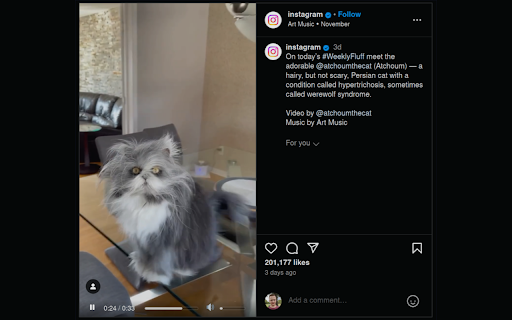
Adds volume and play controls to Instagram videos. This simple web extension enables video controls for Instagram videos. This grants you the ability to control the volume and the video position.

Better Videos for Instagram: Playback & Volume
Easily control the playback and volume of Instagram videos. Enhances your Instagram experience by allowing easy video playback and volume adjustment. Features: - Playback/seek control - Volume control (remembered) - Autoskip support - Supports all videos on the Instagram Github: https://github.com/emirkabal/better-videos-for-instagram Legal: Instagram is a registered trademark. This extension was developed independently of Instagram, by someone who is not related or affiliated with Instagram, without any help or endorsement from them.

Video Speed Control and Volume Booster
Video and Sound Manager to control any Video Playback Speed in Chrome. Sound Boost feature to increase sound volume for up to 600%. 🎥 The Video Speed Control and Volume Booster allows you to speed up or slow down any video playing in your Chrome Browser, on any website. This is an extremely helpful tool for those who need a video manager to watch or listen to any video at higher or lower speed. You can slow down or speed up any video playback for up to 16 times. 🔊 Another feature is Sound Volume Boost. The extension manages sound of each browser tab separately and can increase sound volume for up to 600%. For better user experience, the extension works separately on each tab. Thus, you can regulate sound volume of each tab independently. 🔍 USER GUIDE - How to use Video Speed Control and Volume Booster: 1) Install the extension and pin it to your browser. That's it. Installation process is very simple and doesn't require any additional settings or actions. 2) Open any tab with a playing video or audio. 3) Click on the icon of the extension. 4) Change video playback speed or sound volume from the extension control panel. You can increase playback speed for up to 16 times. Sound Boost can be done for up to 600%. Done. 💥 Video Speed Control and Volume Booster works on any page or website, including most popular streaming and video hosting platforms like: - Netflix - Amazon Prime Video - YouTube - Vimeo 📹 The Video Speed Control feature would be useful when you'd like to rewatch your favorite video in slow motion, or speed it up. You can enjoy your favorite YouTube video or Netflix series at any speed you want. Slowing down video is a very useful feature for those who learn something (like a foreign language, etc.) through video. Speeding up any video simply allows you to skip boring or too slow part of a video. You can fine-tune video speed with 0.1 precision. Such a smooth tuning provides you with the most comfortable playback speed for you. 🔊 The Sound Boost feature is a desired tool for those who want to lift Chrome Browser limits on sound volume. Now you can increase volume for up to 600%, i.e., your browser can play any music or video with sound 6 times more than standard maximum one. Even more comfy feature: You can regulate sound volume for every browser tab separately. It's a super cool perk for someone who hops from one tab to another, which actually means it is handy basically for everyone. Note Please note that this extension is not an official Google application or product. It is designed and developed by me, an independent developer. All copyrights belong to their respective owners. Google doesn't endorse or sponsor this Chrome extension.

EasyLoad. Upload Video & Photo for Instagram
This extension allows uploading photo and video to Instagram feed and stories from desktop EasyLoad is a Chrome extension which makes uploading Image or Video to Instagram from desktop possible. You can upload any photo or video to Story or Feed from you PC without any additional apps or complicated actions. Normally Instagram doesn't allow to upload anything in it's web version, that's why we created a tool which makes uploading photo and video fast and handy. You can now create Story or Post right from your PC or laptop. You can upload any image or video to create a great Reels, Posts, and Carousels. You can upload any image or video to create a great Reels, Posts, and Carousels. With EasyLoad you can also: ❇️ Trim video ❇️ Use filters ❇️ Mark location ❇️ Tag people ❇️ Turn on/off comments and likes on your Posts ❇️ Upload Video directly to feed (not to reels) ❇️ Upload Video or Picture to IG stories ❤️🔥Instagram is always better with EasyLoad.🔥

Reel Downloader for Instagram - FastReel
Download Reels and Video from Instagram. Saves any Instagram Video or Reels. Downloading soundtrack of any Instagram Reels. Looking for a simple way to download Instagram Reels directly to your computer? 🎬 FastReel - Reel Downloader for Instagram is a powerful Chrome extension that allows you to save your favorite Reels videos and audio tracks in just one click. Whether you're collecting content, archiving trends, or saving inspiration, FastReel is built to make downloading seamless. Download Reels in high quality and store them safely on your desktop. Whether it's a dance, tutorial, meme, or behind-the-scenes clip, the extension preserves video integrity and provides reliable performance with every download. ● Save Instagram Reels videos in high quality ● Extract and download audio tracks from any Reel ● Works directly from your browser – no additional tools needed ● Clean and intuitive interface ● Compatible with all major desktop operating systems Like the music in a Reel? Capture the audio instantly and build your own collection of trending sounds and viral audio clips. This extension is perfect for content creators, marketers, editors, and anyone who enjoys saving social media content for later use or offline viewing. No more complicated apps or screen recordings. Just install FastReel and start downloading from Instagram Reels with ease. Whether you're organizing your files or using clips for reference, the extension supports both video and audio downloads from public Instagram profiles. Reel Downloader for Instagram – FastReel is designed for desktop users who need a fast, secure, and hassle-free way to download Reels content. Save videos and sounds effortlessly, all within your Chrome browser. Get started today and simplify the way you download Reels from Instagram. 🚀
