
jknkoohnhhnlnojgddpjgibniodllhae

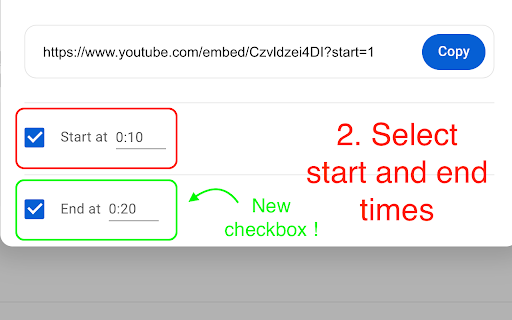
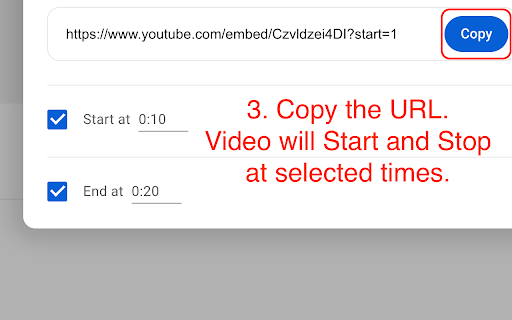
Problem ━━━━ If you ever wanted to... • Share a section of a YouTube video with someone - instead of the whole video. • Save or bookmark sections of YouTube videos. • Create memes by sharing very short sections of videos. • Share many sections of a very long video. Solution ━━━━ This extension adds an "End at" checkbox and input under the "Start at" one in the Share dialog next to the YouTube video. This way you can get a link to a section of the video, by selecting the "Start at" and "End at" times. When the link is opened, the video starts and stops at the specific times you have selected ! 🎉 Advantages over YouTube Clip feature: • There is no need to have a YouTube creator (google) account and to be logged in to create a clip. • There is no 5-60 seconds restriction on clip duration. The clip can be as short or long as you like. Limitations: • Does not work if the creator has deactivated embedding for the video. • Does not work on Premiere and Live videos. Source code: https://github.com/elias-pap/youtube-share-clip 🚀 Report issues: https://github.com/elias-pap/youtube-share-clip/issues Share your feedback: eliaspap.apps@pm.me Give me a rating, if you like it ❤️

Cammio Clips
Record clips straight from the browser Say goodbye to the hassle of switching tabs or navigating through different platforms just to send a video message. With the Cammio Clips Chrome Extension, make your recruitment process faster, more personal, and incredibly efficient—all from the comfort of your browser. *Note: An active Cammio license is required to log in to this extension. FEATURES: 🎥 Record or upload videos without having to switch browser tabs 🏷️ Customize your clips with a title and additional information for enhanced context and clarity. 🎨 Change the branding to make your clips align with your company’s identity. 🔒 Hide clips to ensure they are visible only to you and your administrative team. 🚀 Share your clips instantly with a link 🔄 Manage your clip library effortlessly with options to edit, duplicate or delete clips. 🛡️ Videos are securely stored in correspondence with GDPR regulations Start engaging candidates like never before with Cammio Clips.

Video Cutter and Trimmer
Cut and Trim video online without downloading software on your computer Best Video Trimmer & Cutter for Chrome. Cut and trim video online without watermark. Video Cutter and Trimmer is a web app which helps you to effortlessly trim or cut video online. With this simple online tool, you can cut and trim video files without downloading complex software on your computer. Video Cutter and Trimmer is easy to use and works perfectly on your Windows and Mac. To take out the pause and shutters from your video, Video Cutter and Trimmer is your best option. Main Features: ✓ Smart Cut AI technology is introduced and allows you to mark and cut silent parts with only one click! With this tool, you can easily remove unwanted parts from video in a smart way. ✓ Trim & Cut Unwanted Parts It allows you to cut or trim any parts of the video as you desire. No need to download any others, creating fantastic videos can be all done in your Chrome. ✓ Support All Popular Formats MP4, MOV, MKV, AVI, and more other common video formats are supported in this chrome extension. ✓ Precise Preview The finished videos must be to your satisfaction as it provides a precise preview feature for you to preview your video once you finish editing and then trim or cut again. ✓ 100% Safe Our Video Cutter and Trimmer do not collect any user information, so there are no privacy issues involved and you can use it with no worries. ✓ Free Included Free to deal with 6 files with no more than 200 file size. But it is a cost-effective video cutter chrome extension to cut YouTube videos or videos from other platforms. ✓ Professional Support No matter you have any questions or inquires, please feel free to contact support@hitpaw.com , our support team will give you professional help as soon as possible.

video-clipper
Enhance Your YouTube Experience with Video Clipper Video Clipper is a Chrome extension that allows you to seamlessly create, organize, and play clips from your favourite YouTube videos. Whether you're a dancer, musician, student, or just want to save memorable moments, Video Looper makes it easy to extract and curate the content you love directly within YouTube. Support for more platforms is coming soon! - Simple Clip Creation: Select and save specific video segments with just a few clicks or shortcuts. - Full-Screen Playback: Enjoy your clips in full-screen mode while retaining the original video's context. - Search Capability: List all your clips and search through them easily in a dedicated UI. - Organized Library: Sort your clips into folders and playlists for easy access. - Customizable Settings: Modify playback speed, loop settings, and more to match your preferences. Ideal for - Dancers: Practice and perfect your moves with customized clips. - Musicians: Extract and loop specific song sections for practice or performance. - Students: Save key segments of lectures or tutorials for easy review. - Anyone: Create and share your own clips for personal use or to share with friends. Download Video Clipper today and maximize your YouTube experience!

Export YouTube Clips
A Chrome extension that allows you to easily extract YouTube clips and grab their urls. The YouTube Clips Markdown Generator is a handy browser extension that simplifies the process of creating markdown files from YouTube video clips. With this extension, you can easily extract relevant information from YouTube videos and generate organized markdown files that include video details, clip titles, URLs, and transcripts. It saves you time and effort by automating the tedious process of manually extracting and formatting information. Whether you want to create summaries, highlight key points, or share clips with others, this extension streamlines the task and helps you create professional-looking markdown files with ease.
