
jjafobbfjlanabndedbimoappjnagjbd
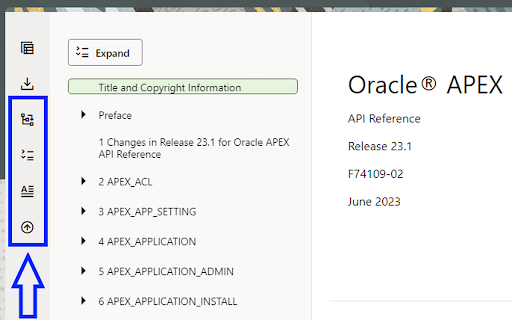
Enhance the Oracle Help Center with fully expanded navigation, quick access buttons, and enhanced usability. * Redwood Help Center Enhancer - Browser Extension The Redwood Help Center Enhancer is a browser extension designed to improve the user experience of the new Redwood themed Oracle Help Center. This extension enhances the navigation options by adding useful features to the navigation center's button bar. * Purpose The Oracle Help Center provides comprehensive documentation on Oracle products, and in 2023, it introduced the Redwood theme to enhance the user interface. However, some users may find the navigation experience lacking certain functionalities. One such opinion was expressed via a blog Post "Oracle-base: Oracle Documentation - The Redwood Look & Feel" The Redwood Help Center Enhancer aims to address these limitations by offering several navigational enhancements. * Features The Redwood Help Center Enhancer implements the following features through additional buttons in the navigation center's button bar: - Fully Expand Navigation Menu: This feature allows users to expand the navigation menu to the last level, providing a complete view of the available documentation sections. - Close Auxiliary Navigation Drawer: To maximize the screen space for reading the documentation, this feature automatically closes the auxiliary navigation drawer conveniently. - Access Expand/Collapse Button Anywhere: Users can access the expand/collapse button from anywhere on the page, making it easier to toggle the navigation menu. - Fast Access to Document Title: This feature provides users with quick access to the document title, allowing them to promptly move to the document title page. - Fast Scroll to Top: Users can instantly scroll to the top of the page efficiency. * How to Use To use the this browser extension, follow these steps: Download and install the extension from the appropriate web browser store (Chrome Web Store, Firefox Add-ons, etc.). Once installed, navigate to the Oracle Help Center. In the navigation center's button bar, you will find the additional buttons added by the Redwood Help Center Enhancer. Click on the buttons to utilize the respective features: - To fully expand the navigation menu, click the "Expand" button. - To reopen the auxiliary navigation drawer, click the "Chevron" icon button. - To access the expand/collapse button from anywhere, click the "Expand/Collapse" button. - To quickly view the document title, click the "Document Title" button. - To fast scroll to the top of the page, click the "Scroll to Top" button. * Feedback and Issues If you encounter any problems while using this browser extension or have suggestions for additional features, please feel free to submit issues or provide feedback on the GitHub repository. * Resources -Oracle Help Center: https://www.oracle.com/help/ - Blog Post on Oracle-base: Oracle Documentation - The Redwood Look & Feel I hope you find the Redwood Help Center Enhancer useful in enhancing your navigation experience on the Oracle Help Center! Happy browsing!

APEX Project Eye
Code used from APE browser addon to connect Oracle APEX PageDesigner and APE watchlist. This Add-On initializes a broadcast channel in Oracle Page Designer and allows APEX Project Eye applications to retrieve the application and page ids that are being edited. It injects a line of javascript code that is executed only if Page Designer is detected. Broadcast channels allow communication between tabs/windows within the same domain in the same browser.

Fextralife Fix
This little extension removes the twitch embed from the fextralife website. If you want to use that site for some reason. This little extension removes the twitch embed from the fextralife website. If you want to use that site for some reason.

Levvy Password Manager
Levvy's password manager keeps your credentials safe and secure. Save the logins you need to complete a task in Levvy. Increase your productivity by automatically filling in credentials when you launch the sign in page.

LCA URL Extension
This extension copies the active tab URL and paste it into the Licensed Content Agreement generator LWC in Salesforce. Introducing the Google Extension, "LCA URL Copy-Paste," a handy tool designed to streamline your workflow in Salesforce. This extension allows you to effortlessly copy the URL of your active tab and paste it directly into the Licensed Content Agreement component called LCA Generator in Salesforce. With "LCA URL Copy-Paste," you can bid farewell to manual copying and pasting of URLs between different platforms. Install the extension, and it seamlessly integrates with your Google Chrome browser. Whenever you're on a page with the desired URL, a single click will copy it to your clipboard. When you navigate to the LCA Generator Lightning Web Component page in Salesforce, the extension takes over. By clicking the extension icon or using a keyboard shortcut, it intelligently pastes the copied URL into the designated field on the page, eliminating the need for manual input. Save valuable time and reduce the risk of errors by utilizing the "LCA URL Copy-Paste" extension. Whether you're a Salesforce administrator, developer, or user, this extension will enhance your productivity and streamline your LCA generation process. Say goodbye to tedious manual tasks and focus on what truly matters—getting the job done efficiently.
