
jilajkmkggigmofihljmeajphfdphpjl

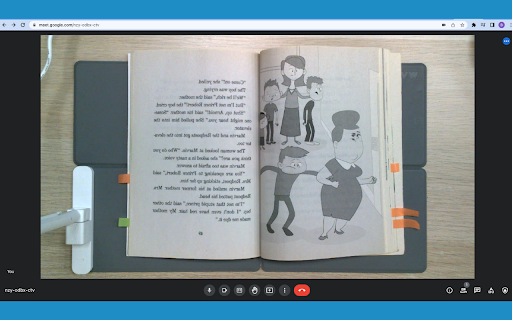
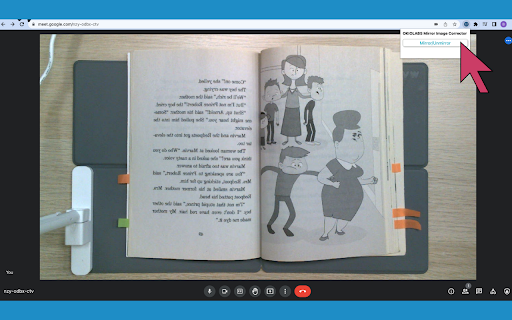
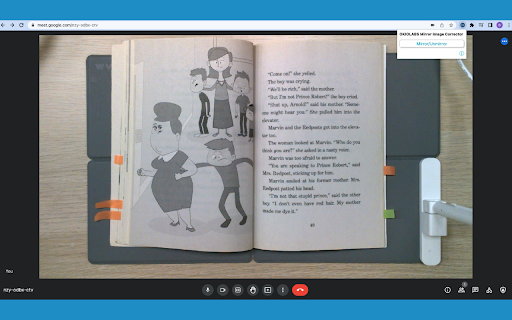
The OKIO Mirror Image Corrector extension allows you to correct the adjusted image that occurs when using Google Meet. 📝 The FREE OKIO Mirror Image Corrector is an extension meant to work in conjunction with Google Meet that helps you enable and disable the adjusted mirror image so that you can accurately see what you are writing, drawing, presenting, discussing, or creating! 😀 The OKIO Mirror Image Corrector gives you the power to toggle between the mirrored and non mirrored image. After downloading, you can use the extension by clicking the extension’s popup and then you will be able to enable and disable the mirrored image. 🎥 The OKIO Mirror Image Corrector helps you to explicate difficult math problems, model unique art techniques, and demonstrate good penmanship! 😀 Google Meet automatically mirrors the preview window (sender’s video). The OKIO Mirror Image Corrector lets you correct the preview window by toggling between the unmirrored image as well as the mirrored image.

OKIOCAM Live
The perfect app for live presentations. Display your camera's image on a larger screen or share it through conferencing software. OKIOCAM Live is the perfect app for live presenting with your document camera, allowing you to display your camera's image on a larger screen or share it through conferencing software. The app comes with new exciting features that you have been asking for — Annotation, PiP (Picture-in-picture), and exclusive Presentation Modes to be used together with our new OKIOPoint visual pointer. Get the most out of your document camera with OKIOCAM Live! ★Zoom and Follow Zoom and follow is the default mode when you turn on the OKIOPoint feature in the OKIOCAM Live App for the first time. In this mode, the camera will zoom in at the place you point with your OKIOPoint. Great for: -In-class read-alouds. -Close ups on pictures and graphics. -Creating variety to make your audience alert while they follow your movement! —------- ★Highlight In Highlight mode, only a small area next to where you are pointing is shown clearly to make it easy to see where everyone should be focusing on now. The Width and Height of the area can be adjusted to fit your needs. Great for: -Minimizing distractions when reading. —------- ★Fluorescent Marker In this mode, a small area you are pointing at will be highlighted just like how you would highlight certain parts of a text using a highlighter to let students know that “this is important”! You can take snapshots at any point of your presentation on the App and distribute the shots as review materials after. —------- Great for: -Highlighting an important section of the text. -Highlighting a math formula that’ll be on the test! —------- ★Underline Underline mode is perfect for teaching kids how to read graphs. As a bonus, it makes it much easier for teachers to line up the names with numbers in attendance registers and grade books too! Great for: -Making it easy for students to follow along in class -Accentuating important information —------- ★Spotlight Bring a theatrical spark into your lessons! Spotlight mode shows whatever you are pointing at in the spotlight, while darkening the surrounding areas. Great for: -Playing games in class. -Making reading roleplays more fun. Handy Tools for Teachers: ★Annotation Make annotations in class to enhance visual memory, take a snapshot, and save it for future review! Includes handy functions like freehand drawing, framing, lines, and arrows. ★Secondary Camera (PiP) With the built-in PiP function, you can easily show your face using a second camera (like using another OKIOCAM or webcam) at the same time as you show your work with your main OKIOCAM camera. This way, you can strengthen relationships during online presentations by showing your personality to the audience!

Mirror Extension
A Chrome extension that displays a popup below the extension icon and requests camera access, acting like a mirror. Feature Overview The Camera Preview Extension is a practical tool designed specifically for the Chrome browser, allowing you to easily use your computer's camera to preview your image directly in the browser with left-right mirroring. This extension features an elegant interface design, providing an excellent user experience. Key Features Real-Time Camera Preview: Simply click the extension icon to open the embedded camera window without any additional steps. Left-Right Mirror Effect: Provides left-right mirror effects, simulating a real mirror for convenient daily use. Flip Functionality: Easily flip your camera preview horizontally with a single click, enhancing usability for different scenarios. High-Quality Design: A beautifully designed interface that makes your camera preview more refined. Easy to Use: With just a few setup steps, you can use it effortlessly without complicated operations. Why Choose This Extension? Instant Efficiency: Preview your camera image directly in the browser without opening other applications, convenient and fast. Multi-Scenario Application: Whether it's for video conferences, online teaching, or daily photos, it can handle it with ease. Lightweight Tool: Does not take up too many system resources, ensuring smooth usage. High-Quality Interface: Simple yet sophisticated design provides a premium visual experience. Installation Guide Open the Chrome browser and go to the extension store. Search for "Camera Preview Extension" and click the "Add to Chrome" button. Follow the prompts to complete the installation. Once installed, click the extension icon at the top right corner of the browser to start using it. Usage Tips Before video conferences or online teaching, preview your image to ensure you present your best look. Use the flip functionality to switch the camera preview direction according to your preference. The Camera Preview Extension is an essential tool for every Chrome browser user. Install it now and enjoy a more convenient and efficient camera experience! User Feedback and Improvements Continuously improve the extension's functionality based on user feedback, such as adding window size adjustment and filter effects. Security Considerations Data Privacy: The extension should not store or transmit user image data; all processing should be done locally. Camera Permissions: The extension should request camera access only when the user clicks on it, and release the permissions immediately after use. If you encounter any issues, you can visit the support page or contact customer service for assistance.

Front Mirror - One click camera check
A one-click camera check, right from the chrome toolbar. The fastest and easiest way to check camera and it’s free. 🥷 What is this? It's a chrome extension that provides one-click access to your camera, right from your chrome toolbar. 🎯 Yeah but why? Ever been in a hurry to join a video call and quickly needed to check your camera? Front mirror simplifies that process with just one click. No more navigating menus or wasting time - just instant access to your camera when you need it most.

CamFlip
Flips your webcam CamFlip creates a virtual webcam in your browser which is mirrored horizontally. This is useful for video chat applications because others in the video chat receive the mirrored version instead of the original from your webcam. - Useful for video chat applications - Tested in Google Meet, Zoom for web, Microsoft Teams - Free for unlimited use with a small watermark. Remove the watermark for a small one-time payment
