
jhkicjpoijacjpgehbodajiighgpaila

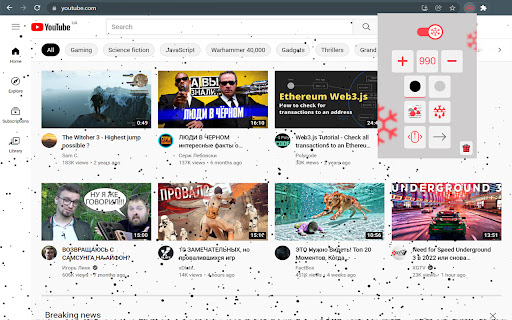

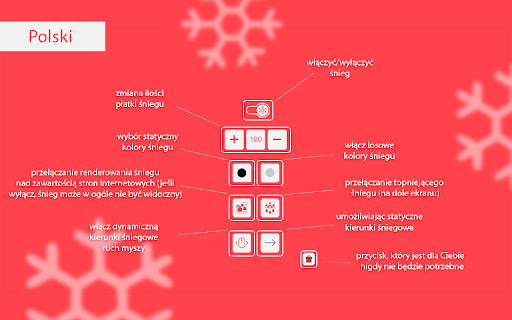

Get some snow in your browser with a small customization Make sure to check the "How to use" block below. Available snow settings: - snowflakes number selection - snow static color or random colors selection - top level paint (the snowflakes will paint on top of all page content, if possible) - static or dynamic(by mouse move) snow direction (you can look for more detailed settings description at the slider above) How to use: - install by clicking "install" button at the top of the page - open a new web page or reload existing ones - snow won't appears on web pages which were opened before extension installation! (you should reload them once) - snow won't appears on "https://chrome..." pages like the current one! (it's Chrome browser restriction) - snow won't appears on opened new empty tab (it should be a webpage) - you won't see the snow until the web page be ready (it's done to prevent effect to web pages load speed)

Dizzy Web
Make your web dizzy :) Everything looks crooked and wobbly. #Note: Reload tabs or browser after installation for it to work.

Let it snow
Making the internet look a lot like Christmas Are you tired of boring, lifeless websites that lack the magic of the holiday season? Do you wish you could turn any website into a winter wonderland, complete with falling snowflakes? Look no further than the Let it Snow Chrome Extension! ❤️ With just a simple download, you can transform any website into a festive, snowy paradise. And the best part is that it's completely customizable – you can adjust the amount of snow, the size of the snowflakes, and the speed at which they fall. 🌨️ Not only does Let it Snow make your browsing experience more enjoyable, but it also brings the magic of the season to any website you visit. So why settle for dull, uninspiring websites when you can have a winter wonderland at your fingertips? 🎄 Download the Let it Snow Chrome Extension today and experience the joy of the holiday season on any website you visit. Happy holidays! It's super easy to get going with Let it snow. Just download the extension, and you should be good to go. The next site you visit will get better than it was before - because now it's snowing. - Takes a shitty site and makes it amazing. 🎄 - Makes your favorite site even better! 🎿 - It makes it snow in the browser. ❄️ - Makes listening to Mariah Carey and Bing Crosby a lot more immersive. 🎶 What are you waiting for? Get into that Christmas spirit and install Let it snow! A: You might be visiting a site that is not supported - such as the **Chrome extension store**. It could also be that the site you're visiting is white.. and you know.. snow is white. --- Q: Why does the extension say "Too warm"? A: Well.. the site you're visiting might not support extensions - such as the **Chrome extension store**. It might also be that you need to reload the page you're currently visiting. --- Q: How do I access the Let it snow dropdown? A: At the top right of your browser - you should see a blue little icon (that's the Let it snow icon), click that and it should show. If the icon isn't showing, there should be a "puzzle button", click that and _pin_ the Let it snow icon. Now it should always be available at the top of your browser. Merry Christmas, and a happy new year 🎄🎅

Cat-In-Tab
A cat that can walk around on your page Want a cat to accompany you while surfing the web? This extension can make your dreams come true! How to use: 1. Install extension 2. Open a new webpage 3. Find your cute cat somewhere on the page 4. That's it! Enjoy & Have fun! * If you want to get your cat to sleep, just click the extension button. (It's harmless I promise)

Tab Garden
A pocket-sized garden sim browser extension. Tab Garden replaces your New Tab page with a pocket-sized garden sim. Water your plants and watch them grow 🌱 Crossbreed flowers to produce new varieties 🌷 Collect all 12!
