
glbcjjncmcgmnjcnijnnakeeccdojipb


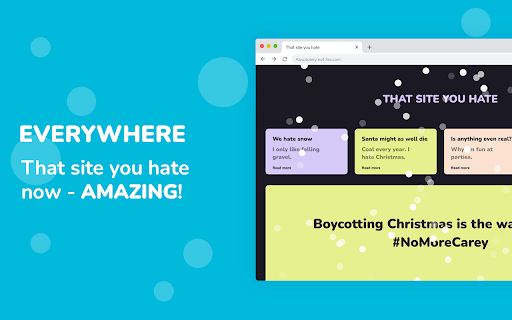
Making the internet look a lot like Christmas Are you tired of boring, lifeless websites that lack the magic of the holiday season? Do you wish you could turn any website into a winter wonderland, complete with falling snowflakes? Look no further than the Let it Snow Chrome Extension! ❤️ With just a simple download, you can transform any website into a festive, snowy paradise. And the best part is that it's completely customizable – you can adjust the amount of snow, the size of the snowflakes, and the speed at which they fall. 🌨️ Not only does Let it Snow make your browsing experience more enjoyable, but it also brings the magic of the season to any website you visit. So why settle for dull, uninspiring websites when you can have a winter wonderland at your fingertips? 🎄 Download the Let it Snow Chrome Extension today and experience the joy of the holiday season on any website you visit. Happy holidays! It's super easy to get going with Let it snow. Just download the extension, and you should be good to go. The next site you visit will get better than it was before - because now it's snowing. - Takes a shitty site and makes it amazing. 🎄 - Makes your favorite site even better! 🎿 - It makes it snow in the browser. ❄️ - Makes listening to Mariah Carey and Bing Crosby a lot more immersive. 🎶 What are you waiting for? Get into that Christmas spirit and install Let it snow! A: You might be visiting a site that is not supported - such as the **Chrome extension store**. It could also be that the site you're visiting is white.. and you know.. snow is white. --- Q: Why does the extension say "Too warm"? A: Well.. the site you're visiting might not support extensions - such as the **Chrome extension store**. It might also be that you need to reload the page you're currently visiting. --- Q: How do I access the Let it snow dropdown? A: At the top right of your browser - you should see a blue little icon (that's the Let it snow icon), click that and it should show. If the icon isn't showing, there should be a "puzzle button", click that and _pin_ the Let it snow icon. Now it should always be available at the top of your browser. Merry Christmas, and a happy new year 🎄🎅

Rotten Tomato Destroyer
Throw rotten tomatoes in websites that you do not like! Throw one by one rotten tomatoes in any area of almost any site on the Internet. We have all heard of or even seen people throwing rotten tomatoes when disappointed in a live performance. Now you have the opportunity to throw tomatoes in websites that deserve it. Tomato website destroyer for Chrome is always at hand when necessary to blow off steam on sites that really infuriates. Just click on the website destroyer extension icon in the toolbar menu of the browser and throw tomatoes by mouse clicking in the nasty sites. Tomatoes will fall on the webpage and flatten out on its surface, spraying the pulp and juice on the sides. Let the websites know your anger and resentment. Use Tomato destroyer game! And also it can be used for streaming and video to express how your feel about bad web sites, pages and services. In the new release, we have added a collection of objects for throwing in websites: - Rotten tomato; - Slime; - A rotten egg; - Banana.

Christmas Countdown and Radio
A beautiful Christmas Countdown. Also, a list of Christmas radio stations that you can listen to all day. Christmas countdown and a list of Christmas radio stations where you can listen to xmas carols waiting for the big day. I like to hear from you. If you have any suggestions, don't hesitate to send me a message.

Happy dog - virtual pet for you and friends
An AI companion you can chat with, care for, and co-parent with your friends Take care of a virtual pet right in your browser. It remembers, reflects, and grows with you, keeping you company as you work, browse, or study - with a personality that’s truly one of a kind. ------------------------ Key Features ------------------------ - Adopt a unique AI-powered virtual pet that lives in your browser - Chat with your dog - they remember you, reflect on their adventures, and respond with warmth and personality - Every hour, your dog has new memory of something fun they did. You can see all their memories in a timeline — like a storybook! - Invite friends or coworkers to co-parent your pet together - Walk your dog across any website, keeping you company while you browse - Earn stars by caring for your pet and unlock hats, outfits, and more - Mood journal: track your own emotions with your pet's support - Dogmoji and Photo Mode: snap photos with your dressed-up dog and share in the public photobook - Leaderboards: see which pets are the happiest and most cared for - Community: join our Discord to share stories, tips, and feature ideas - Refer your friends to get more stars Note: your happy dog won't show on "new tab" or Chrome Web Store. ------------------------ FAQ ------------------------ 💬 Can I talk to my dog? Yes! Your dog understands natural language and remembers what you’ve said. It may bring things up later or reflect on your time together. 🧠 What does “memory” mean? Every hour, your pet creates a simulated memory (e.g., “I sniffed a tree in a desert” or “I made a new friend”), powered by AI. 💤 My dog is sleeping! That’s normal. Dogs get tired after play, walking, or lots of interaction. Let them rest! ⭐ How do I earn stars? By walking, feeding, playing with, or petting your dog. Use stars to buy goodies. 💩 Yes, your dog poops. But don’t worry—it’s just virtual poop. ❤️ How do I keep my dog happy? Feed it, rest it, play with it, talk to it, and check in often. 📷 What’s the Photobook? A community gallery of the best-dressed and most adorable Happy Dogs out there. 🤝 Want to talk to other pet parents? Join the Discord!

Cat-In-Tab
A cat that can walk around on your page Want a cat to accompany you while surfing the web? This extension can make your dreams come true! How to use: 1. Install extension 2. Open a new webpage 3. Find your cute cat somewhere on the page 4. That's it! Enjoy & Have fun! * If you want to get your cat to sleep, just click the extension button. (It's harmless I promise)
