
jgpfnkhpecliocnopchaoogpmnejlghn
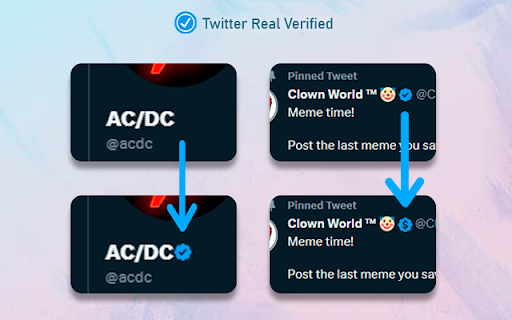


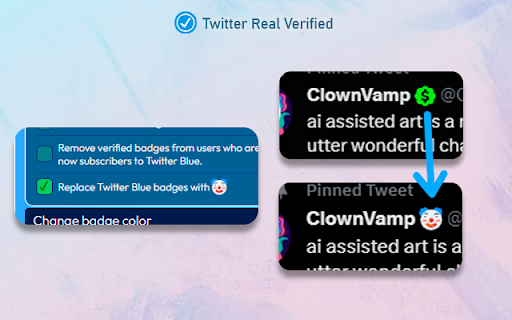
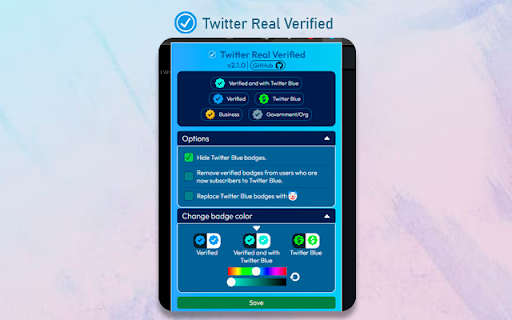
Return Twitter's legacy verification and change the verification badge from users with Twitter Blue The verified icon (legacy verification) will be restored to all users who had it before the Twitter Blue changes on April 20, 2023. Note: The data of verified accounts was taken before April 4, 2023. Full list Provided by Travisbrown: https://gist.github.com/travisbrown/b50d6745298cccd6b1f4697e4ec22103 ✅ Options - Hide Twitter Blue badges - Remove the verification badge from users who have Twitter Blue. - Replace Twitter Blue badges with a clown 🤡 - Add a simple green checkmark to legacy verified accounts: Keeps the current twitter verification system and only adds a green checkmark to accounts that were previously verified. ✅ Change badge color - Change the badge color for verified users, Twitter Blue users, and verified users who have Twitter Blue. 🤝 Do you want to contribute or have you found any bugs? https://github.com/luiserdef/twitter-real-verified

Blue Tick
"Blue Tick" restores authentic blue ticks and distinguishes between actual verified account and paid subscribers. Hours after launching this new feature, Twitter users are left in chaos and confusion. Thousands of fake verified accounts have impersonated prominent brands and personalities. Twitter has provided voice to the voiceless. It helped many of us locate an empty hospital bed or find crucial medicines during the second Covid wave. It is my tiny attempt to preserve the integrity of the platform.

Real Twitter Verifier
Officially verifies Twitter accounts with Paid blue ticks and Genuine accounts In 2025, as Twitter continues to evolve, distinguishing authentic accounts from paid verifications has become more important than ever. With Real Twitter Verifier identify Genuine & Paid Verified Accounts. The Real Twitter Verifier is your ultimate tool to identify and manage Twitter accounts effectively. It helps you identify verified Twitter profiles by distinguishing between genuinely verified accounts and those with paid verification checks. In a time when Twitter is evolving, knowing the difference between accounts verified for credibility and those using the Twitter paid blue tick identifier is essential. With Real Twitter Verifier, profiles are tagged as either "Verified" for authentic accounts or "Paid" for subscription-based verifications. Additionally, you can effortlessly manage Twitter content with the Twitter mute keywords tool, blocking unwanted words and content to enhance your browsing experience. Distinguish between genuine and paid verification statuses with ease using this real Twitter verifier. Understand which profiles are officially credible and which are subscription-based. Profiles are labeled as "Verified" for official accounts and "Paid" for subscribed verifications, making it the ideal Twitter account status checker. Use the Twitter mute keywords tool to block specific terms and unwanted content from your feed. Ensure a more curated and enjoyable browsing experience by filtering out irrelevant or bothersome topics. Take control of your Twitter experience with tools to mute unwanted Twitter words and streamline your feed. Install the Extension: Click “Add to Chrome” and pin the extension to your toolbar. Browse Twitter: Visit any profile or scroll through your feed to see verified statuses. Identify Verification: Look for labels like "Verified" for genuine accounts or "Paid" for subscription-based profiles using this Twitter account verification tool. Mute Keywords: Go to "Settings and Privacy" > "Mute and Block" > "Mute Words" to activate the Twitter mute keywords tool and filter out unwanted terms. Simplify your Twitter experience with Real Twitter Verifier. Whether you’re checking the Twitter account status of a profile or filtering your feed with the Twitter mute keywords tool, this extension makes navigating Twitter easier, smarter, and more efficient. 1. What is Real Twitter Verifier? Real Twitter Verifier is a Chrome extension that helps users distinguish between genuine and subscription-based verified accounts on Twitter by adding tags for easy identification. 2. How does the mute keyword feature work? Simply go to "Settings and Privacy" > "Mute and Block" > "Mute Words" to block specific keywords. This feature keeps your Twitter feed free from unwanted content. 3. Is Real Twitter Verifier free to use? Yes, Real Twitter Verifier is completely free and easy to install, offering seamless functionality for a better Twitter experience. 4. Can I rely on Real Twitter Verifier for accurate verification status? Real Twitter Verifier uses Twitter’s data to differentiate verification types, so it’s reliable for identifying genuine versus paid verification badges.

Old Twitter Layout (2026)
A new extension that returns old Twitter's look. Extension to return old Twitter layout from 2015 (or 2018). WORKS IN 2026! This extension doesn't add any CSS on top of original Twitter. It's fully different client that replaces original new Twitter client, making it faster than alternatives that just add style on top of Twitter. This extension requires you to be logged in to Twitter account. Please visit https://twitter.com/old/settings after installing to make it work just as you like. It switches to chronological timeline by default, you can switch back to algorithmical timeline in settings. You can visit unchanged Twitter by visiting https://twitter.com?newtwitter=true. The code is open source! Check https://github.com/dimdenGD/OldTwitter to see the code and report any issues. Features - Almost all of Twitter functionality is implemented - Custom profile link colors supported - You can change custom profile link color and it'll appear for other extension users (priority: oldtwitter color db -> twitter color db -> default color) - Removes all analytics and tracking from Twitter - Track your unfollowers for free - Search, sort and filter your followers - Removes all ads - Easy download of videos and GIFs - Translate tweets without having to open them, also ability to set specific users/languages to autotranslate - Shows why tweets were added to algorthimical timeline - Dark mode support - Ability to enable/disable Twemoji, disable stars (favorites) back to likes (hearts), change font, default link color and any other color in extension - Lot of hotkeys - Mobile support - Custom CSS support If you found this extension useful please consider donating: https://dimden.dev/donate/ or following me on Twitter: https://twitter.com/dimden

Legacy Verified
Legacy Verified is a browser extension that enables you to view who previously was verified on Twitter The Legacy Verified Extension enables people to add a verified logo next to names of accounts on Twitter that were previously verified. Uses data provided by Travis Brown and initiated by Oliver Alexander. It is being developed by Robert Spier
