
jgjkefnbeaoejcbpfggcggicconjfldd

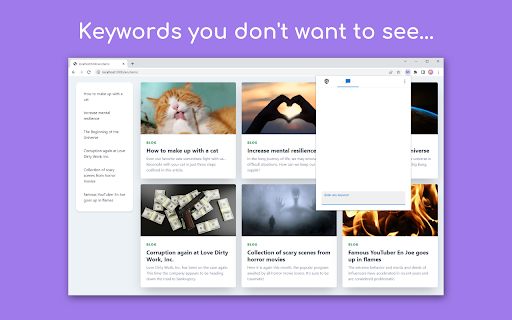



EmoGuard is a browser extension that allows you to block text or elements you don't want to see on any website. • Keyword blocking: Block keywords you don't want to see • Customizing CSS selectors: Pursue your own way of blocking • Sync feature: Sync data across all your devices using Dropbox • Cross platform: Supports desktop and some mobile browsers • Get over the slander: There are all kinds of people in the world. You can't change them, but you can control the information on the web pages you view with EmoGuard. • Avoid any spoilers: Spoilers sneak up on you like assassins and suddenly appear. Don't worry anymore, you can prevent it by adding the relevant words to EmoGuard. • Focus on what matters: Once people feel bad, they spend their time on distractions. So save your emotions with EmoGuard and use your precious time for what matters. For more information on how to use the extension, please visit the official website. https://emoguard.app/ It's time to bring back the fun web. Happy Internet Life! 1.3.2 • Now supports Spanish, French, German, Italian, Dutch, Russian, Ukrainian, Chinese (Simplified), Chinese (Traditional), and Korean. 1.3.1 • Added feature to register keywords to the blocklist by right-clicking. • Added option to always show whitelist. • Updated default CSS selectors. • Updated popup design. • Fixed issue where the enable/disable of CSS selectors could not be overridden on each website. • Fixed CSS selectors to be registered without converting letter case. 1.3.0 • Added whitelist feature. • Added reset feature. • Keyword detection sensitivity can now be adjusted. • The popup icon now reflects the on/off status of the extension. • Updated default CSS selectors. • Fixed the popup screen design. • Fixed an issue where keywords were not blocked in certain situations. • Improved performance by skipping some processing when possible. 1.2.3 • Improved stability and quality of keyword blocking. • Fixed an issue that caused an error in Cloud Integration. 1.1.0 • Simplified the design of the extension's popup. • Added customization mode for power users. Customization can be enabled from "⋮" in the top right of the popup. Twemoji graphics made by Twitter, Inc and other contributors are licensed under CC-BY 4.0: https://creativecommons.org/licenses/by/4.0/

Block these URLs, Domains or Keywords
Site blocker. Blocks URL, Domain or URL with keywords. Redirect. Help yourself to be more productive and save time! Block distracting or harmful sites easily! What does this extension do: - blocks URLs; - blocks Domains; - blocks URLs with keywords; - redirect blocked pages (if you want); - saves your time; - password available. Why this extension is better than other site blockers: - Totally free; - Low CPU usage; - No ads and popups; - No data collecting; - 4 color themes (red, blue, green, black); - Simple to use. Don't forget to allow the extension to run in incognito mode! If you forget your password - write me a letter!

uBlacklist
Blocks sites you specify from appearing in Google search results This extension prevents the sites you specify from appearing in Google search results. You can add rules on search result pages, or on sites to be blocked by clicking the toolbar icon. Rules can be specified either by match patterns (e.g. *://*.example.com/*) or by regular expressions (e.g. /example\.(net|org)/). You can use this extension in several search engines other than Google. The list of supported search engines is available at: https://github.com/iorate/ublacklist#supported-search-engines You can synchronize rulesets across devices via cloud storage. At the moment, Google Drive and Dropbox are supported. You can also subscribe to public rulesets. Some subscriptions are listed on the website: https://ublacklist.github.io/subscriptions

Blocked Search
Stay focused & improve productivity. Easily block any distracting and unproductive searches. Stop procrastination once and for all! Example, you often need to search stackoverflow on google while debugging a problem. Just add the word stackoverflow on allowed searches. If you don't include the word stackoverflow on your google search, , e.g., css id not matching, this Blocked Search extension will block the search's results, you might be googling funny cats or latest gadgets instinctively! This extension will block that unproductive search and will only allow searches that pertains to stackoverflow, or other words or phrases added to the extension. To allow your search, you must search, e.g., stackoverflow css id not matching. Stay focused & improve productivity. Easily block any distracting and unproductive searches. Stop procrastination once and for all! 2.1.0 NEW: It is now allowed to exclude the first picture when randomizing lockdown pictures UPDATE: Upgraded to manifest v3 2.0.0 NEW: Selecting the allowed word/phrase from the pop-up will search the word/phrase in new tab 1.0.1 HOTFIX: Numeric and alphanumeric was not working, e.g., 5700, 5700U. This is fixed now, numeric and alphanumeric are allowed to be searched 1.0.0: Search is now working for non-English searches 0.13.1: Word parser bugfixes: * "spider-man" search should not match the "spider" in the storage * "c#" search should not match the "c" in the storage * "asp.net" search should not matches the "asp" in the storage 0.13.0: Pictures can now be dragged and dropped to lockdown pictures. Improved word parser, e.g., ".net" is distinguished from "net". 0.11.1: Bugfix: When in unblocked mode, clicking any part of the popup window with Block Search button, blocks the search. Blocking should only happen when user click the Block Search button, not the area surrounding it. Made a fix, blocking happens only when user clicks the Block Search button 0.11.0: Added help link. User is informed when the picture added is not an image. 0.10.1: Bugfix, next and back button for lockdown slides should not appear when there is only one picture. Made a fix. 0.10: Search can be unblocked for a period of time, default is 10 minutes, this can be changed by the user 0.9: Pictures uploaded by the user will be shown when search is in lockdown mode. User can upload inspiring pictures, or any pictures that can instill discipline to himself/herself 0.8.1: Bugfix for lockdown mode

CustomBlocker
Filter any element on any web site with any condition with XPath, CSS Selector & RegExp CustomBlocker is a powerful Chrome extension designed to give users full control over the content they encounter on the web. This extension allows you to filter out any element on any website using a variety of selectors, including XPath, RegExp, and CSS selectors. This means you can block specific content across platforms—whether it’s muting tweets on Twitter, filtering out reviews on shopping websites, removing comments on Facebook, or eliminating unwanted domains from Google search results.
