
jghlbgpehejkbenneehiialadabidfpb
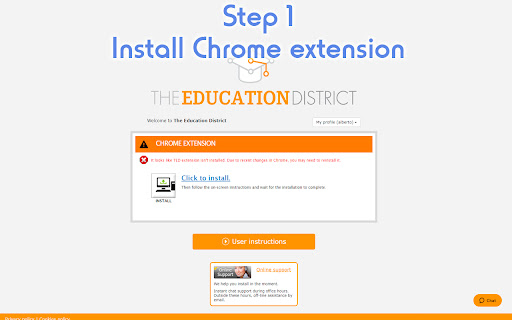


The Education District This extension is esential for the proper functioning of The Education District platform under chrome environments. Extension purposes are: - Check correct installation of The Education District platform current version. - Help user installing The Education District platform. - Start The Education District platform using the apropiate parameters. Chrome offers the best user experience to enter our virtual world so we highly recommend to use it. The Education District is a social educational platform that provides a 3D environment so users can collaborate online with people worlwide. Among other features the platform provides: - Educational Games for entertainment like Chess, Checkers, Otello, our own collaborative blocks construction BRICKS.... - Places to meet people worldwide with similar interests and collaborate or just practice a second language. - Museums and art galleries to enjoy with other people. - Conferences, symposiums, fairs and exhibitions about many interesting topics. - Cultural visits to real places with virtual and real guides. - Educational and entertainment games from other companies recommended by our editors. Actually this platform is being used by: - Schools and high schools. They can join with their students and play educational collaborative games and activities, organize virtual exchanges with other schools, travel to virtual places and learn about history, culture while practicing a second language. - Universities. The platform connect teachers and students in a unique way. It can be used as the most realistic online university technology. - SME. They can organize public conferences for free and promote their services in virtual fairs. This is very useful for getting new fans and potential customers. - Big companies. They can engage their workers with the most amazing training and gamification technology. Several big companies are creating their online 3D campus to connect and train their staff.

ViViWo
This extension is esential for the proper functioning of ViViWo platform under chrome environments. It checks client software availability and version in order to launch it. Chrome offers the best user experience to enter our virtual world so we highly recommend to use it. ViViWo is an online world hosting various kinds of tourism, entertainment and leisure industry attractions, places, sites, companies, institutions. It provides detailed information and materials to the users who are planning a trip of any nature, touristic or business visit. They will be able to find information on cities, places of historical or cultural interest, museums and art exhibitions, main sites, accommodation and booking information etc.

CatchHotels.com | Save on travel bookings
Save up to -40 % on car and hotel bookings. We track prices 24/7 and notify you when prices drop. Book at lower rates and catch travel deals with our free browser extension. The CatchHotels extension is your passport to savings across all booking platforms. It tracks hotel rates, room availability, and price drops in real time, so you always catch the lowest price possible. ✅ Save Up to 50% Off Room Rates Maximize your savings with real-time price comparisons across booking platforms. We also constantly track rates and send you notifications when there’s a good deal on a hotel you like. You always pay less for any room you book. ✅ Save Even More with Price Drop Alerts Even after getting a reservation at the lowest price possible, you can still save much more when a hotel drops its rates anytime before your booking. We monitor the hotel rates for you and immediately send you price drop alerts so you can cancel and rebook at a lower price. ✅ Simple & Seamless No hidden fees, no complicated registration processes, and absolutely no hassle! CatchHotels.com simplifies the booking experience with just one browser extension. You see all real-time price comparisons on one pop-up window, making it easy to enjoy the best travel deals effortlessly. ✅ Non-Exclusive Hotel Searches We’re not tied up with specific booking platforms or hotels. The extension works on room searches on all major booking websites. Our priority is finding you the lowest prices on the internet for maximum savings. ✅ Always Free & Risk-Free We believe in transparency and freedom. Our extension is always free to use, with no hidden or additional fees. It's also absolutely risk-free – cancel anytime if we don't live up to your saving expectations. CatchHotels catches savings for you in several ways: -- By crawling through different booking sites to compile the different prices of the room you want to book, -- By sending you notifications on room availability and reduced room rates from the hotels you selected -- By monitoring price drops on your existing reservation so you can cancel and rebook at lower rates What’s best is that you get access to all these services without the complicated booking process and expensive subscription fees. All it takes is one click of a button to add the CatchHotels extension to your browser. How To Use the CatchHotels Browser Extension INSTALL & ACTIVATE. Click “Add to Chrome” to install the CatchHotels extension. Activate your account by verifying your email. We don’t ask for any other information nor charge subscription fees. Once installed and activated, the extension does its magic in whichever booking platform you use. BROWSE & BOOK. Browse through booking sites like Agoda.com, Hotels.com, Expedia.com, and more. A pop-up window will appear to show the prices other booking platforms are offering for the same room. Find the room with the lowest rates and book directly on that platform. REQUEST ALERTS. If you’re not ready to book yet, go to your preferred booking site and search for available rooms in your destination on your travel dates. A bell icon will appear on the right side of each hotel listing in the search results. Click on the bell to get notifications on price drops and room availability for that specific hotel. Check your inbox for alerts and click the link in the email to book with up to 50% off room rates through the booking site that offers the best deal. How To Catch More Savings After Your Booking Already have a reservation? You can still potentially save hundreds of dollars by canceling and rebooking when prices drop. 1. Go to your inbox and look for the confirmation email for your hotel reservation. 2. Forward the confirmation email to booking@catchhotels.com. 3. CatchHotels will monitor the room rates and send you an email notification when there’s a price drop. 4. Cancel your previous reservation and rebook the room at a lower price. Changed your mind and no longer want to monitor a reservation? One click of a button is all you need to do to stop reservation tracking. 🎩 Where's the Magic? Advanced Technology | Seamless Process | Powerful Data Processing The magic is definitely not in a flick of a wand or from an old-fashioned cauldron. We leverage the latest technologies to brew innovative solutions. The magic of CatchHotels lies in our proprietary software and seamless process. POWERFUL DATA EXTRACTION. Our software is designed for fast data extraction, processing, and parsing, so you get to compare prices across different booking platforms in real time. TRACKING ID TECHNOLOGY. Our extension adds a tracking ID to your booking. This allows us to monitor prices and notify you of drops in instantly. AUTOMATED ALERTS. Our workflows are streamlined and follow a seamless process. The latest automation tools enable us to send alerts within seconds after a hotel drops its prices. As a CatchHotels user, you can rest easy with CatchHotels.com knowing that: -- Every transaction is safe. We guarantee secure transmission every time you use our browser extension or click on our links. Your information, including your email address, is transmitted securely through an API to our protected environment, ensuring your privacy and data security. -- Our cloud storage is secure. Your email address and reservation details are stored securely in our cloud environment and are never shared with third parties. -- Your data stays private. We never compromise on your privacy. No spying, no data-selling – your information stays secure and confidential. Besides, we'll never ask for personal or business information beyond what's necessary for seamless reservation monitoring. -- We don’t spam. Say goodbye to inbox clutter! We will NEVER inundate your email with junk mail or third-party offers. Your inbox remains yours exclusively. -- You can cancel with ease. It almost never happens, but if, in any case, you are not satisfied with our services, you can unsubscribe to alerts hassle-free at any time. There are no lock-in periods or lengthy uninstallation processes. We stand by these promises and do our utmost to stay true to them. CatchHotels is absolutely free to use. We help you rake in savings without any costs or hidden charges. Just add the extension to your browser, and you’re all set for pocket-friendly travel. What do we gain if we don’t charge users? Well, aside from the happiness we get knowing we help travellers save tons of money, we also get some rewards from booking platforms. We take a cut of the commissions they get from hotels whenever a CatchHotels user makes a booking using our extension or links. It’s pretty similar to how affiliates get commissions, but our priority is to save you money. You book at lower prices; we get a bit of a reward. It’s a win-win situation for both of us. 🌐 Install CatchHotels Now Never miss out on savings with CatchHotels.com – your trusted partner for finding unbeatable room deals. Try it risk-free today to see just how much you can save on travel expenses. Explore more about CatchHotels.com and our mission at https://go.catchhotels.com/about/. 🌍✈️

Wakelet
Save, organize and share content from across the web! The Wakelet Browser Extension makes saving, organizing, and curating content from the web easier than ever! Hit the blue Wakelet icon to capture content as you browse, organize it into collections, and share those collections with whoever you want. All of this is done through the Wakelet side panel, which allows you to quickly capture the website you’re visiting, edit the description and cover image, and save it directly into a collection. You can even create new collections from within the side panel itself! 💥 Bookmark any content instantly 🗂️ Organize content into collections 📸 Capture text, screenshots and images 🚀 Curate faster than ever with the Wakelet side panel! 📋 Capture X Links (Tweets) with one click Wakelet is the ultimate curation tool, empowering you to save the things you love, and share them with the people who matter. Don’t forget to share your feedback, ideas and suggestions with us on social @Wakelet!

NetSupport DNA Agent
This DNA Agent extension for Chrome OS is for use with NetSupport DNA (version 4.50 and above), a single, low-cost solution delivering IT Asset Management, Classroom Instruction, Internet Safety and more – with dedicated versions available for schools and corporate enterprises. The extension supports NetSupport DNA’s core desktop management capabilities. When launched within a Chrome Browser, it will interrogate the Chrome OS device to gather key system inventory details and monitor online activity. The data collected is dynamically sent to your local NetSupport DNA Server and is then available for reporting within the NetSupport DNA Management Console. Real-time Monitoring - An Admin or Teacher via the Console can view a real-time summary of all Chrome OS devices. Selected devices can be viewed either in a detailed list view or via real-time thumbnails of each device screen. Internet Metering - A summary of Internet activity via the extension is recorded, including start and finish times for each URL visited and the active time spent on a page. Safeguarding Keyword Monitoring (Education version) – This tool helps schools protect students from being exposed to inappropriate online content. It alerts staff when students type or search for any terms that match with those in the DNA keyword database, providing safeguarding and internet safety indicators for self-harm, bullying, radicalisation, Child Sexual exploitation - and much more. Safeguarding Report a Concern (Education version) - Students can report concerns directly and discreetly to nominated school staff. Hardware Inventory - When the Chrome Browser is launched on a device, an inventory is dynamically sent to the NetSupport DNA Server. Activity - Console operators can see a chronological view of device activity for a selected time period, including triggered Safeguarding phrases. For more information on NetSupport DNA (or to download a full evaluation version of the entire solution) please visit our website. Installation of the NetSupport DNA Agent Extension should be centrally managed via the Google Admin Console. This allows the extension to be force-installed on Chrome OS devices and set to connect to the required DNA Server location. NetSupport is a leading producer of educational and corporate software solutions. With our easy-to-use IT management tools, we help our customers increase productivity and security, as well as save time and money. Updates and fixes in version 1.8.0.0 ----------------------------------------------------- Performance and operability enhancements
