
jggapkmopfnbcolaeiigmammeiodbglc
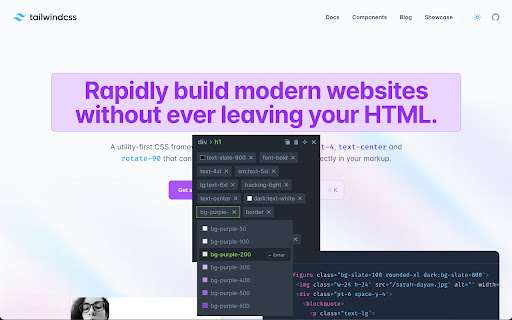
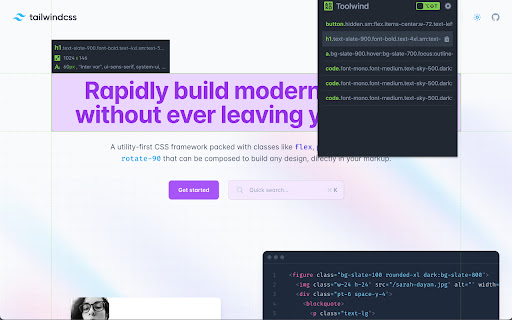
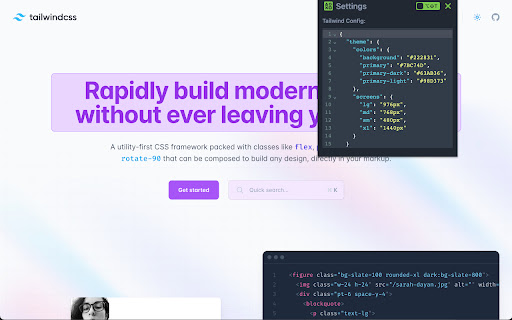
Enhance Tailwind CSS workflow: Easily add, modify, remove, and copy classes with built-in Tailwind IntelliSense Introducing Toolwind: Tailwind CSS DevTool Chrome Extension 🎨 Elevate your Tailwind CSS development experience to new heights with Toolwind, the ultimate Chrome extension designed for seamless class management. 🚀 Toolwind empowers developers and designers to streamline their workflow, effortlessly adding, editing, deleting, copying Tailwind classes, and even incorporating their own custom Tailwind configurations right from their browser. Say goodbye to the hassle of switching between your code editor and documentation – Toolwind brings the power of Tailwind CSS directly to your fingertips. ✨ Effortless Class Management 📚: Toolwind simplifies the process of working with Tailwind CSS classes. Browse a comprehensive library of classes, and add them to your code with just a click. Forget about the manual search and typing – Toolwind accelerates your development by reducing repetitive tasks. ⏩ Real-time Class Editing ✏️: Tailoring your designs has never been easier. Modify existing classes directly within the extension. Adjust attributes, values, and variations to achieve the perfect styling without the need to navigate back and forth between your code and documentation. 🎯 Quick Class Deletion 🗑️: Cleaning up your code is a breeze with Toolwind. Delete unwanted or unused classes from your HTML or CSS effortlessly, maintaining a clean and organized project structure. 🧹 Copy to Clipboard 📋: Copying classes should be as simple as it sounds. Toolwind allows you to swiftly copy classes to your clipboard, ready to be pasted into your codebase. Say goodbye to manual copying and pasting – Toolwind improves accuracy and efficiency. ✂️ Customization with Custom Tailwind Configuration ⚙️: Tailwind CSS offers an array of customization possibilities, and Toolwind ensures you make the most of them. Adjust breakpoints, spacing, colors, and more, all while previewing the changes in real time. Integrate your own personalized Tailwind CSS configuration to perfectly align with your project's design requirements. 🛠️ Intuitive UI 🖼️: Toolwind's user interface is designed with simplicity and functionality in mind. Navigating and utilizing the extension is a seamless experience, whether you're a seasoned developer or new to Tailwind CSS. 🤖 Search and Filtering 🔍: With a vast collection of Tailwind classes, finding the right one can be daunting. Toolwind’s search and filtering capabilities let you quickly locate specific classes, components, or utilities. 🔎 Say hello to an extension that revolutionizes the way you work with Tailwind CSS. Toolwind saves you time, enhances your efficiency, and enables you to create stunning designs with ease. Embrace the future of Tailwind development – install Toolwind and take control of your CSS workflow directly from your Chrome browser. 🌟

Live editor for CSS, Less & Sass - Magic CSS
Run this extension and start writing your CSS/Less/Sass code which gets applied immediately. The code you write will be saved in the browser extension's storage space or the site's local storage. ✓ Live editor for CSS/Less/Sass code - Preview changes as you write code ✓ Autocomplete ✓ Live edit CSS files and auto-save on file system ✓ Open code editor in external window ✓ CSS reloader ✓ Option to reapply styles automatically ✓ Syntax Highlighting ✓ Auto-generate CSS selectors with point-and-click ✓ Emmet support ✓ Color picker ✓ Convert code from Less/Sass to CSS ✓ Beautify / Format code ✓ Minify code ✓ Highlight DOM elements matching the CSS selectors ✓ Option to load this extension in iframes as well ✓ Get SVG icons ✓ Lint CSS code This extension is available for: You might want to use it for: ➤ No need to refresh pages to test your CSS/Less/Sass code ➤ Auto-save your changes to filesystem as you write the code ➤ Reload CSS resources without refreshing the page ➤ Speed-up development by writing code directly on your page ➤ Develop and test your code before finalizing your changes ➤ Apply some temporary styles (like hiding some components) ➤ Do CSS changes on any website ➤ The CSS/Less/Sass code you write gets applied as you write it ➤ The CSS reloader watches CSS files and live updates them immediately ➤ You can develop the code and see the output at the same time ➤ The code is saved in file/browser as soon as you write it ➤ The code editor is draggable and resizable ➤ Use code editor in external window for developing responsive pages ➤ The code you write is auto-saved for the site ➤ You can use "TAB" key to indent your code ➤ Running Magic CSS again, while it is already loaded, disables the code ➤ Press "Esc" or click on close to hide it ➤ The code is added at the bottom of the tag ➤ It includes CSS/Less/Sass beautifier ➤ It includes CSS minifier ➤ It highlights the DOM elements matching the CSS selectors ➤ Use it along with Chrome/Edge/Firefox/Opera Developer tools ➤ You might find it useful in creating your custom themes for websites based on Stylish / Stylist ➤ This extension was previously known as "MagiCSS - Live CSS Editor" Security and privacy: ⓘ No permissions approval is required for installing the extension ⓘ For advanced features, like "Apply styles automatically", permissions are requested on-demand ⓘ Mixpanel is used to get anonymized stats for improving UX ⓘ Browser extension's storage, localStorage etc are utilized for the extension's core features. Visit https://webextensions.org/ for further details. Connect with us:

Tailwind CSS Devtools
All-in-one browser extension for Tailwind CSS Developer. Features 🔥 🗂 Quickly inspect edit and filter HTML elements with TailwindCSS utility classes. ✨ Support Tailwindcss Intellisense autocompletion for JIT mode. ✔️ Custom config support. Personal data 🔒 Tailwind CSS Devtools had never collected and will never collect any personal data, browsing history, etc. Tailwind CSS Devtools also doesn't share/care about your data at all.

CSS Scanly - Copy CSS | Tailwind & Bootstrap
Copy CSS properties from any web element with CSS Scanly. Supports Tailwind & Bootstrap, Helpful for developers and designers CSS Scanly: Inspect, Analyze, and Edit CSS in Real-Time Discover the power of advanced CSS inspection and editing with CSS Scanly, the must-have tool for web developers, designers, and CSS enthusiasts. This Chrome extension transforms how you interact with web page styles, providing an intuitive and feature-rich environment for exploring and manipulating CSS on any website. Hover over any element to instantly view its applied styles See computed styles, including those from stylesheets and inline CSS Explore pseudo-class styles etc. without leaving the page Edit CSS properties on-the-fly and see changes immediately Experiment with styles without affecting the original page Perfect for prototyping and troubleshooting design issues Automatically detects and highlights Bootstrap and Tailwind CSS classes Gain insights into how popular frameworks are used on different websites Pin multiple CSS information boxes for easy comparison Ideal for analyzing styles across different elements simultaneously 5. Copy-to-Clipboard Functionality Quickly copy any CSS styles with a single click Streamline your workflow by easily transferring styles to your projects View applied media queries for responsive design analysis Understand how styles change across different screen sizes Intuitive control bar for easy navigation and tool management Keyboard shortcuts for enhanced productivity Pause and resume the scanner as needed Move the control bar to your preferred location on the screen Perfect For: Web Developers seeking to debug CSS issues Designers looking to analyze and draw inspiration from other websites Students learning web design and CSS QA testers verifying style implementations Anyone curious about the styles behind their favorite websites Elevate your web development and design process with CSS Scanly. Download now and start scanning the world of CSS like never before!

Gimli Tailwind
A DevTools extension enabling smart tools for Tailwind CSS. The professional Devtools extension for Tailwind CSS developers. It lets you view and intuitively edit utility classes. Please note: Gimli Tailwind requires a $49 one-time lifetime license. No subscriptions. You can purchase your license via the extension (includes a 14-day money-back guarantee). ✔️ Autocomplete: Intelligent suggestions for class names. It also supports searching for CSS property names. ✔️ Quickly toggle utility values with Cmd/Ctrl + Click. ✔️ Intuitive UI We don't want to overwhelm developers with options and inputs. Here’s a list of features that enable developers to find relevant utilities quickly: ➤ Variant override: Displays what variant is active. ➤ Inputs are grouped the same way as in the official docs. ➤ Some sections like Grid and Flex will only be visible when relevant. ➤ Active inputs are always shown. ➤ Customizable UI.
