
jgemmpmngfhhnfgielmdjajdccchedap
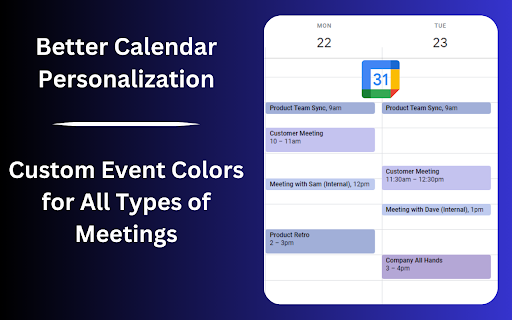
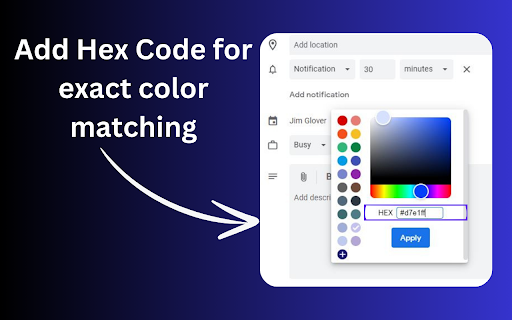
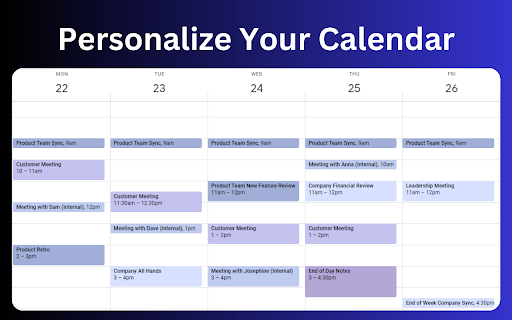
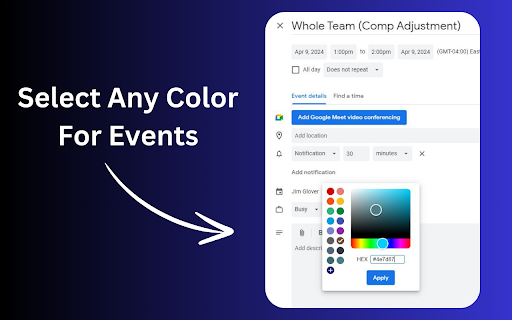
Enhance your Google Calendar with a Chrome extension that adds custom colors to each event for a personalized, organized schedule. Add More Colors to Calendar gives you the option to create any custom color for your Google Calendar! Finally, More Colors for Google Calendar! Add any color palette you would like with our Google Calendar Color Extension. 1. After installing the extension, click the extension tab on the top bar of Chrome and then log in with your Google account to "Add More Colors to Calendar" 2. After logging into the extension, go to your Google Calendar and create an event. 3. In the event popup, you will have the option to change the color of the event. Click the color selector and then click the "+" that appears at the bottom of the default Google Calendar colors. 4. Select any color from the selector then click "Apply". 5. Save your event! Hint: You can also right-click already created Google Calendar events and change the color quicker. HOW TO CANCEL YOUR PRO SUBSCRIPTION 1. Click on the Add More Colors to Calendar logo on the top chrome bar. 2. Click the "Manage Subscription" link 3. Log in to your user account in Stripe 4. Click the "Cancel Subscription" button on the right of the screen HOW TO DELETE A COLOR 1. Click the Extension logo in the top of the Chrome browser 2. Log in if needed 3. Click the "X" beside a color you have selected 4. Delete the color. 5. You can now add a new color to replace the one that was deleted UPDATE 10/20 We have released an update of the extension to work with Chrome's new version FEATURE UPDATE 4/17 We have reduced the price of the Pro version of the extension to $8. We have also implemented a recurring payment model so the price is $4 per month for Add More Colors to Calendar Pro FEATURE UPDATE 3/26 We have added the ability to input your own #hex color to have more accuracy in the color selection process. We would love any feedback on the feature and any suggestions you have for future releases. Are you tired of the limited color options in Google Calendar? Feel like your calendar could use a splash of personality or a more systematic color-coding scheme that truly fits your style or your company's branding? Our Google Chrome extension is here to transform your calendar experience. Introducing the ultimate solution for everyone seeking to add more colors to their Google Calendar. Whether you aim for a more organized calendar, desire more aesthetic appeal, or need your employees' calendars to match your company's colors, this extension is crafted just for you. Why Add More Colors to Your Google Calendar? Google Calendar is a powerful tool for managing your time, organizing your schedule, and keeping track of events and appointments. However, with its default color palette, users often find themselves wishing for more options to customize their calendars. That's where our extension comes into play, offering limitless possibilities to personalize your calendar. Here's how it makes a difference: Enhanced Organization: By allowing for custom color coding, our extension lets you categorize events, tasks, and appointments more effectively. This makes your calendar not just a scheduling tool but a visual representation of how your time is allocated. Aesthetic Appeal: Transform your Google Calendar into a work of art. With custom colors, you can match your calendar's look to your personal style, your desktop theme, or even your mood. Company Branding: For businesses, this extension is a game-changer. Align your employees' calendars with your company's color scheme, reinforcing brand identity and ensuring a uniform appearance in all calendar-related communications. Unlimited Color Options: Break free from the default palette and choose any color under the sun. Our user-friendly color picker ensures that you can select precisely the shade you need. Easy to Use: With a simple and intuitive interface, customizing your calendar's colors is a breeze. No technical expertise required! Compatibility: Designed specifically for Google Chrome, this extension integrates seamlessly with Google Calendar, offering a smooth and stable experience. Perfect for Teams: Make your team's calendars a reflection of your company's brand. Our extension supports shared calendars, making it easy to apply a uniform color scheme across your organization. Free to Try: Get started with our extension at no cost. Explore the full range of features and see how it transforms your Google Calendar experience. Transform Your Google Calendar Today Ready to take your Google Calendar from functional to fabulous? With our Chrome extension, adding more colors to your Google Calendar has never been easier. Whether you're looking to improve organization, enhance aesthetic appeal, or align your team's calendars with your company's branding, our extension is the key to unlocking a more personalized and visually appealing calendar experience. Don't settle for a bland and impersonal calendar. Embrace color, embrace creativity, and embrace the full potential of your Google Calendar with our extension. Try it today and see the difference for yourself!

Hue: More Colors for Google Calendar
A Chrome extension designed to enhance and personalize your Google Calendar experience. Currently allows you to have full control of your Google Calendar events with custom colors. Add new colors to your palette in the extensions popup menu to see more color options in your calendar! More features to come. Patch Notes: ========== Version 1.0.5 (1/19/2025) - Custom color now applies onto all repeated events - Storage usage now shown in settings - Fixed issue where user couldn't set custom colour when creating event - Fixed issue where color selection menu would all change to the same color Version 1.0.3 (3/10/2024) - Updated color overlay code to replace all found HTML colors of an event rather then query for specific class names: should reduce instances of event colors not changing.

GCal Pro: More Custom Colors for Google Calendar Events
Customize Google Calendar events with more colors for better organization and readability, no OAuth required! GCal Pro helps you customize Google Calendar event colors beyond the default palette, making your schedule easier to scan, organize, and understand at a glance. If you rely on Google Calendar every day, limited color options can make everything blend together. GCal Pro gives you more control over event colors, so your calendar works the way you think. ✨ What you can do with GCal Pro • Add unlimited custom colors to Google Calendar events • Set custom text colors for calendar events • Go beyond Google’s default color palette • Use HEX and RGB color values for precise color control • Save custom colors to your Chrome profile, so they sync automatically across your signed-in Chrome browsers • Reuse saved colors anytime without re-creating them • Edit a saved color once and automatically update all events with the same title • Improve visual clarity for work, personal time, or multiple calendars All color changes are applied directly inside Google Calendar and update instantly. GCal Pro integrates seamlessly into the Google Calendar interface. There’s no setup, no separate dashboard, and no learning curve — it simply adds more flexibility to the calendar you already use. 🔒 Privacy-first • No accounts required • No tracking or analytics • No external servers • All customization happens locally in your browser Your calendar data stays private. 📝 Important notes • This extension works only on the desktop web version of Google Calendar (calendar.google.com). • It does not work on the mobile version or the Google Calendar mobile apps (Android or iOS). Enhance your schedule with more custom colors, better visual organization, and full control over how your Google Calendar looks. Version 1.0.6: • Added new Event Text Color controls: Auto, Light, Dark, and Custom. • Added custom text color picker support in the popup. • Improved readability for dark event colors by enforcing better text visibility. • Updated saved event color editing to be direct (click edit icon and pick immediately). • Refined popup UI with clearer sectioning (Event Colors) and improved picker styling. Version 1.0.7: • Added smarter custom color targeting for Google Calendar events: This series only (recurring event instance group) All events (same event title across calendar) • Improved event color consistency between calendar chips and event edit/details views. • Fixed color swatch sync in event edit dialog so custom colors appear correctly. • Fixed precedence handling when both mappings exist: Series-specific color now correctly overrides title-wide color. • Improved scope switching behavior in color picker UI: Easier switching between series-only and all-events mapping. • Improved reset behavior: Reset from series falls back to all-events color if present, then to default. • Reworked selector logic to be more robust: Reduced reliance on language-dependent UI text. Removed brittle popup detection logic based on color name strings. • General reliability fixes for recurring events and same-title event groups. Version 1.0.8: • Added a dedicated Save button workflow so users explicitly confirm changes. • Added one-click HEX copy button inside the HEX field, including copied-state feedback. • Enabled opacity slider in the custom color picker. • Refined popup UI styling for consistency

Meeting Dolphin Google Calendar Tags
The best Google Calendar companion. Enables you to add tags to events, drive insights, search & filter and much more. Meeting Dolphin helps you maximise your Google Calendar experience and optimize it for work purposes. Use it to tag calendar events, organise your week, set Active Hours, and Remove timestamps, ... all in one extension. Learn more @ https://meetingdolphin.com/extension Our blog @ https://meetingdolphin.com/blog FEATURES 🏷️ Tagging for Google Calendar Drag and drop tags to categorize an event. This makes it easy to visualize your week. 📊 Time Analytics See your weekly or monthly time allocation by tag as you shift views. Export your tag data to CSV on the web app. 🔍 Search & Filter Search and filter either by Tags or by Text using the search bar. The matches are highlighted directly in your current calendar view. Set Work/Active Hours You never need to scroll up and down because Meeting Dolphin fixes your view to only your work/active hours. Hide timestamps: Clean up your events by removing the time stamps. At Meeting Dolphin, we believe that great software shouldn't come at a cost to privacy. Our extension securely stores your tags in the cloud so you can keep them backed up and accessible from anywhere you need them. Your data belongs to you, and we store it to provide value to you. Our extension uses read-only permissions for your calendar events. We do not store this data; its purpose is to programmatically link your tags to events. If you ever have questions about Meeting Dolphin's security practices or your data, reach out to us at security@meetingdolphin.com. Feel free to contact support at support@meetingdolphin.com and we'll reply as soon as possible.

Calendar Color
Customize your Google Calendar colors with ease. Choose from Google's palette or create your own custom colors. Now with a built-in Focus Timer to boost productivity during calendar events. 🎨 Google Calendar Color Categorization: Assign categories to Google Calendar's existing color palette, making it easier to remember the purpose of each color. For example, red could represent "Critical," blue "Learning," and green "Finances." 🖌️ Custom Color Groups: Add custom color groups that appear in the color picker on calendar events. Each color in the group can be customized with a unique color and label. ⏱️ Focus Timer: Start a productivity timer directly from any calendar event. Track your focus time, get completion sounds, and build better work habits. 🔍 Eyedropper Tool: Pick any color from the screen to use in your custom palette. 🔄 Reset and Disable Options: Clear all custom colors or disable them to use only categorization with Google's default colors. 🧩 Templates for Easy Setup: Pre-made templates including Time Blocking, Priority, Energy Levels, Schedule Type, Projects, Focus Mode, Mood, and Value. 🛠️ Dependency on Google Calendar Layout: This extension relies on Google Calendar's current layout. Changes by Google may temporarily break features. If this happens, reach out via email: ali@humanquest.net or visit: https://humanquest.net 💻 Desktop-Only: Chrome extensions don't work on mobile. For mobile, use Google's core colors. 🙏 Free Extension: This is completely free. Please reach out with issues rather than leaving a negative review. 🆕 v0.2.4 - Gmail Sidebar Support • Custom colors now appear in Gmail's sidebar calendar — click the Calendar icon in Gmail and your event colors should show up v0.2.3 - Storage & Color Reliability • Fixed custom colors reverting on page refresh — The local storage fallback now correctly reads chunked data, so your colors persist even when sync storage is temporarily unavailable. • Fixed potential infinite loop in storage sync — When Chrome's sync state changes (e.g. signing in/out), the extension no longer risks getting stuck in a recursive loop. • Fixed event viewer dialog coloring — The event detail popup no longer gets incorrectly painted with the event's custom color; only the color dot indicator is updated. v0.2.2 - Storage Health Warnings • Storage Health Warnings - Get notified when storage is running low, blocked, or when using incognito mode. Helpful tooltip explains what's happening and how to fix it. • Focus History now syncs across devices - Your timer sessions are now stored in synced storage, so your focus history follows you across computers. Last 50 sessions are kept. • Expandable Focus History - Click to see all your tracked events, not just the top 5. • Clear History confirmation - Prevents accidental deletion with a two-step confirmation. v0.2.1 - Focus Timer ⏱️ NEW: Built-in productivity timer for calendar events • Start a timer from any event's right-click menu • Timer adapts to remaining event time, full duration, or custom minutes • 7 pleasant completion sounds • Preview sounds and adjust volume in settings • Track focus sessions with history and statistics • Optional break suggestions after completing sessions • Focus mode dimming to reduce distractions • Beautiful floating widget with event color theming v0.1.0 - Task Color Support ✨ Customize colors for Google Tasks • Right-click any task and choose from your custom color palette • Works with timed tasks. DOES NOT WORK for all-day tasks since Google Calendar does not have colors for these v0.0.8 - Stability & Sync • Improved stability - addresses issues with lost colors and stuck dialogs • Better handling of Chrome sync on/off/changing states • Support for larger collections of colored events (smart chunking) • Enhanced cross-device synchronization reliability
