
jfipnkcdgkdndjndmkkcbmnlminnlfbn

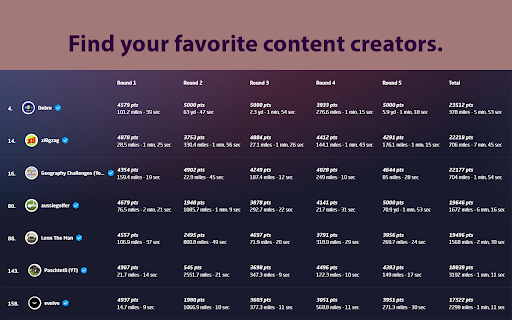
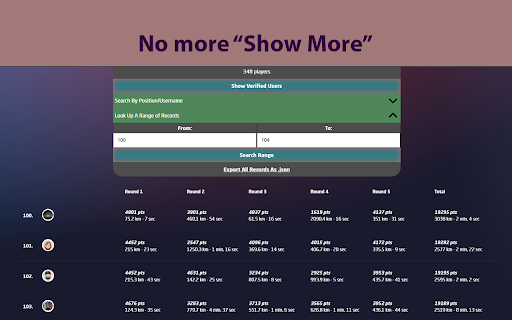
Enchanced features for the Geoguessr Challenges Leaderboard Better Leaderboard: QOL improvements for GeoGuesser Challenge Scoreboard. Better Leaderboard improves the functionality of the GeoGuessr leaderboard. It works on all GeoGuessr challenges(geoguessr.com/challenge/). Features: 1) View how many users played a challenge 2) View scores from all verified users. 2) Search the scoreboard by username or by rank 3) Search a custom player range 4) Export all challenge data as a .json file If you're having trouble, please let me know about your issue and I will be happy to help. --Changelog Version 1.4.5: - Gave the extension a style refresh made internal changes. Let me know how you like it! - Now selling verified badges for $8 a month (JK lol) Version 1.4.1: - Better Leaderboard now displays results in your unit of choice, not just imperial Version 1.4: -Fixed bug where if more than 6000 users played a challenge, only the first 6000 users would be found (new max is 10000) -Increased max search range to 200(previously 50) -Added only show verified users feature, added verified badge. -Added metadata to data export feature. -Total distance is now shown in miles, yds and total time is shown.

Geoguessr Helper
A simple extension to help you play Geoguessr better. A simple extension to help you play Geoguessr better. To use this extension, download it, open your round of Geoguessr, refresh the page, and then open the extension. From there, you can make a guess based on the information provided.

Geoguessr Country Leaderboards
Geoguessr browser extension that allows you to view the leaderboard for any country/region Geoguessr browser extension that allows you to view the leaderboard for any country/region instead of just the region that you're from.

GeoGuessr History
Better game history for geoguessr GeoGuessr History adds a table to your activities page, where you can find all the key stats for all of your games in just one look. For even more details you can simply click one of the games from the table and be navigated to this game's summary page.

Map Making App - Extras
Some extra tools for the Map Making App - Adjust the map/preview size by dragging between both sections - Add tags using number or numpad keys (1–9) - Assign a dedicated number shortcut to a Tag (Number + Left-click on a Tag, Esc + Left-click to remove) - Focus the input field (Ctrl+Space / Alt+Space on Mac) * - Open the Tags dialog in Fullscreen (Ctrl+Space / Alt+Space on Mac) * - Toggle Map Fullscreen (M) - Multi-select Tags by left-clicking and dragging with your mouse * The Shortcut for Tag Dialog / Focus input field is customizable in the browser extension shortcuts (chrome://extensions/shortcuts for Chrome) - You can toggle the extension on or off anytime by clicking its icon (reload required) - This extension is built exclusively for https://map-making.app and works only on that site - No data is saved or stored
