
fmkmmpoomcebkmollnpokebaaekfleim
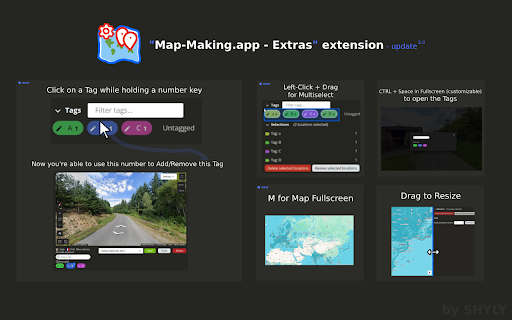


Some extra tools for the Map Making App - Adjust the map/preview size by dragging between both sections - Add tags using number or numpad keys (1–9) - Assign a dedicated number shortcut to a Tag (Number + Left-click on a Tag, Esc + Left-click to remove) - Focus the input field (Ctrl+Space / Alt+Space on Mac) * - Open the Tags dialog in Fullscreen (Ctrl+Space / Alt+Space on Mac) * - Toggle Map Fullscreen (M) - Multi-select Tags by left-clicking and dragging with your mouse * The Shortcut for Tag Dialog / Focus input field is customizable in the browser extension shortcuts (chrome://extensions/shortcuts for Chrome) - You can toggle the extension on or off anytime by clicking its icon (reload required) - This extension is built exclusively for https://map-making.app and works only on that site - No data is saved or stored

Map Maker
Use Map Maker – custom map maker to create interactive maps. Learn how to make a map and easily make your own map with simple tools Map Maker – Your Ultimate Custom Map Creator Tool Looking for the easiest way to make a map right from your browser? Meet Map Maker – the powerful, intuitive custom map maker and map app designed for creators, travelers, educators, and professionals alike. Whether you want to map a world journey or plot out your next project, this extension has everything you need. With Map Maker, you’ll finally know how to make a map that is functional, beautiful, and interactive. 🗺️ Why Use Map Maker? There are countless reasons to use this custom map maker interactive map design tool. Some of the top benefits include: 1️⃣ User-friendly interface 2️⃣ Drag-and-drop simplicity 3️⃣ Full control over styling and pins 4️⃣ Easy import of GPX, KML, KMZ, and GeoJSON files 5️⃣ Seamless sharing and embedding options Create a Plot With Precision and Style If you've ever wondered how to make a map that looks clean and works perfectly, you're in the right place. Use Map Maker to: ➤ Create a visual for business planning ➤ Make your own guide for travel logs ➤ Design a custom map creator project for class or presentations ➤ Build a detailed interactive map for websites or reports Full File Support Map Maker isn’t just a pretty interface – it’s a professional-grade tool. Easily work with the following formats: ✅ GPX viewer – perfect for plotting hiking or cycling routes ✅ KMZ file viewer – ideal for importing layered Google Earth files ✅ GeoJSON viewer – great for developers and analysts ✅ KML viewer – quickly visualize data-driven locations Drop a Pin, Make It Matter Want to make a map with pins? Done. Want to label them, color them, and move them around? Also done. This map pin functionality makes it easy to visually tell a story, track key points, or create maps that make an impact. 📍 Make Your Own Map in Minutes You don’t need to be a designer or coder to make your own map. With Map Maker, just: Launch the extension Click Create a map Add your pins, data, and style Export or share! You’ll learn how to make a map faster than you thought possible. World Map Maker Features You’ll Love This isn’t your average map app. It’s a full-featured world map maker with everything you need: ▸ Real-time editing ▸ Multi-layer support ▸ Custom color themes ▸ Full zoom and pan controls ▸ Geolocation pinning Perfect for Every Use Case Whether you're a student, traveler, content creator, or business analyst, Map Maker is your go-to custom map maker. Use it to: Plan your travels Design delivery routes Showcase company locations Track global events Create learning projects From Data to Interactive Map in Seconds Got data in GPX, KMZ, KML, or GeoJSON format? Just drag it in! This extension functions as a: • gpx viewer • kmz file viewer • kml viewer • geojson viewer Your data becomes an interactive map with a single click. 🧭 Your All-in-One Map Creator Tool Need a flexible map creator? A fast mapmaker? Or just a powerful custom map creator for your ideas? This tool does it all. Here’s what you can expect: 1️⃣ No coding required 2️⃣ Seamless performance in Chrome 3️⃣ Fully customizable interface Install Map Maker now and experience the easiest way to: ✅ Create a map ✅ Make your own map ✅ Use a full-featured custom map maker ✅ Add map pin markers that matter ✅ Turn data into an interactive map Visualize Your World, Your Way Create stunning interactive visuals of your favorite places, journeys, or data points. Whether you're planning a road trip, plotting delivery zones, or designing a geographic guide for your business, our tool gives you the control to build it your way. 🧭 Turn Raw Data Into a Live Display Upload files in GPX, KML, KMZ, or GeoJSON formats and watch your content transform into an interactive visual layout. Ideal for hikers, analysts, teachers, and developers who need fast and accurate spatial displays. Interactive Visual Design Tools Style your entire layout with customizable themes, colors, labels, and layers. Add animations, tooltips, and even multimedia to build engaging and informative experiences that adapt to your audience. Built for Professionals and Creators From classroom projects to corporate dashboards, our platform is flexible enough to meet any need. It's designed to simplify location-based planning and storytelling for all skill levels – no design background required. Supports Every Major Location Format Working with geographic data? You're covered. Easily upload and view routes, regions, or coordinates using: GPX files for routes KMZ and KML layers from Google Earth GeoJSON files for complex structures These are processed instantly and displayed in a way that's easy to explore and present. Map a world of your own – today. 🌐

7TV
Improve your viewing experience with 7TV on Twitch & Kick with new features, emotes, vanity and performance. The 7TV Extension lets you see chat emotes in nearly a million channels across Twitch and Kick! Not only that, but also dozens of new features, performance improvements and vanity options to truly create your own experience.

GeoStatsr
Keep your GeoStatsr server up-to-date by automatically sending your GeoGuessr stats to it when your game ends. This program tracks your GeoGuessr stats and uploads them to GeoStatsr. Keep your GeoStatsr profile up-to-date with in-browser tracking, when you finish a game we will update your profile, this also allows you to store all your GeoGuessr single player games and historical games as well. This extension is a companion to https://geostatsr.com but you do not need an account to use it, though you will get better statistics by going to https://geostatsr.com and registering. Features: * Immediate results - When a game finishes it should be in your profile within minutes * Update all stats - By providing your NCFA token you will allow GeoStatsr to collect even more statistics as well as old stats giving you a full history of every game you've ever played on GeoGuessr. Note: GeoGuessr is a trademark of GeoGuessr AB. GeoStatsr collects statistics or the game GeoGuessr but is not affiliated in any way.

Geoguessr - Better Leaderboard
Enchanced features for the Geoguessr Challenges Leaderboard Better Leaderboard: QOL improvements for GeoGuesser Challenge Scoreboard. Better Leaderboard improves the functionality of the GeoGuessr leaderboard. It works on all GeoGuessr challenges(geoguessr.com/challenge/). Features: 1) View how many users played a challenge 2) View scores from all verified users. 2) Search the scoreboard by username or by rank 3) Search a custom player range 4) Export all challenge data as a .json file If you're having trouble, please let me know about your issue and I will be happy to help. --Changelog Version 1.4.5: - Gave the extension a style refresh made internal changes. Let me know how you like it! - Now selling verified badges for $8 a month (JK lol) Version 1.4.1: - Better Leaderboard now displays results in your unit of choice, not just imperial Version 1.4: -Fixed bug where if more than 6000 users played a challenge, only the first 6000 users would be found (new max is 10000) -Increased max search range to 200(previously 50) -Added only show verified users feature, added verified badge. -Added metadata to data export feature. -Total distance is now shown in miles, yds and total time is shown.
