
jfiilkclaokhgocelgjgdmagcbonnala


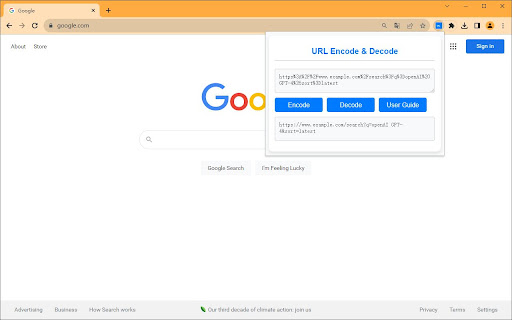

Easily encode and decode URLs directly from your browser. The URL Encoder & Decoder Chrome Extension allows you to easily encode and decode URLs with just one click. Whether you're a developer, a data analyst, or anyone who deals with URLs, this extension will save you time and make your tasks more efficient. Features: • Simple, clean UI • Quick encoding and decoding of URLs • Input validation to ensure accuracy • Helpful alerts and user guide How to Use: • Open the extension by clicking its icon in the Chrome toolbar. • Paste or type the text you want to encode or decode into the "Input" textarea. • Click "Encode" to encode the text or "Decode" to decode it. • The result will be displayed in the "Output" textarea.

URL Encode - Encode for URL
Encode text for URLs effortlessly with our URL Encode extension. Secure and optimize your web links with precision! URL Encode - Encode for URL is a simple browser tool for converting raw text or links into encoded URL format directly in Chrome. It helps you prepare cleaner URL-safe strings without using external websites. The extension works as a practical url encoding tool for quick browser-based formatting. Main Features ✓ Encode Raw Text or URLs: Paste a link or text string into the input area and generate the encoded result instantly. This makes the extension useful for everyday url encode tasks. ✓ Percent Encoding Support: The tool applies standard percent encoding so special characters can be represented in a URL-safe format. ✓ Encoded Output View: The result appears in a separate output area, making it easier to review the final url encoded string before copying it. ✓ Copy and Clear Tools: You can copy the encoded result with one click or clear the fields to start a new conversion. Practical Usage This tool can help when working with links that contain spaces, symbols, or other characters that should be encoded before use. It may also be useful when you need to percent encode url values or encode spaces in url strings while working in the browser. For general string conversion, the extension can also support workflows similar to uri encode or a lightweight encodeuri encoder. How to use this? 1. Install the extension from the Chrome Web Store. 2. Paste the raw text or URL into the input area. 3. Click Encode URL. 4. Review the encoded result. 5. Copy the output if needed. URL Encode - Encode for URL provides a quick way to encode raw text and links directly in your browser.

YG Encoder/Decoder
YG Encoder/Decoder is a privacy-first, all-in-one Chrome extension for developers. Encode/decode Base64, URL, HTML, JWT, JSON — plus MD5, SHA-1, SHA-256, SHA-512 hashes. 100% in your browser. No server. No tracking. 42 KB. WHY USE IT • 100% offline — JWT tokens, hashes, URL params never leave your browser • 6 tools in one — replaces 5 single-purpose extensions • 42 KB total — smallest in its category (vs 545 KB for some JWT-only tools) • Right-click any selection on any page → encode/decode in place • History of last 50 operations, instantly recallable • Dark mode that actually looks good WHAT IT DOES • Base64 — encoder/decoder for API responses, image embeds, data URIs • URL — encoder/decoder for query strings and redirect params • HTML entity — encoder/decoder to prevent XSS during debugging • JSON — prettifier + minifier with one click • JWT — decoder showing header, payload, expiry, signature • Hash — generator: MD5, SHA-1, SHA-256, SHA-512 FOR DEVELOPERS • Debugging auth flows? Decode JWTs without leaking session data to jwt.io. • Inspecting API responses? Pretty-print JSON or decode Base64 in one keystroke. • Verifying file integrity? Generate any hash locally. FAQ Q: How do I decode a JWT in Chrome without a third-party site? A: Right-click any JWT on a webpage and select "Decode JWT". Q: Is the source open? A: Yes — github.com/yourname/yg-encoder-decoder

Encoding Tool
Encode/decode: Base64/URL/Unicode/Hex/HTML, MD5/SHA hash, UUID/GUID. Offline, 10 languages. Encoding Tool A powerful encoding/decoding tool that supports multiple encoding formats, hash algorithms, and utility tools. Automatically detects system language and supports multi-language switching. Main Features ① URL Encoding/Decoding Supports URL encoding operations, converting special characters to URL-standard encoded formats to ensure URL validity and security, avoiding request issues caused by special characters. Can decode encoded URLs, restoring encoded characters to their original form for easy viewing and modification of original URL information. ② Base64 Encoding/Decoding Provides Base64 encoding functionality, converting binary data, text, etc. to Base64 format, commonly used for transmitting longer identifiers, encrypted data, etc. in HTTP environments to ensure data transmission integrity. Allows users to decode Base64-encoded data, restoring it to original data or text. ③ HTML Entity Encoding/Decoding Supports HTML entity encoding and decoding, converting HTML special characters to entity codes (e.g.,

Url decode
Chrome extension that decode the encoded url and provides parameterization.
