
pbdpnfbjgmfomeplaadabchcnakpphhd
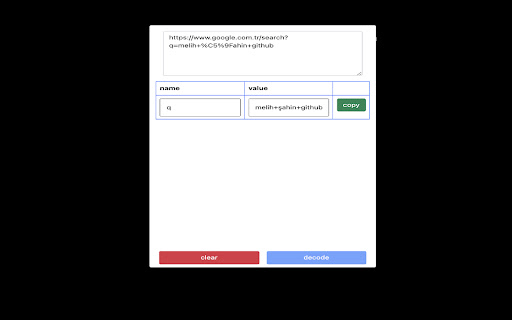
Chrome extension that decode the encoded url and provides parameterization.

URL Decode/Encode
A nifty tool for decoding URLs that have been encoded. Useful when you've encoded a URL and actually want read it! URL encoding (also known as percent-encoding) is a mechanism for encoding information in a Uniform Resource Identifier (URI). This is a developer utility that allows you to paste (or type) an encoded URL string into a text field and see a decoded version. This is useful if you often deal with encoded URLs and want a quick way to read easily it. The last URL you entered is remembered and shown the next time you open the extension. This extension also includes links to other tools from LinangData, the LinangData main website, and our Youtube channel from the menu bar. The following tool buttons are available: - Decode/Encode - toggle between decoding and encoding URLs - Clear - clear the URL - Paste - paste from clipboard (replacing existing URL) - Append - pastes URL from clipboard (appending to existing URL) - Copy - copy encoded/decoded URL to clipboard - Replace - copies the encoded/decoded URL to the input text area (replacing existing URL)

I Notes
i Notes is a lightweight, easy-to-use extension for taking quick notes, saving developer commands Notes is a lightweight and intuitive Chrome extension that lets you quickly jot down notes, save ideas, and stay organized without leaving your browser. iNotes helps you keep your thoughts in one place. Why You’ll Love iNotes: ✅ Voice Notes: Just speak, and your note is saved automatically. ✅ Rich Text Formatting: Bold, italic, underline, lists – organize your notes beautifully. ✅ Reminders & Alarms: Never forget a task or idea with easy-to-set alarms. ✅ One-Click Copy: Share or save notes instantly to your clipboard. ✅ Minimalist Design: Focus on your thoughts, not distractions. ✅ Stay Organized: Quickly jot down ideas, plan tasks, and keep everything neat. Take notes faster, smarter, and easier – all without leaving your browser!

Decode URLs
Decode URLs to make it easy to share URLs in non Latin characters (Hebrew, Arabic, etc.). Decode URLs to make it easy to share URLs in non Latin characters (Hebrew, Arabic, etc.).

CyberPad
CyberPad: Your Ultimate Security, Development & Pen-testing Notepad A secure, distraction-free notepad for your security assessments, coding, or penetration testing. Perfect for quickly documenting findings, writing and formatting code, and keeping all your notes organized—right in your browser. 🆕 What's New in v2.2.1 - Live Markdown Preview: Instantly see your formatted notes as professional HTML documents - Settings Dashboard: Customize your exports with company logos, custom footers, and confidentiality levels - Document Branding: Upload your logo and add custom footers for client-ready reports - Confidentiality Markings: Label documents as Public, Private, or Confidential with color-coded headers - Enhanced Export Options: Choose which elements (logo, footer, classification) to include in each preview - Fixed path issues for Linux systems ✨ What CyberPad Does - Keeps Your Notes Private: Everything stays local in your browser—no cloud sync, no external connections. - Preview Your Work: Instantly preview Markdown as formatted HTML with custom branding. - Professional Export Ready: Add company logos, footers, and confidentiality markings for polished reports. - Simplifies Security Work: Effortlessly capture vulnerabilities, bugs, or configuration changes during assessments and bug hunts. - Supports Multiple Languages: Highlight syntax for HTML, JavaScript, Python, PHP, CSS, and many more. - Dark & Minimalist Theme: Less strain on your eyes, more focus on your work. - Easy Saving & Organization: Save multiple findings with timestamps, quickly download notes as Markdown, and stay on top of your work. - Emoji Integration: Add 🛠️, ✅, or ⚠️ as quick status indicators. ⚡ Why You Should Install It - Local-Only Storage: No one sees your notes. Perfect for pen-testing or handling sensitive info. - Live Preview: See your formatted notes instantly before exporting. - Custom Branding: Upload your company logo and add custom footers for professional documentation. - Confidentiality Controls: Mark documents as Public, Private, or Confidential with visual indicators. - Effortless Reporting: Export Markdown files in one click for easy integration into your final reports. - Developer-Friendly: Write code, format it with built-in tools, and reference it later without leaving the browser. - Bug Bounty & Research: Keep track of new vulnerabilities or findings in real time. - Minimal Permissions: Only needs storage, contextMenus, and activeTab—ensuring your system stays secure. 🚀 Built For - Security Assessments: Document each step and vulnerability with professional formatting - Penetration Testing: Quick note-taking during engagements with instant preview - Bug Bounty Hunting: Organized approach to discoveries with branded exports - Development: Syntax highlighting and code snippets - System Administration: Document configurations and updates - Security Research: Compile and structure research data with custom templates ⚙️ Key Features - Live Markdown Preview: See formatted HTML output instantly - Custom Document Branding: Upload logos and add custom footers - Confidentiality Markings: Label documents as Public, Private, or Confidential - Multiple Language Support: HTML, JavaScript, Python, PHP, CSS, and more - Markdown Capabilities: Format your notes for professional reporting - Instant Export: One-click download of notes - Timestamped Entries: Keep track of when you made each discovery - Easy Copy/Paste: Works smoothly for code or text snippets - Bug Reporting System: Quickly log and manage software bugs - Settings Dashboard: Customize your export templates and preferences - Clean Interface: Avoid distractions and focus on your work 🔒 Privacy & Security - Stores notes only in your browser - No external servers or cloud databases - Minimal permissions, strict content security policy - Manifest V3 compliance Install CyberPad and get a lightweight, secure space for all your security findings and development notes—with professional export capabilities right at your fingertips.
