
jffafkigfgmjafhpkoibhfefeaebmccg

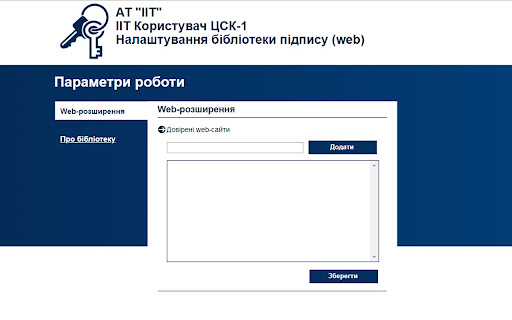
Designed to control private keys and certificates of CA users and to sign and encrypt user data The web-extension is intended for interaction with the CA users signature web-library. For the web extension to work, you need to install additional software according to the links for the corresponding OS: Microsoft Windows: https://iit.com.ua/download/productfiles/EUSignWebInstall.exe Apple macOS: https://iit.com.ua/download/productfiles/EUSignWebInstall.pkg Linux (Debian\Ubuntu) 32-bit: https://iit.com.ua/download/productfiles/euswi.deb Linux (Debian\Ubuntu) 64-bit: https://iit.com.ua/download/productfiles/euswi.64.deb Linux (RHEL\CentOS) 32-bit: https://iit.com.ua/download/productfiles/euswi.rpm Linux (RHEL\CentOS) 64-bit: https://iit.com.ua/download/productfiles/euswi.64.rpm Linux (second) 32-bit: https://iit.com.ua/download/productfiles/euswi.tar Linux (second) 64-bit: https://iit.com.ua/download/productfiles/euswi.64.tar

POHRAI/NE HRAI: Steam Developers Tracker
Розширення маркує українських та ворожих розробників і видавців у Steam. ПОГРАЙ/НЕ ГРАЙ — трекер українських та російських розробників і видавців у Steam Можливості розширення: — маркування українських та російських розробників/видавців у Steam: у магазині, вішлисті, тегах, фестивалях, пошуку, списку ігор у профілі тощо — база налічує понад 600 українських розробників та понад 3800 російських — за замовчуванням українські ігри маркуються зеленим, а російські - червоним — самостійне додавання розробників на сторінці гри у Steam за допомогою кнопки "+" — перегляд та видалення розробників з бази за допомогою кнопки "i" або іконки розширення у браузері — кастомізація: кольори, підписи та прозорість маркування, а також вмикання/вимикання окремих функцій

Smarty.Sale
Your Reliable Shopping Companion Smarty.Sale extension is your personal assistant that helps you save up to 50% on online purchases. Forget about constantly checking for cashback availability – the extension automatically notifies you about available rewards and displays the cashback amount in a convenient format. Ease of Use Activate cashback with a single click directly from the extension, without wasting time navigating between websites. After installation, you'll see the Smarty.Sale icon in the upper right corner of your browser – simply click it for quick registration or login. How It Works: Automatically recognizes partner stores Instantly displays available cashback percentage Reminds you about savings opportunities before purchase Ensures cashback is credited to your account Install Smarty.Sale today and transform ordinary shopping into profitable purchases with guaranteed cashback! --------------------------- By using the Smarty.Sale browser extension, you agree to our Terms of Use (https://smarty.sale/rules.html) and Privacy Policy. How Smarty.Sale Works: Smarty.Sale partners with affiliate networks and thousands of online stores worldwide. When you make purchases through our service, we receive commission from partner merchants. We return most of this commission – up to 50% of your order value – back to you as cashback. It's completely free for you! Data Transparency: To enhance your shopping experience, our extension collects anonymous usage statistics. This data helps us improve our service, add new stores, and offer you the best deals. Your privacy is our priority, and we never share your personal data with third parties. Your Benefits: Accumulated cashback can be withdrawn in your preferred method – to your bank card, mobile top-up, or through popular payment systems.

Download Master
Intercept downloads for Download Master, download a file or a group of files from the context menu. Download with Download Master* by clicking on the any file link. Enable or disable browser integration from the extension menu, set the minimum file size from the extension options. Extension adds the ability to download using Download Master* specified file or group of files from the browser's context menu. After installing the plug-in a new section with items "Download link", "Download all links" and "Download remotely" is added the context menu of Chrome. Right-clicking on the link (example link) you will see a menu with 3 new items added: - Select "Download link" if you want to download the selected file; - Select "Download ALL links" if you want to download multiple files located on this page; - Select "Download remotely" if you want to download a file via a remote download service. When entering the page with the video clip, if the video service is supported, extension button will be changed. Click on it and select “Download video”, you transfer the movie for download using Download Master*. If you highlight text on a page, right-click and choose "Find selection on ...". You will go directly to the page with the search results where you can download your files. * The plug-in must be installed on the PC together with Download Master.

CMeter
Activates Content Meter library for web-pages. CMeter is a library that allows users send statistic information about advertising campaigns in a websites. It is unprecedented in its class as, unlike common widely used meters (for example AdRiver, Google Analytics) providing only standard data on the number of impressions and clicks through, Content Meter makes it possible to determine better-quality data: the number of contacts that an Internet-user has with content, users’ interests (other websites that the user visits), and most importantly, to get social and demographic characteristics of the audience. CMeter automatically collects browsing URLs and advertisement exposure data and transmits this information to secure research servers for market research purposes. Data is not sold and is not used for personalized advertising.
